1.1
1
Getting Started
AV / SCART
CABLE
AV
YESTERDAY
ALL MY TROUBLES
SEEM SO FAR AWAY
AV CONNECTOR
+
DC 9V
DC 9V
1 - Getting Started
This is how to get started straight away using the main OkyWeb2 functions.
Switching on and off
OkyWeb2 is normally switched on by plugging the adapter plug into the DC 9V socket.
It can, however, be switched on and off with the keys on the upper panel.
for a long time = SWITCHING OFF Press and hold down the STOP key for two seconds.
Press ANY key for switching it on.
NOTE: You are advised to unplug the power supply plug only when you have to move the unit.
Use the STOP key procedure for switching it off and on. Switching off with the STOP key puts the unit into stand-by.
You are advised to unplug the external adapter from the mains if you are not planning to use the unit for a long time.
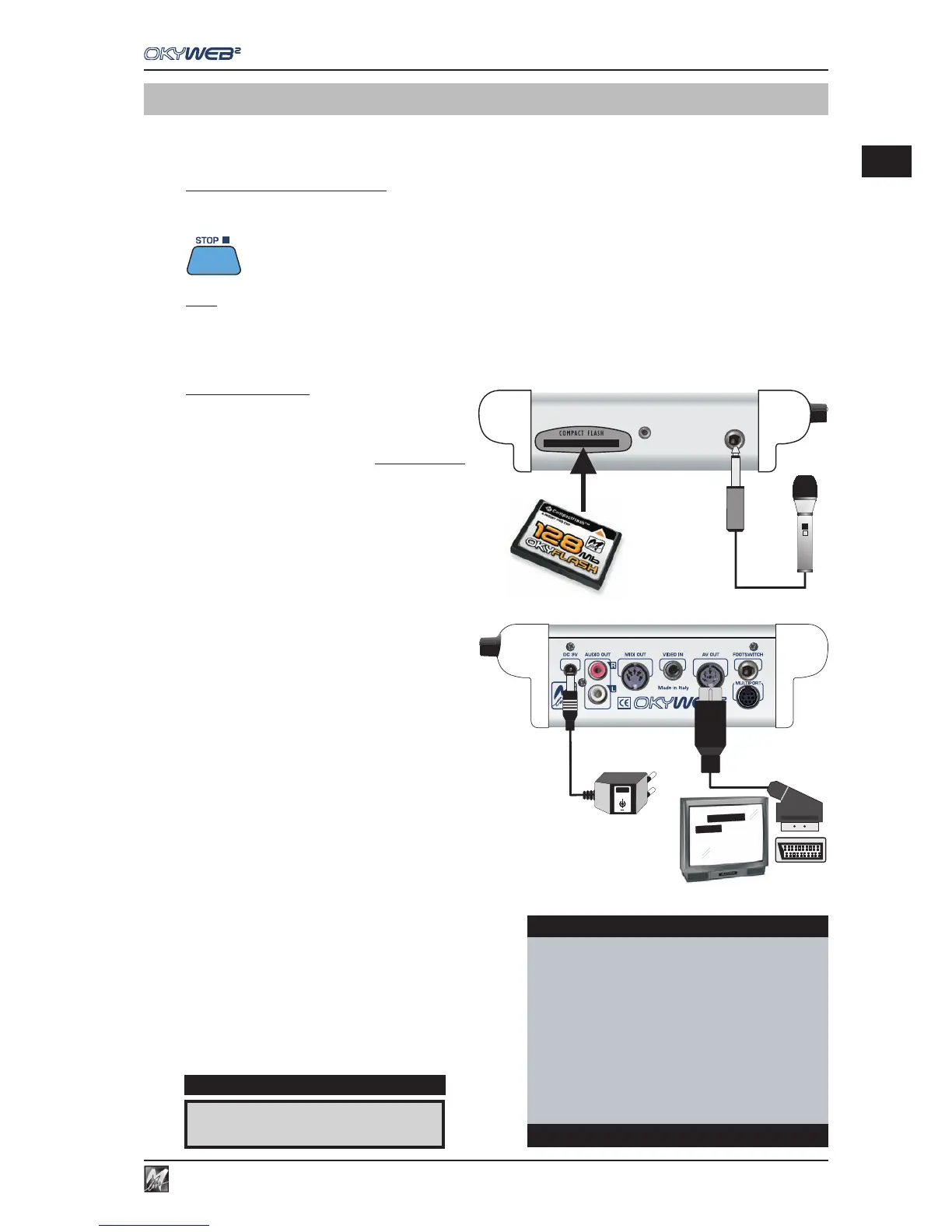
Connections
COMPACT FLASH: before carrying out any
connections, insert the Compact Flash card
supplied in the appropriate slot.
The Compact Flash card is indispensable,
because it contains the backing tracks and other
important data indispensable for using OkyWeb2.
N.B.: if necessary, you can also use an “empty” Compact Flash
card, proving its is appropriately formatted (e.g. a card
formatted with the software for PC supplied, or an M-Live
OkyFlash).
MICROPHONE: connect a microphone to the MIC
IN input.
AUDIO/VIDEO OUTPUT: connect the OkyWeb2
AV output to the TV SCART socket, using the
supplied lead.
OkyWeb2 allows good performances also connected just
to a normal television set. You can use this simple
connection for your first attempts.
ADAPTER UNIT: connect the external power supply adapter to
the DC 9V socket and to the mains.
TUNING A TV SET: set the television at AV.
At this point, after the introductory page, the first OkyWeb2
page will appear on the TV screen.
The window shows the list of Songs on the Compact Flash
card.
The upper panel display shows the first song in the list.
MIC
I
A FOGGY DAY È
DISPLAY
OkyWeb2
ÆA FOGGY DAY
AIN’T SHE SWEET
ALWAYS ON MY MIND
BLANKET ON THE GROUND
DANCE THE NIGHT AWAY
ESCAPE
FEVER
GREENSLEEVES
Select Song



 To Next Page