Editing
6.4
t
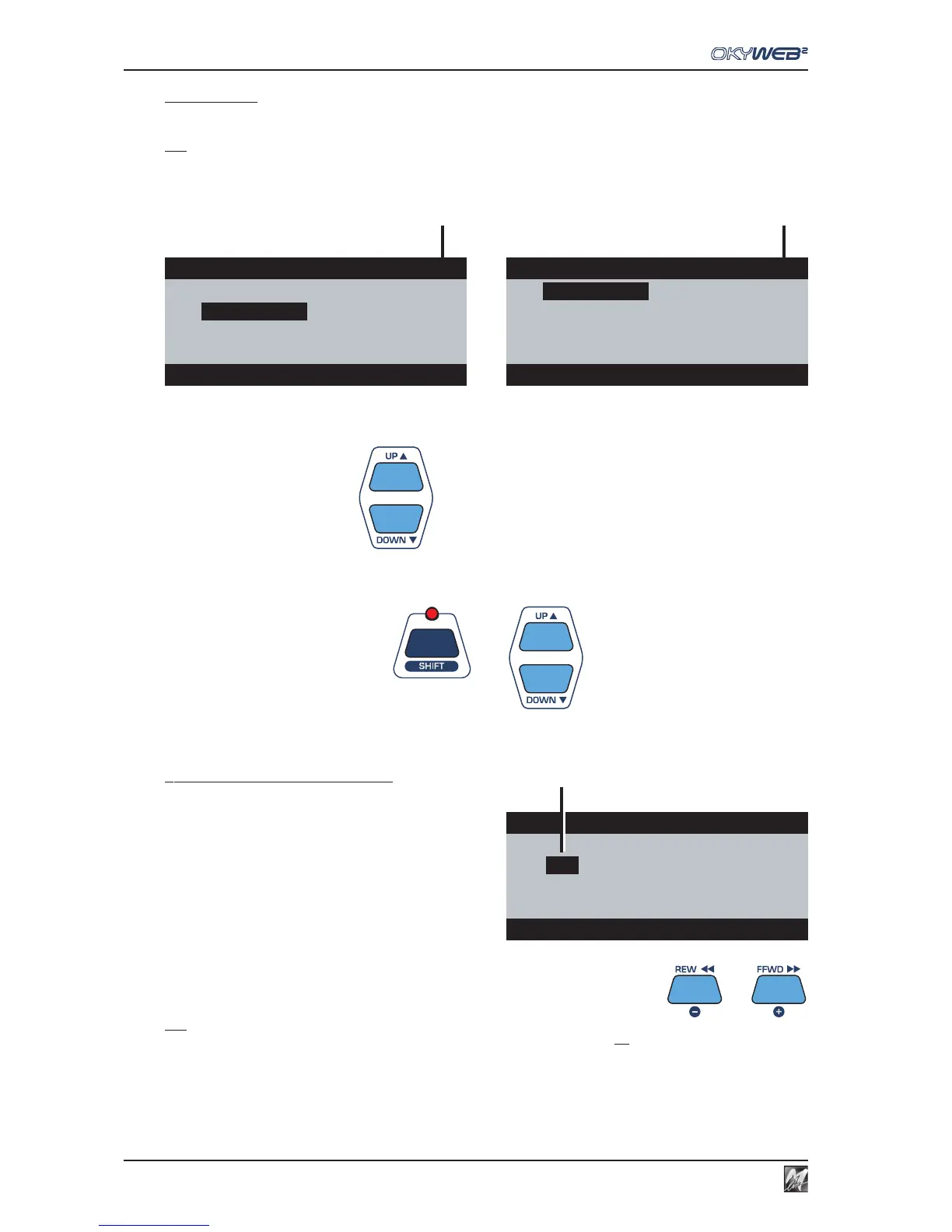
Page counter
Indicates the number of the current EDITING page and the overall number of pages used to contain all the tracks
of the song being edited.
N.B.: remember that OkyWeb2 is able to handle songs with 32 tracks and that each Editing page can contain up to 8 tracks (in Play/Pause)
or up to 16 tracks (in Stop). Therefore, according to the display mode and the number of tracks actually being used by the song, the number
of pages used can vary from a minimum of 1 to a maximum of 4.
To move the cursor to tracks contained in other pages, use the UP and DOWN keys:
pages are scrolled automatically.
To move the cursor one page at a time
use the combination SHIFT (LED lit)
+
UP and DOWN keys.
u
Values of the selected parameter
To the right of each track, the respective value of the
selected parameter is shown.
In the example: Selected parameter = Volume
Volume of track 02 = 127
Volume of track 03 = 123
..
Volume of track 13 = 85
If “MM” appears, this indicates the Melody Track with the
MELODY MUTE function enabled.
To change the value of the parameter in the selected track, use the - and + keys
N.B.: changes in ALL TRACKS mode (cursor on the name of the parameter) are very useful, but should be carried out after careful
consideration: in fact, what is changed is the “absolute value” of the parameter for each track, not the “proportional value” between the
tracks. In other words, the differences between the tracks are only kept until the limits of 0 or 127 are reached.
For example: 1) change the Volume parameter until it reaches the maximum value (127) in all the tracks;
2) now reduce the value: all the previous differences of volume will have been cancelled: all the tracks will have the same volume.
Edit INSTRUMENT pag1/2
02
FingeredBs
10
StndDrums1
03
¸¸
¸¸
¸
Clean Guit
11
GrandPiano
04
Vibraphone
12
Overdr. Gt
07
SlowString 13 Whistle
03 Clean Guitar PLAY
t
Edit INSTRUMENT pag2/2
14
¸¸
¸¸
¸
SynStrings
1
5 Bass+Lead
16
Distort.Gt
14 Synth Strings1 PLAY
t
Edit VOLUME pag1/2
02
127
10
120
03
¸¸
¸¸
¸
123
11
125
04
MM
12
96
07
120 13 85
03 Clean Guitar PLAY
u



 To Next Page