6.5
Editing
6
v
Status of the selected track
This Status indicates the operating condition of each track, and can be set as:
- PLAY = enabled track - MUTE = disabled track - SOLO = only active track
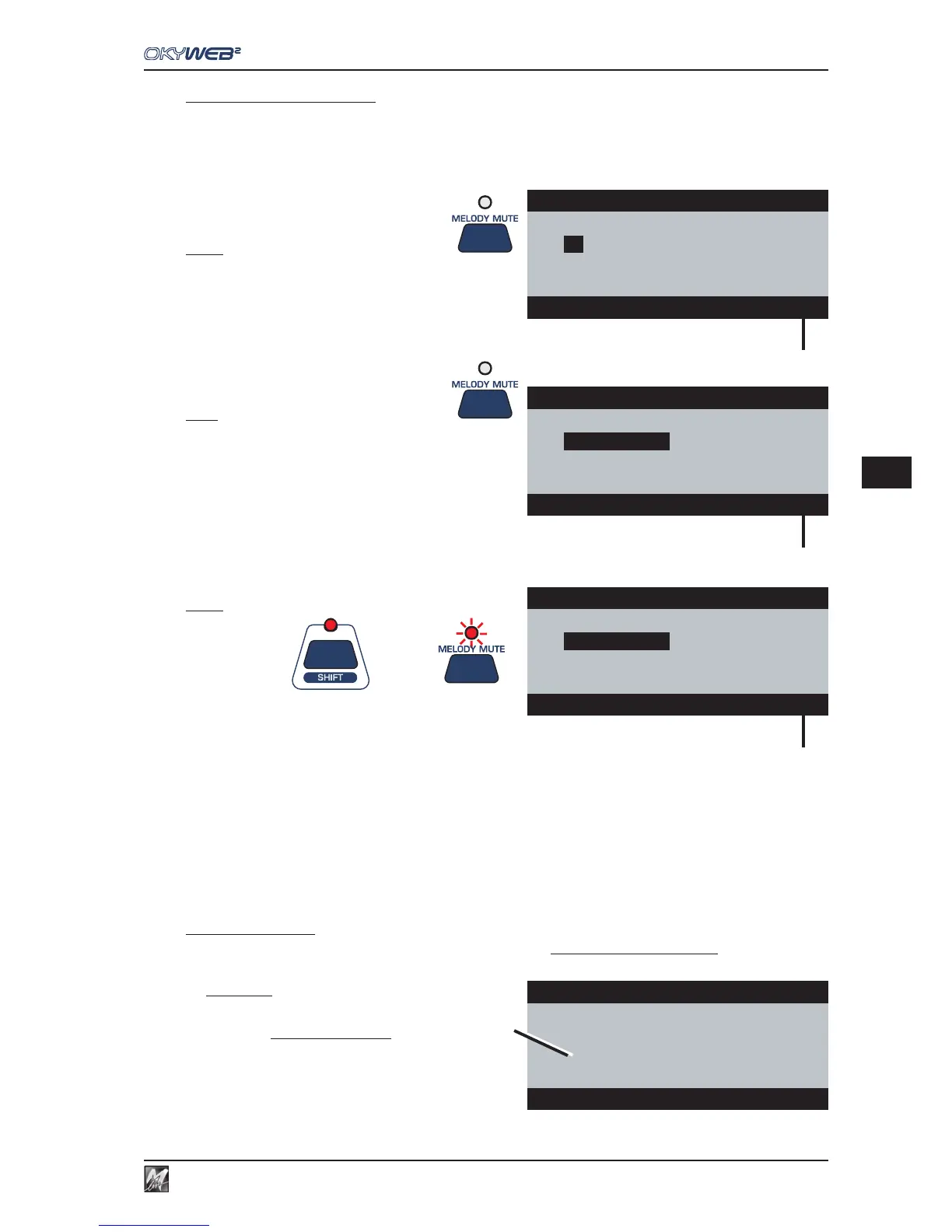
A track’s status is changed by means of the MELODY MUTE key, which in the EDIT environment assumes new
functions:
MUTE: pressing the Melody Mute key
on a track with Status = PLAY
- the tracks is set in Status = MUTE;
- all the values of all the parameters of the track in
MUTE are replaced with an asterisk.
PLAY: pressing the Melody Mute key
on a track with Status = MUTE
- the tracks is set in Status = PLAY;
- the asterisk disappears and all the values of all
the track’s parameters are reset as before.
SOLO: using the key combination
+
SHIFT (LED lit)
+
Melody Mute
- the selected track is set in Status = SOLO (only active track);
- all the other tracks are set in MUTE: the relative values are replaced with asterisks;
- the Melody Mute LED flashes.
- the Status indicator flashes.
To disable SOLO status, use the key combination Shift (LED lit) + Melody Mute again.
N.B.: for obvious reasons, MUTE and SOLO functions are enabled only in Single Track mode (cursor pointed on a track).
In ALL TRACKS mode (cursor pointed on the parameter’s name), the Melody Mute key is disabled.
The Melody Mute function as such (muting of the melody track) is not accessible, but can be normally enabled before accessing the EDIT
environment.
w
MM (Melody Mute)
Indicates that the MELODY MUTE function is enabled and the Melody Track can’t be edited.
ATTENTION: don’t confuse the Melody Mute function with
Muting of the tracks via editing.
The Melody Mute function only affects the playing of the track
set as Melody Track (Options/Music Options/Melody Track)
and can be enabled immediately without distinction for all songs.
On the other hand, Muting tracks via editing, affects the setting
of the Status parameter of every single track and can be saved
in the song. Each track of each song can therefore have different
settings.
The two functions are independent. The Melody Mute function
has no effect on a song whose melody track’s Status = MUTE.
Edit INSTRUMENT pag1/2
02
FingeredBs
10
StndDrums1
03
¸¸
¸¸
¸
Clean Guit
11
GrandPiano
04
Vibraphone
12
Overdr. Gt
07
SlowString 13 Whistle
03 Clean Guitar PLAY
v
Edit INSTRUMENT pag1/2
02
FingeredBs
10
StndDrums1
03
¸¸
¸¸
¸
11
GrandPiano
04
Vibraphone
12
Overdr. Gt
07
SlowString 13 Whistle
03 Clean Guitar MUTE
v
Edit INSTRUMENT pag1/2
02
10
03
¸¸
¸¸
¸
Clean Guit
11
04
12
07
13
03 Clean Guitar SOLO
v
Edit
¸¸
¸¸
¸
VOLUME pag1/2
02
127
10
120
03
123
11
125
04
MM
12
96
07
120 13 85
MODIFY ALL TRACKS
w



 To Next Page