Introduction
2.4
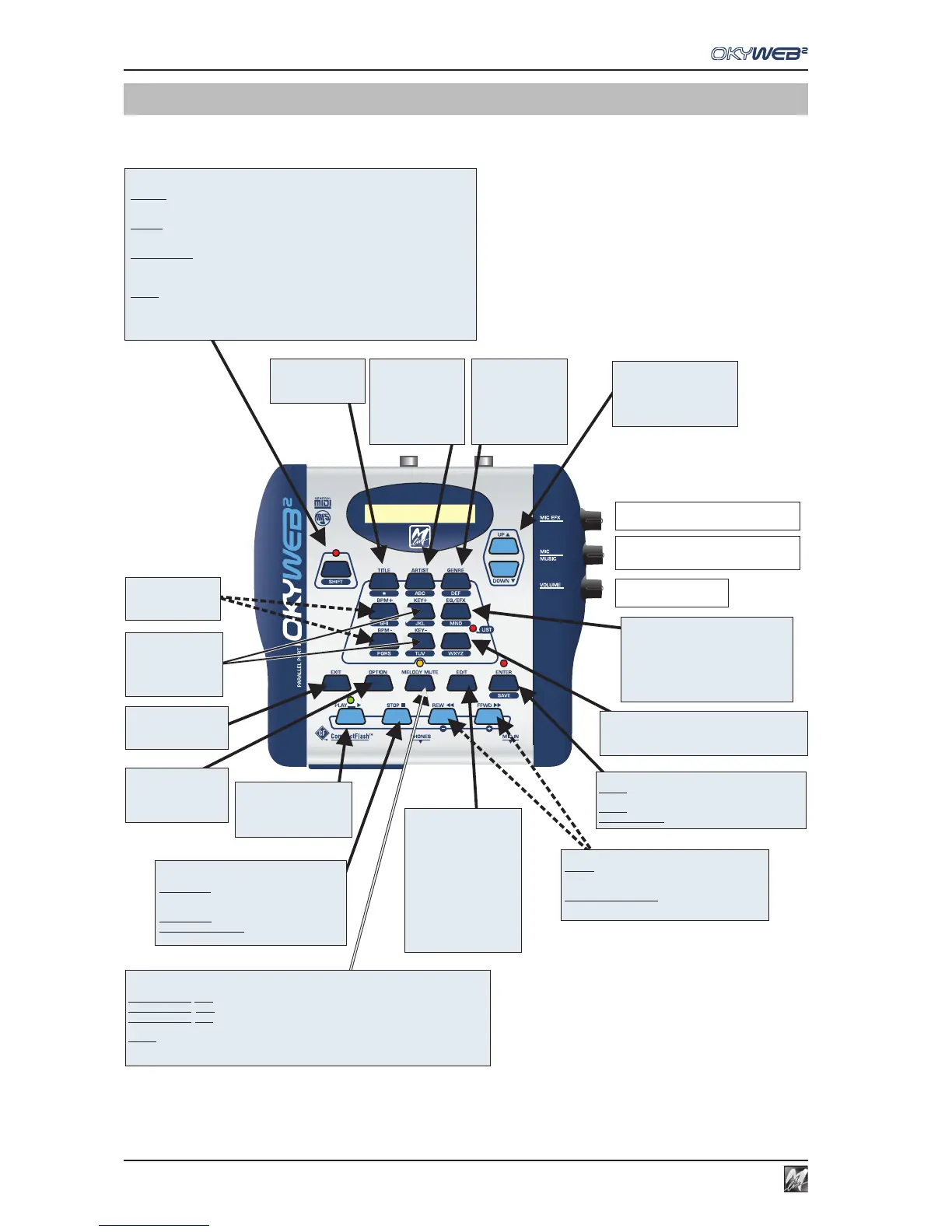
Rapid layout maps
STOP
stopsplayback of the song.
: PAUSE
(press Play to start playback
againfrom the same point);
pressedonce
pressedtwice
pressedfor a long time
: STOP;
:switches OkyWeb2off.
PLAY
- starts playback of the
selectedsong;
- re-starts playback of the
songput on Pause.
REW & FFWD
-
+
&
REW FFWD
&
inPLAY
inEdit, EQ/EFX, Options
the song can be scrolled fast backwards
( )or forwards ( );
modifythe value of the selected parameter (
-
+
)
KEY
change the key of the
songs, adapting it to the
performer'sneeds.
EXIT
to abandon the operation
under way, or the page
beingedited.
UP & DOWN
allows to run through the list
displayed and select the
required item (Song, Artist,
controlparameter, etc.).
MIC / MUSIC
adjusts the balance between the volume of the
backingtrack and that of the microphone.
MIC EFX
adjuststhe volume of the microphone's effects.
VOLUME
adjuststhe general volume.
OPTION
allows to access
OkyWeb2 system
settings: Audio, Video,
MIDI,etc, .
MELODY MUTE
disablesthe songs' melody.
: RedLED Mute(the melody isn't played);
: OrangeLED semi-Mute (the melody is playedatalowvolume);
: LEDoff re-startsthe melody (the melody is played);
MelodyMute MUTEof the selected track.
Shifton + Melody Mute SOLOof the selected track.
pressedfor the 1 time
pressed time
pressed time
inEDIT
st
forthe 2
forthe 3
nd
rd
BPM
change playback
speedof the songs.
TITLE
enables the search and
the display of songs by
Title.
ARTIST
enables the search and
display of the songs by
Artist.
- Press ENTER on the
name of an Artist to
view the songs
available.
GENRE
enables the search and
display of the songs by
Genre.
- Press ENTER on the
name of a Genre to
view the songs
available.
LIST (Playlist)
enablesthe menu of the automatic playback lists.
-Press PLAY to play back the selectedlist.
-Press EDITto program the selectedlist.
ENTER / SAVE
LEDoff
LEDon
Shift(on) + SAVE
:(ENTER) allows access to the selected
page(Option,Artist, Genre).
: song modified with EDIT.
saveschanges to the song
EQ / EFX
allow access to the editing of Effects and
Equalizers.
- Press EQ/EFX repeatedly to select the
requiredprocessor.
- Use the combination Shift (on) + SAVE to
save the settings of the processor
selectedin the song.
EDIT
allows access to song
editing.
- Press EDIT repeatedly to
select the required
parameter.
-Use theUP&DOWN keys to
selectthe required track.
- Use the keys to
changethe value.
- Use the combination
Shift (on) + SAVE to save
changesto the song.
-
+
&
SHIFT
Enablesthe various levels of key and function operation:
SHIFTdisabled
functionsprinted in positive (on the keys) are available:
SearchbyTitle,Artist and Genre; BPM; KEY; EQ/EFX;PLAYLIST.
SHIFTenabled
functionsprinted in negative (below the keys) :Alphabetical search; SAVE.
Shifton + UP& DOWN keys enable to scroll through thesonglistonepage at a time.
T9search enabled
usingthe alphabetic keypad (letters in negative) issimilartothatofmobile phones.
To enable, press SHIFT (off)for a few seconds.
SHIFTon+UP&DOWN movingpage by page
SHIFTon+MelodyMute SOLOof the selected track
SHIFToninTranspose transpositionsby an octave
SHIFToninInstrument choiceof the Family of instruments
LEDOFF
LEDON
FLASHINGLED
inEDIT
areavailable



 To Next Page