4 SETTINGS
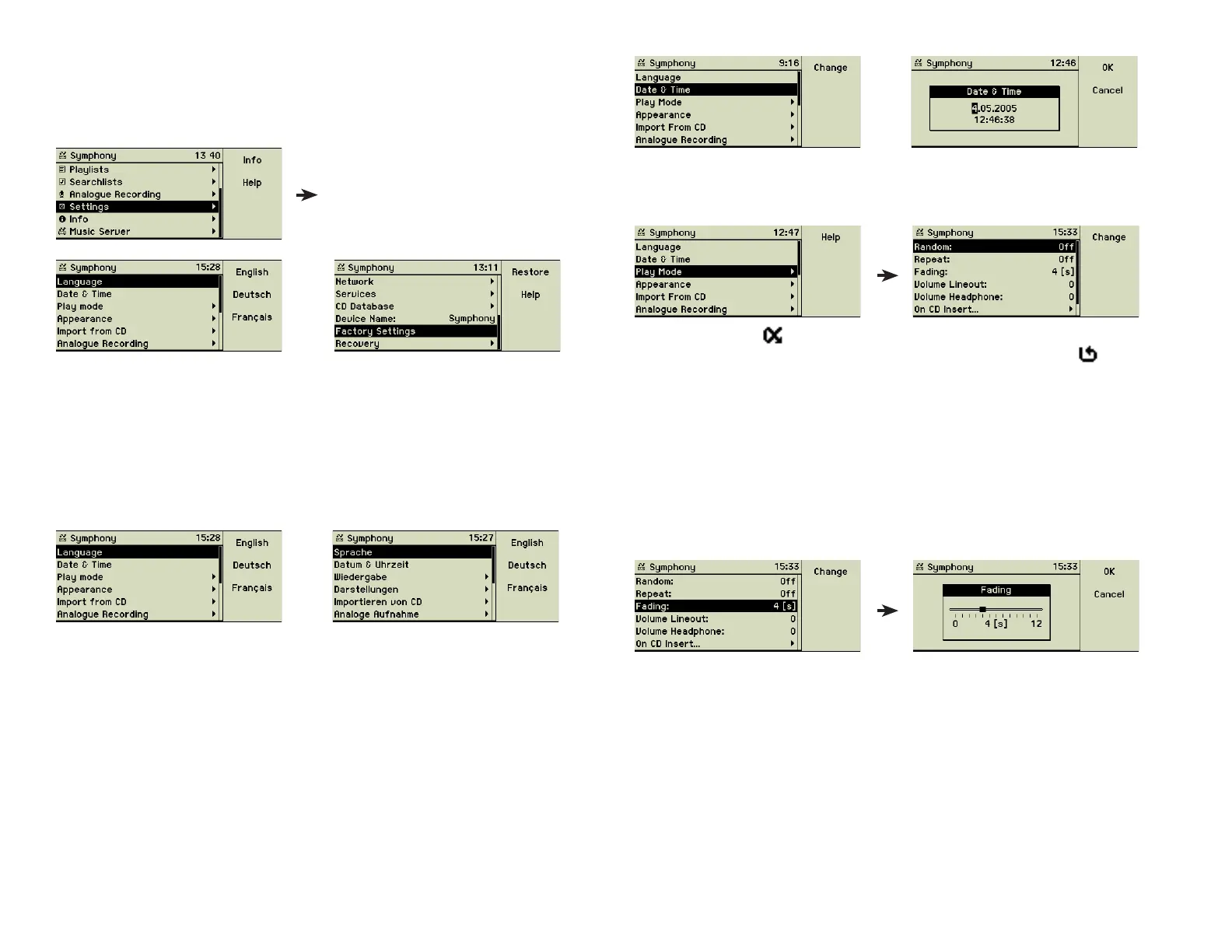
This main menu option provides you with numerous settings to adapt the music
center to your needs and tastes.
Besides the general settings of the display language, date and time, and the
name of your music center, there are options how the music center reacts on
inserting a CD or how to playback songs, and the most detailed parameters
for the network setup.
4.1 Language
You may choose the display language here. Press the appropriate function
key. The display changes immediately.
F2
4.2 Date & Time
You can adjust the internal time and date of your music center here. This may
be necessary for Daylight Saving Time or if your music center has been un-
plugged for a longer time.
Use the inner wheel of the Turn&Select wheel for setting the digits, a quick
right turn of the outer ring moves the cursor to the next fi eld.
F1
4.3 Play mode
Options for the behaviour of the music center while playing songs.
In random mode ( ) songs of the selected artist, the selected album, or an-
other selection are played in random order. In repeat mode ( ) the music
center begins again with the fi rst title of the current selection after the last title
has been played.
Fading maintains an interval of 0 to 12 seconds in which the ending song is
faded out and the next songʼs volume is turned up again.
The volume of the Line-out port (25) can be adjusted to match the needs of
your stereo amplifi er.
The music center can automatically start the playback when a CD is inserted.
Otherwise you have to press the Play button (5).
23



 To Next Page