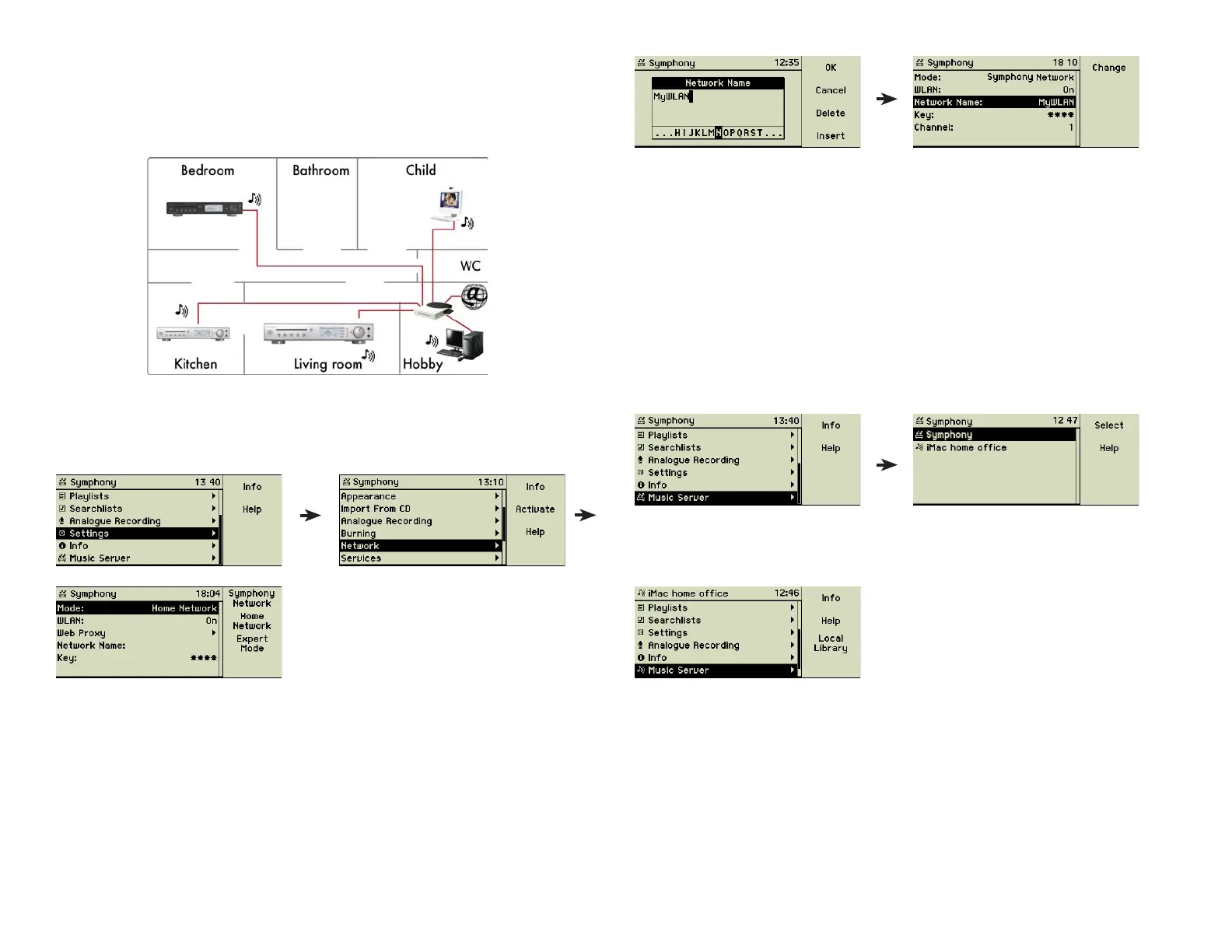
5.2 A member of your home network
If you already use a computer network your music center can smoothly in-
tegrate into it. This can be done conventional by Ethernet cables or wireless
(WLAN).
Use the menu option Settings to change the music centerʼs behaviour to
“Home Network”. Then it will recognise the existing devices and retrieve the
necessary address information from your network managing component.
The antenna (23) for wireless communication (WLAN) is on the back of the
music center, the plugs (21) for Ethernet cabling beneath. As soon as the mu-
sic center is connected to your local network everything is done.
If you are using wireless communication the name of your WLAN and some-
times a password have to be given. Enter it manually or one of the available
networks.
Please check the spelling of both entries. If one does not match the music
center is unable to log in to the network.
More information about the music centerʼs networking capabilities can be
found in chapter 7 «Advanced Networking» on page 34.
5.3 Your music center and iTunes
You may utilise connections between the music center and PCs in both direc-
tions. The music center can play songs stored in iTunes libraries on Macintosh
or Windows PCs and the iTunes software can play the songs of your music
center. Obviously their music collections must be published to be seen here.
Available additional music sources are displayed on the music center under
the main menu option Music Server.
This example shows an active iTunes on the iMac in your home offi ce. Just
select it and the complete library of the remote Macintosh is available on your
music center.
You may notice that the header has changed from “Symphony” to the name
of the remote music server. This emphasises the fact that the music center now
acts only on the remote library. All songs, playlists and settings of the iTunes
library are active and the music center temporarily forgot all about its own li-
brary. Pressing the function key 3 “Local Library” brings this back and pushes
the remote songs away.
30



 To Next Page