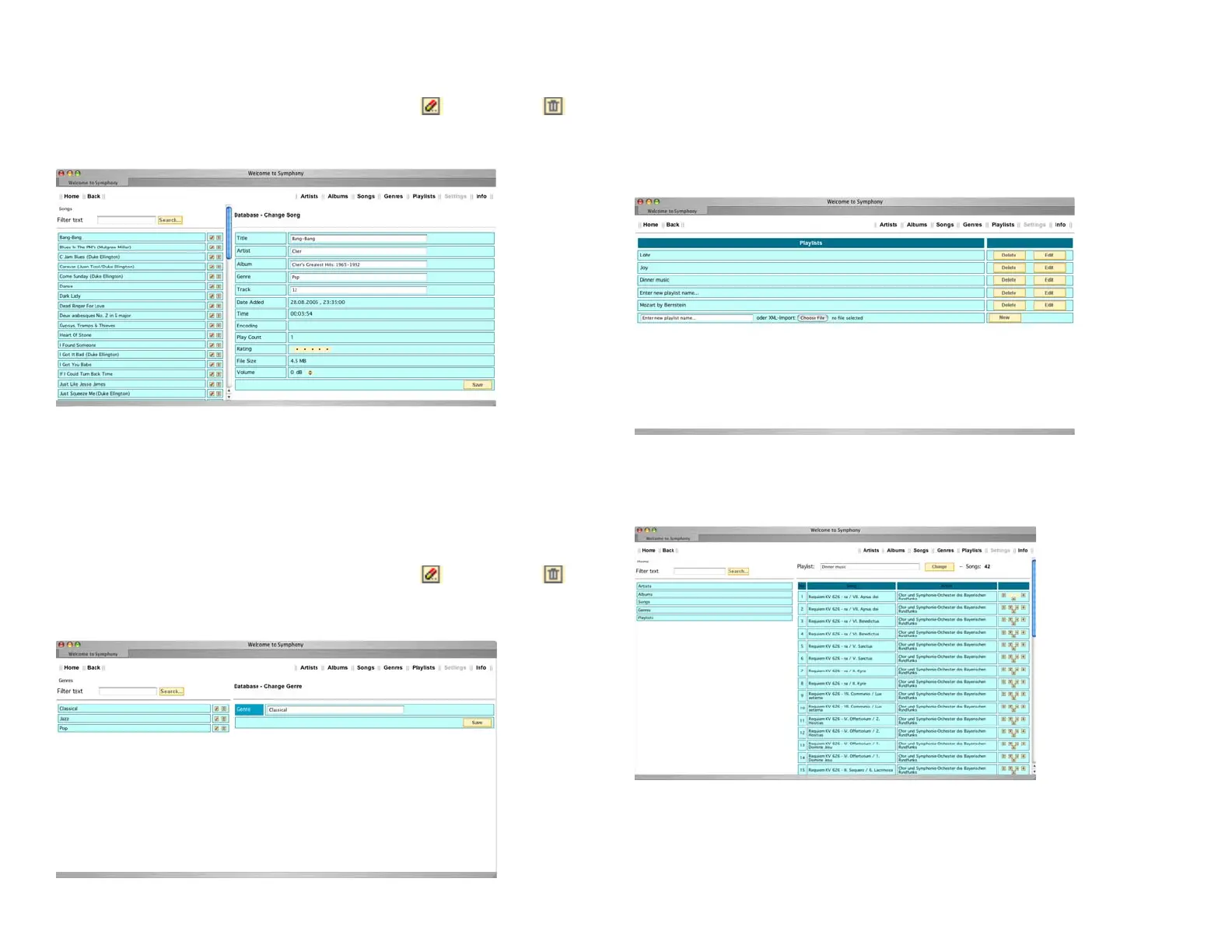
Editing song meta data
When you click the “Songs” button the list of stored songs is displayed. The
small icons attached give you the option of Editing ( ) or Deleting ( ) the
entry. After clicking the “Editing” button the meta data fi elds appear on the
right side of the window.
Enter or change text data by typing into the fi elds. Changing the Ranking can
be accomplished by clicking the displayed stars or their place-markers. The
Volume can be adjusted using the up and down arrows.
Clicking the “Save” button confi rms your changes.
Editing a genre’s data
When you click the “Genres” button the list of stored genres is displayed. The
small icons attached give you the option of Editing ( ) or Deleting ( ) the
entry. After clicking the “Editing” button an input fi eld for the name appears
on the right side of the window.
Clicking the “Save” button confi rms your changes.
The input fi eld Filter Text and the button Search can be used for reducing the
number of displayed items.
Editing playlists
When you click the “Playlists” button the list of stored playlists is displayed.
You may click the name of playlist to reveal its contents.
Using the small buttons to the right of a song title it can be moved up, down,
to the top, or to the bottom of the list, or completely removed from it.
To the left buttons labelled Artists, Albums, Songs, Genres, and Playlists are
shown. Use these buttons to add additional items to the displayed playlist.
The input fi eld Filter Text and the button Search can be used for reducing the
number of displayed items.
33



 To Next Page