6-33
Using Various Functions > Functions
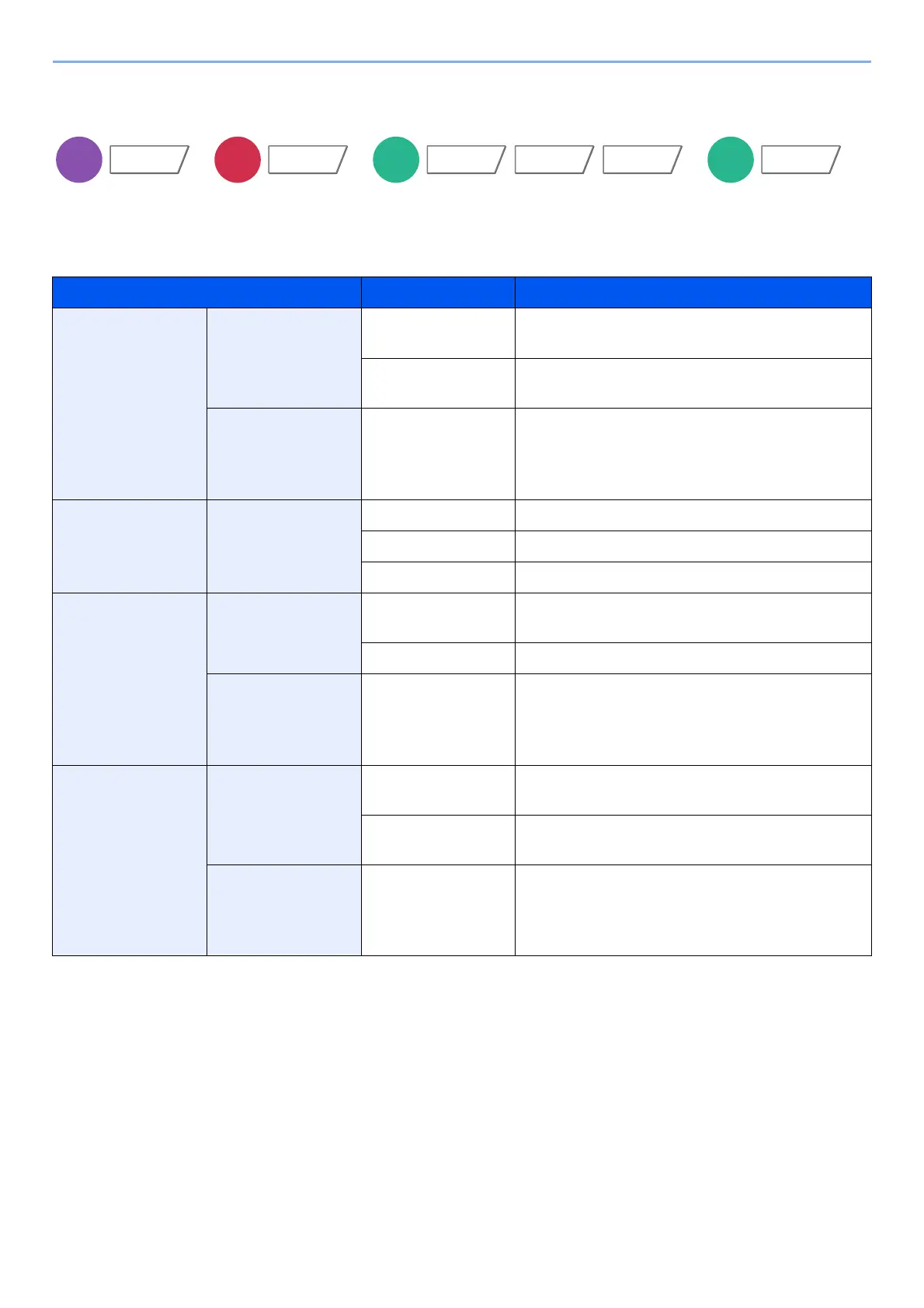
Original Image
Select original image type for best results.
Copying
Item Value Description
Text+Photo
*1
*1 If gray text is not printed completely using [Text + Photo], selecting [Text] may improve the result.
Original Type Printer Output Best for mixed text and photo documents printed
on this machine originally.
Book/Magazine Best for mixed text and photos printed in a
magazine, etc.
Highlighter
Enhancement
Off, On (Normal),
On (Bright)
Select [On (Normal)] to reproduce the color of the
text and markings made with highlighter pen.
If the colors are not bright enough, select [On
(Bright)].
Photo Original Type Printer Output Best for photos printed on this machine originally.
Book/Magazine Best for photos printed in a magazine, etc.
Photo Paper Best for photos taken with a camera.
Text
Light Text/Fine Line
Off Best for documents that are mostly text and were
originally printed on this machine.
On Sharply renders pencil text and fine lines.
Highlighter
Enhancement
Off, On (Normal),
On (Bright)
Select [On (Normal)] to reproduce the color of the
text and markings made with highlighter pen.
If the colors are not bright enough, select [On
(Bright)].
Graphic/Map Original Type Printer Output Best for maps and diagrams printed on this
machine originally.
Book/Magazine Best for maps and diagrams printed in a
magazine.
Highlighter
Enhancement
Off, On (Normal),
On (Bright)
Select [On (Normal)] to reproduce the color of the
text and markings made with highlighter pen.
If the colors are not bright enough, select [On
(Bright)].
Color/
Image Quality
Functions
Image Quality
Color/
Image Quality
Functions









 To Next Page