8-22
Setup and Registration (System Menu) > System Menu
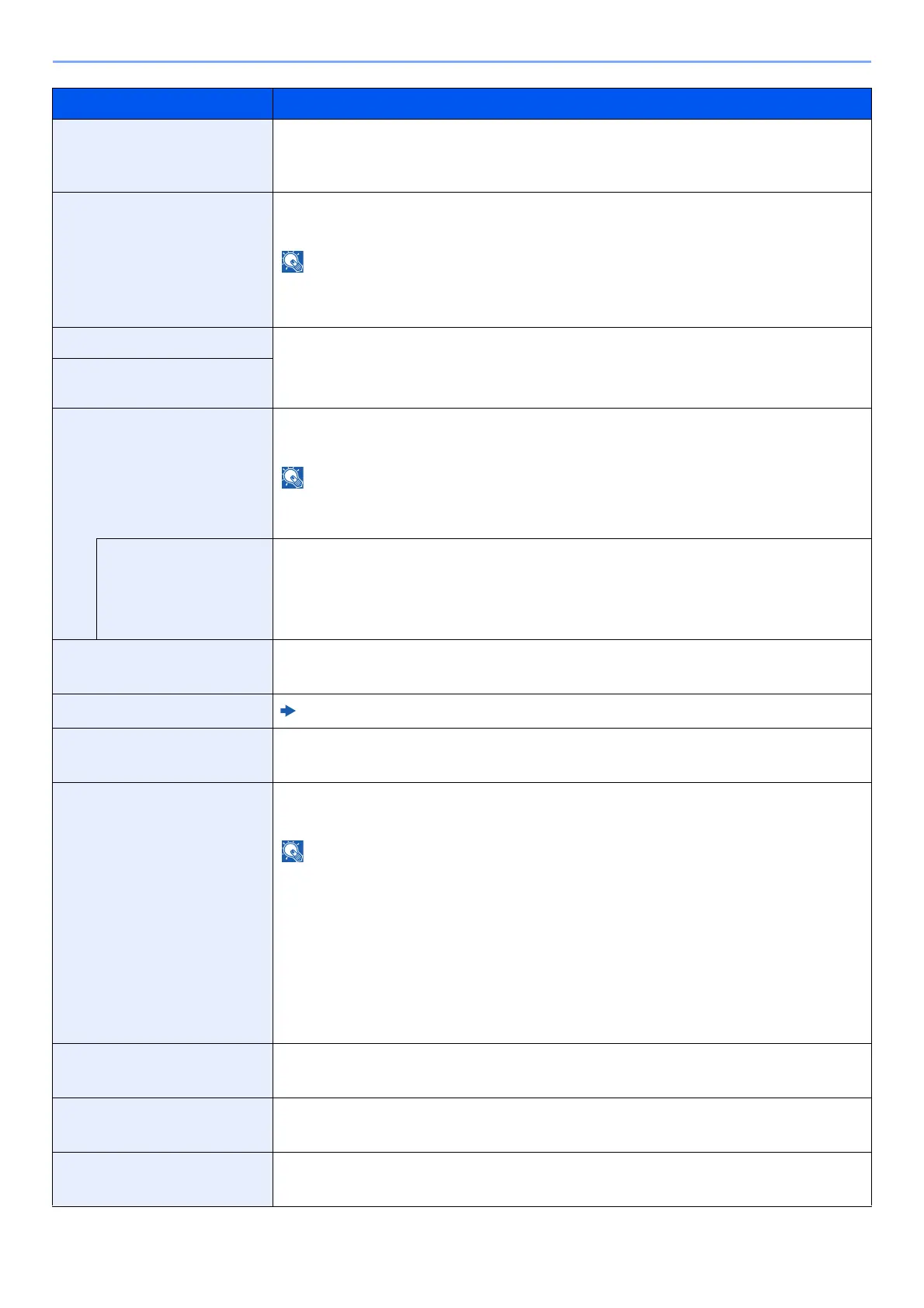
OCR Output Format
*1
Select the OCR output style for text, graphics, and photos.
Value: Text + Graphics, Text+Graphics w/Scan Image, Scanned Image w/
Srchable Txt
Repeat Copy Select the Repeat Copy default.
Value: Off, On
• This function will not be displayed when the Data Security Function is active.
• This function will not be displayed when Repeat Copy Job Retention is set to 0.
Skip Blank Page (Copy) Select the default Skip Blank Page settings.
Value: Off, On
Skip Blank Page (Send/
Store)
File Separation Select the default file separation setting.
Value: Off, On
If you select [On], set the number of pages to be divided. The setting range is 1 to 500
pages.
Attach File to E-mail Select how to attach the files to the E-mail.
Value
All Files in 1 E-mail: Attach and send all files in a single E-mail.
1 file per E-mail: Attach and send 1 file per E-mail.
Cont. Scan (Copy) Select the default Continuous Scan(Copy) setting.
Value: Off, On
Continuous Scan (FAX)
*2
FAX Operation Guide
Cont. Scan (Send/Store) Select the default Continuous Scan(Send/Store) setting.
Value: Off, On
Separator Paper Source Select the default paper source for separator sheets.
Value: Cassette 1 (to 5), Multipurpose Tray
•[Cassette 3] to [Cassette 5] are displayed when the following optional paper
feeder is installed.
[Cassette 3]: When a paper feeder (500-sheet×2) or large capacity paper feeder
(1,500-sheet×2) is installed.
[Cassette 4]: When a paper feeder (500-sheet×2) or large capacity paper feeder
(1,500-sheet×2) is installed.
[Cassette 5]: When a side feeder (3,000-sheet) is installed.
• You cannot select a cassette that is set to FAX Exclusive Paper Source.
Erase Shadowed Areas-
Copy
Select the default Erase Shadowed Areas (Copy) setting.
Value: Off, On
Erase Shadowed Areas-
Send
Select the default Erase Shadowed Areas (Send) setting.
Value: Off, On
Erase Shadowed Areas-
Store
Select the default Erase Shadowed Areas (Store) setting.
Value: Off, On
Item Description









 To Next Page