8-82
Setup and Registration (System Menu) > System Menu
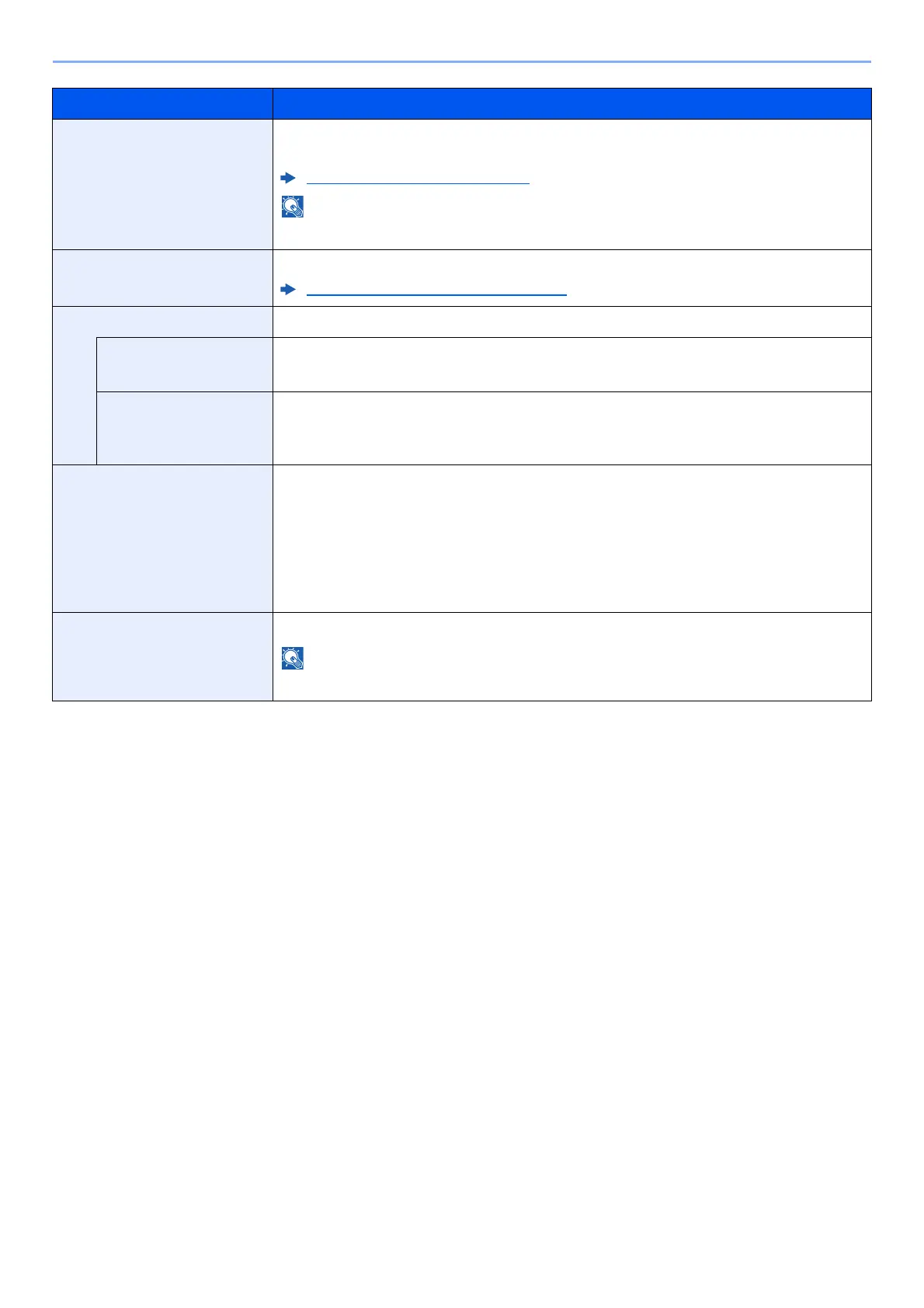
Developer Refresh Adjust the printed image that is too light or incomplete, even though there is enough
toner.
Developer Refresh (page 10-57)
Waiting time may be longer when the toner is refilled during developer refresh.
Laser Scanner Cleaning Remove vertical white lines from the printout.
Laser Scanner Cleaning (page 10-56)
Contrast You can increase or decrease the overall contrast.
Copy Increases or decreases the overall contrast of copies.
Value: -3 (Lower), -2, -1, 0 (Normal), +1, +2, +3 (Higher)
Send/Box Increases or decreases the overall contrast when documents are sent or saved in a
document box.
Value: -3 (Lower), -2, -1, 0 (Normal), +1, +2, +3 (Higher)
Auto Drum Refresh Select the time length of the drum refresh.
Value
Off: The Auto Drum Refresh will not be performed.
Short: Perform Auto Drum Refresh as Short.
Standard: Perform Auto Drum Refresh as Standard.
Long: Perform Auto Drum Refresh as Long.
Open toner cover Open the toner cover.
This function is displayed when using a genuine toner container.
*1 Displayed only when the optional FAX Kit is installed.
Item Description









 To Next Page