9-9
User Authentication and Accounting (User Login, Job Accounting) > Setting User Login Administration
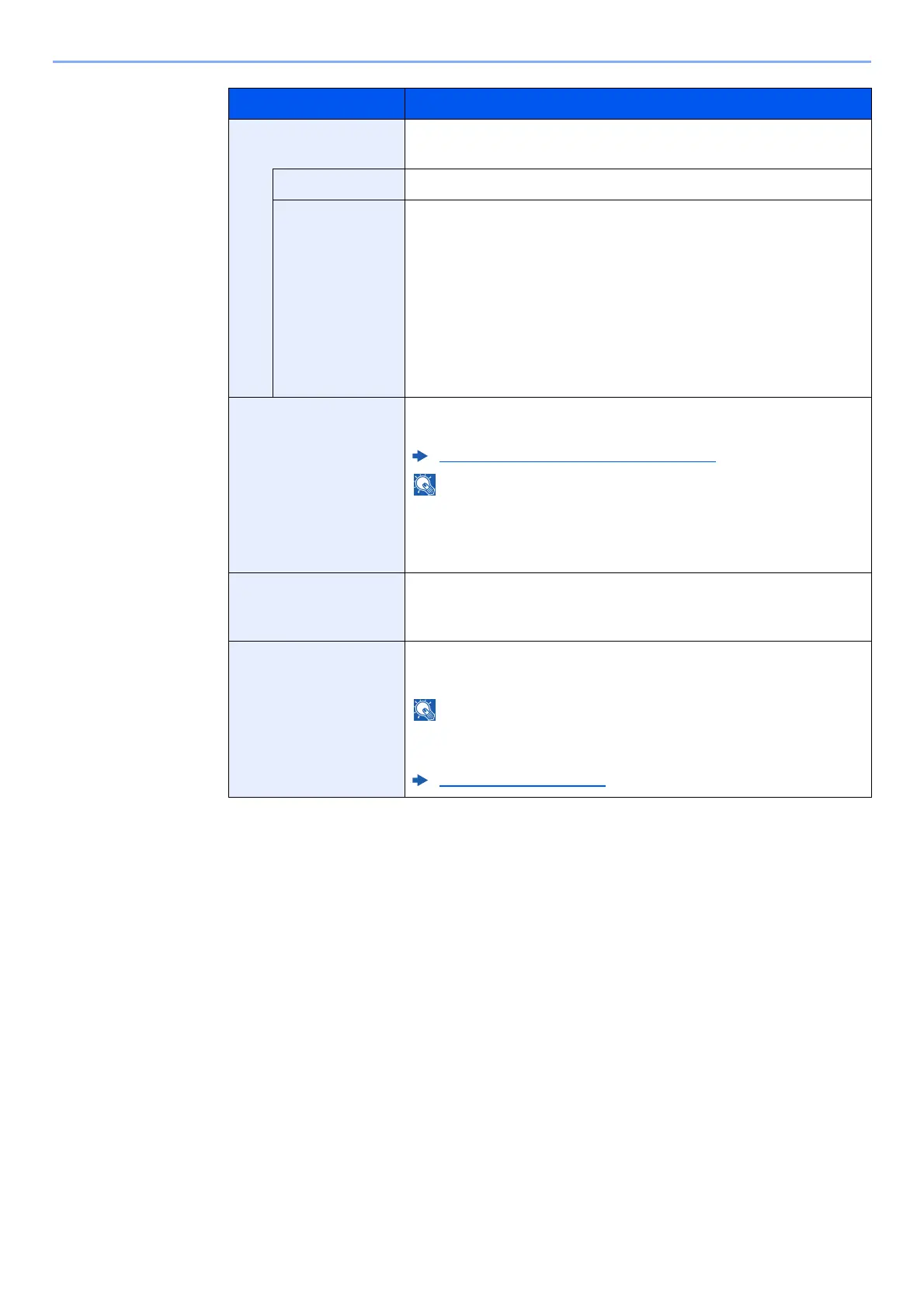
Access Level
Settings
Set user access privileges.
Access Level Select [Administrator] or [User] for user access privileges.
System Admin
Permission
If the user privileges set in the [Access Level] are [User], select
the privileges that can be set from the following.
• Original/Paper Settings
• Address Book
• User/Account Information
• Basic Network Settings
• Basic Device Settings
• Advanced Device/Network Settings
Account Name Add an account where the user belongs. The user, who registered
his/her account name, can login without entering the account ID.
Overview of Job Accounting (page 9-33)
•Select [Name] or [ID] from the "Sort" to sort the account list.
•Select [Search (Name)] or [Search (ID)] to search by account
name or account ID.
E-mail Address The user can register his/her E-mail address. The registered
address will be automatically selected for subsequent operations
that need any E-mail function.
ID Card Information Register ID card information.
Place the ID card on the ID card reader, and select [Read].
This function is displayed when the optional ID Card
Authentication Kit is activated.
Applications (page 11-8)
Item Descriptions









 To Next Page