96
8-2 Connecting procedures
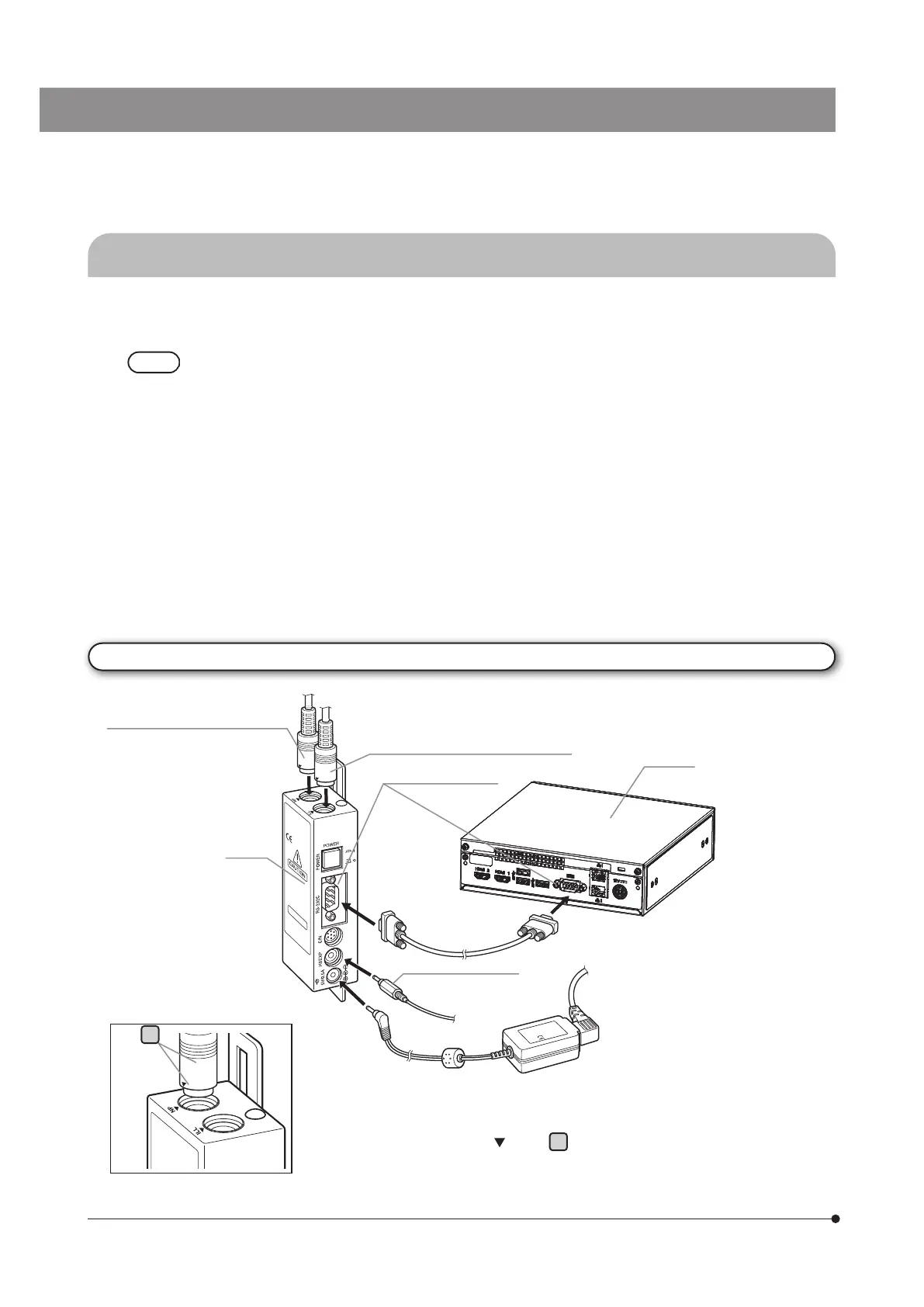
For procedures to connect the microscope to the control box, refer to the instruction manual of the relevant control box
or the microscope.
· Remove only the covers or stickers of necessary connectors on the control box.
· Be sure to connect only units specified by Olympus to each connector. If units which are not specified
by Olympus are connected, the full performance is not ensured.
· Use the RS232C cable for connecting DP2-AOU to the control box for microscope.
· Be sure to set the main switch of each unit to OFF before connecting the cables.
· Align the orientation of the connector and insert it completely to the end. If the connector has clamping
screws, be sure to secure them.
· Inserting the connectors which are not specified by Olympus may damage them.
The connecting procedures are described below by using U-CBS as an example. For other connecting procedures, refer
to instruction manuals of devices to be connected.
Connecting to U-CBS
U-CBS
Connector of the coded illuminator
DP2-AOU
RS232C connector
AC adapter for U-CBS
When attaching the connector of the coded revolving nosepiece or the coded
illuminator, insert it by aligning
marks
A
.
U-HSEXP connector
RS232C cable
(provided with U-CBS)
A
Connector of the coded
revolving nosepiece



 To Next Page