36
B
D
E
C
A
7
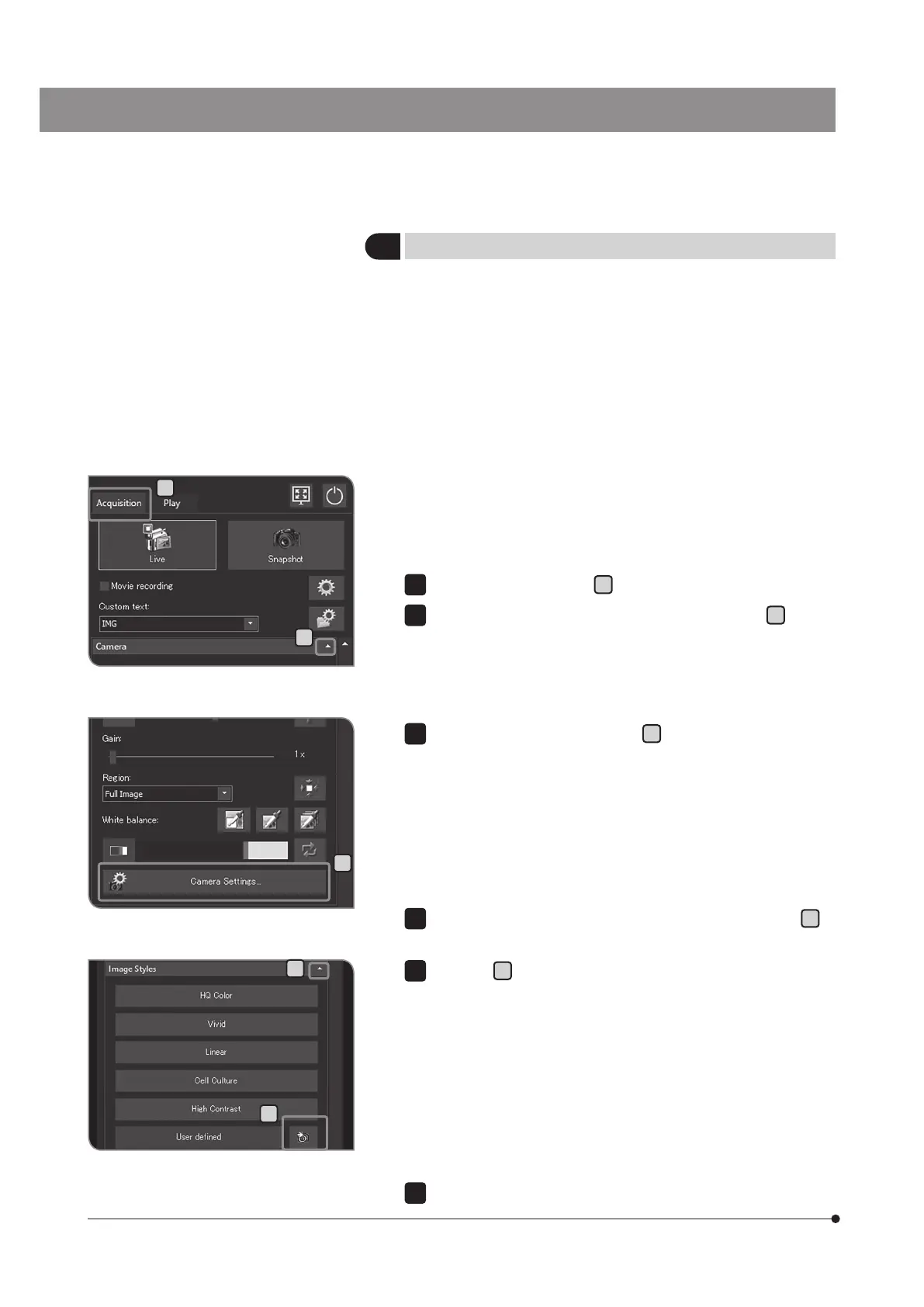
Saving the user-defined presetting
You can save the values of the following setting items as the user-
defined presetting.
· Color space
· Saturation
· Sharpness
· Contrast
· Brightness
· Gamma
· Auto exposure mode
By setting the user-defined presetting, even though the values of
the following setting items are changed, you can return them to the
values you saved by pressing the [User defined] button.
Select the [Acquisition] tab
A
.
If the setting items of [Camera] are not displayed, press
B
to open
them.
1
2
Press the [Camera Settings] button
C
.
3
If the setting items of [Image Styles] are not displayed, press
D
to
open them.
Press the
E
button. The current values of the following setting items
are saved.
For each setting procedures, see the respective pages.
· Color space (see p.37)
· Saturation (see p.37)
· Sharpness (see p.38)
· Contrast (see p.38)
· Brightness (see p.38)
· Gamma (see p.38)
· Auto exposure mode (see p.25)
Press the [Close Camera Settings] button.
4
5
6



 To Next Page