DP23-AOU/DP28-AOU
29
1
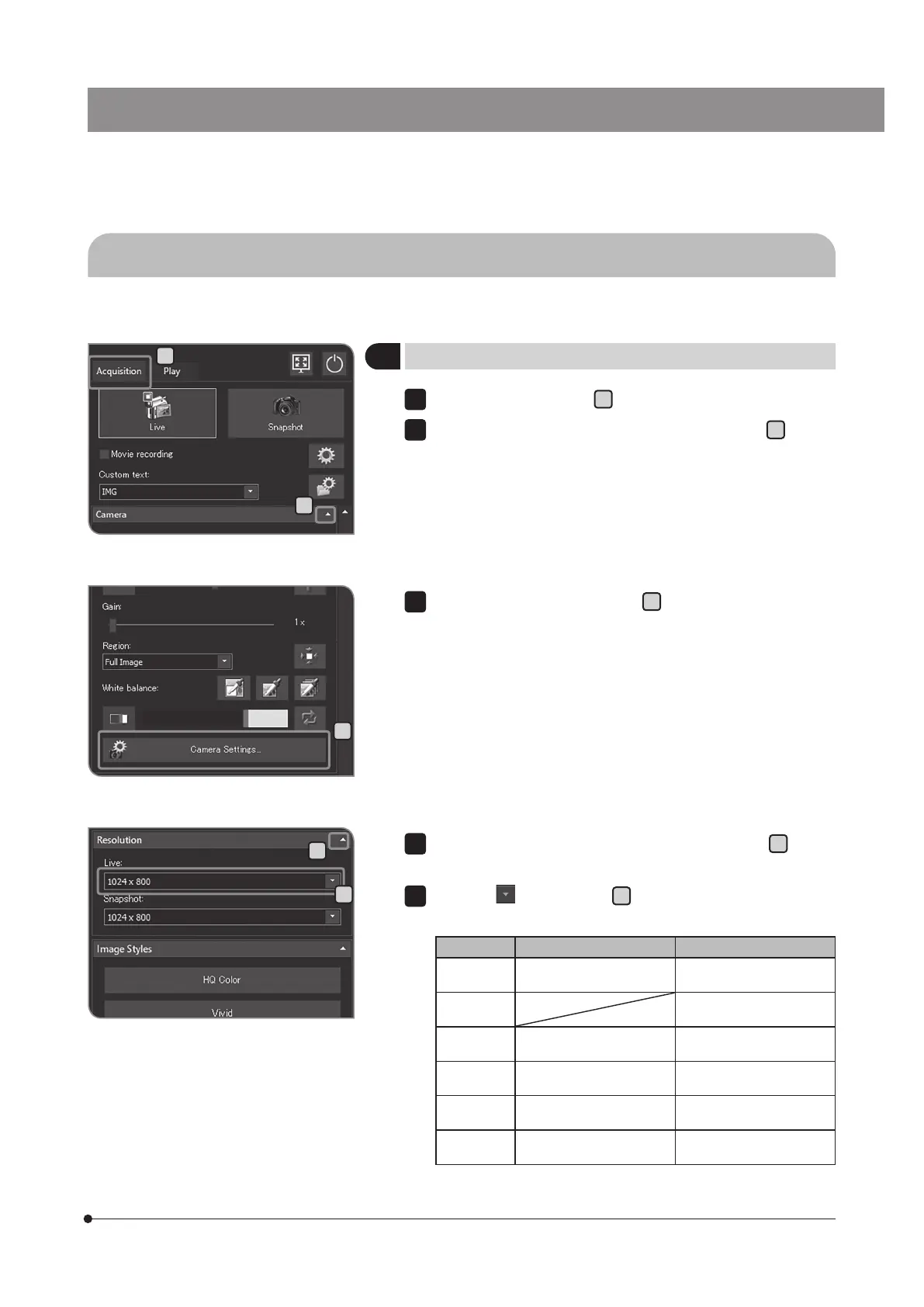
Setting the resolution of live image
Select the [Acquisition] tab
A
.
If the setting items of [Camera] are not displayed, press
B
to open
them.
1
4-2 Basic settings
This section describes the settings related to acquisition.
E
C
B
D
A
Press the [Camera Settings] button
C
.
3
If the setting items of [Resolution] are not displayed, press
D
to open
them.
Press the
button of [Live]
E
to select the following resolutions
from the list.
DP23-CU DP28-CU
Full
resolution
3088 x 2076
Frame rate: 30 fps
4104 x 2174
Frame rate: 30 fps
4K 3840 x 2160
Frame rate: 30 fps
Square 2072 x 2072
Frame rate: 45 fps
2168 x 2168
Frame rate: 30 fps
High speed 1544 x 1038
Frame rate: 59 fps
2052 x 1086
Frame rate: 60 fps
High
sensitivity
1544 x 1038
Frame rate: 59 fps
2052 x 1086
Frame rate: 30fps
Full HD 1920 x 1080
Frame rate: 60 fps
1920 x 1080
Frame rate: 60 fps
4
5



 To Next Page