DP23-AOU/DP28-AOU
37
8
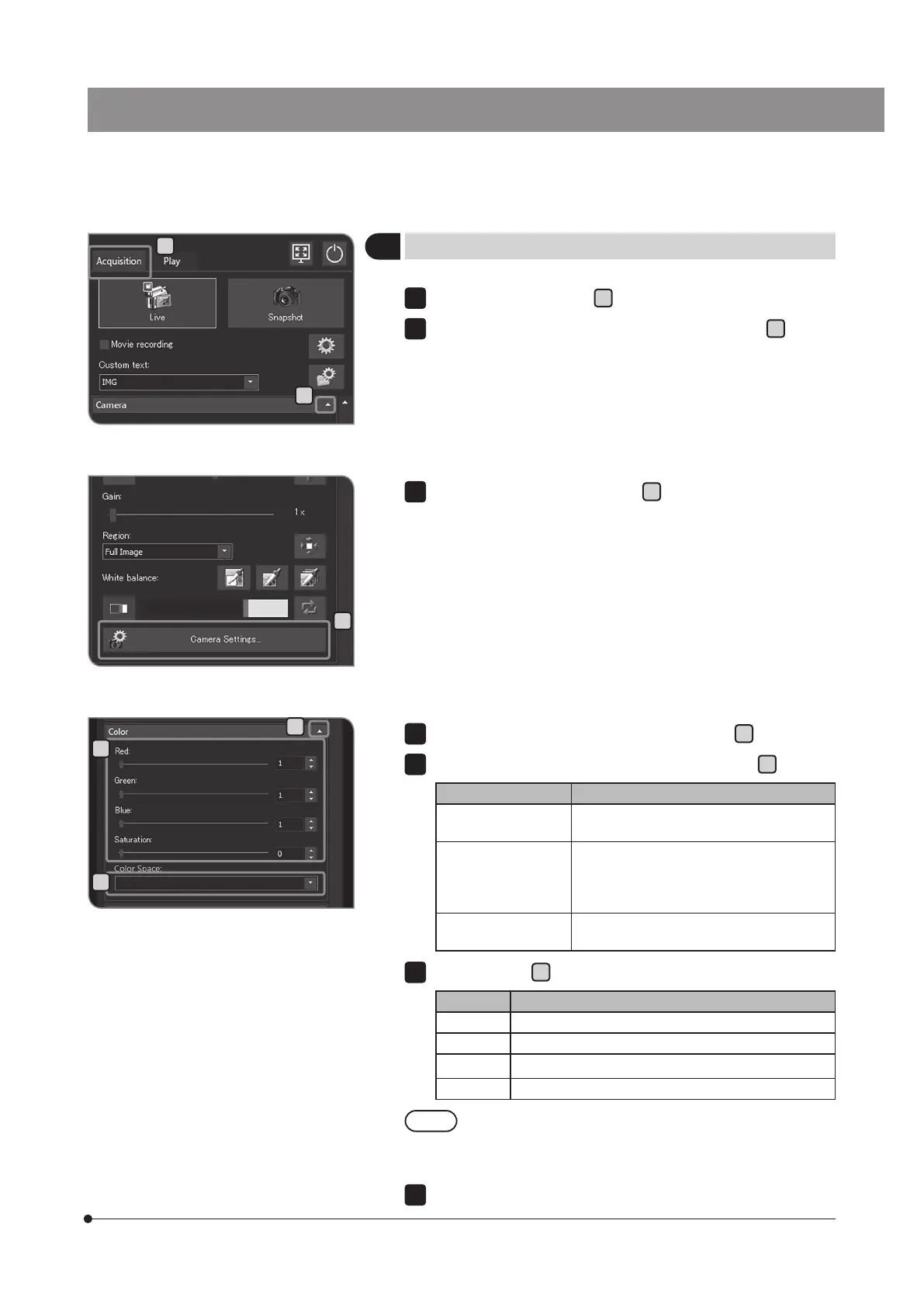
Adjusting the color of the live image
Select the [Acquisition] tab
A
.
If the setting items of [Camera] are not displayed, press
B
to open
them.
1
2
B
D
F
E
Press the [Camera Settings] button
C
.
3
If the setting items of [Color] are not displayed, press
D
to open them.
Select the following items from the list in [Color Space]
E
.
Item Function
[sRGB] This is the best color space when using
the monitor compatible with sRGB.
[AdobeRGB] This is the best color space when using
the monitor compatible with AdobeRGB.
The color reproducibility is improved
furthermore.
[Camera-specific] This is the best color space for linear mode
of image style.
Move the bar in
F
to adjust the color space.
Bar Function
[Red] R(Red) is adjusted.
[Green] G(Green) is adjusted.
[Blue] B(Blue) is adjusted.
[Saturation] The saturation is adjusted.
When [Automatic White Balance] (p.33) or [Grayscale]
(p.38) is selected, [Red], [Green] or [Blue] cannot be
adjusted.
Press the [Close Camera Settings] button.
4
5
6
7
C
A



 To Next Page