DP23-AOU/DP28-AOU
25
2
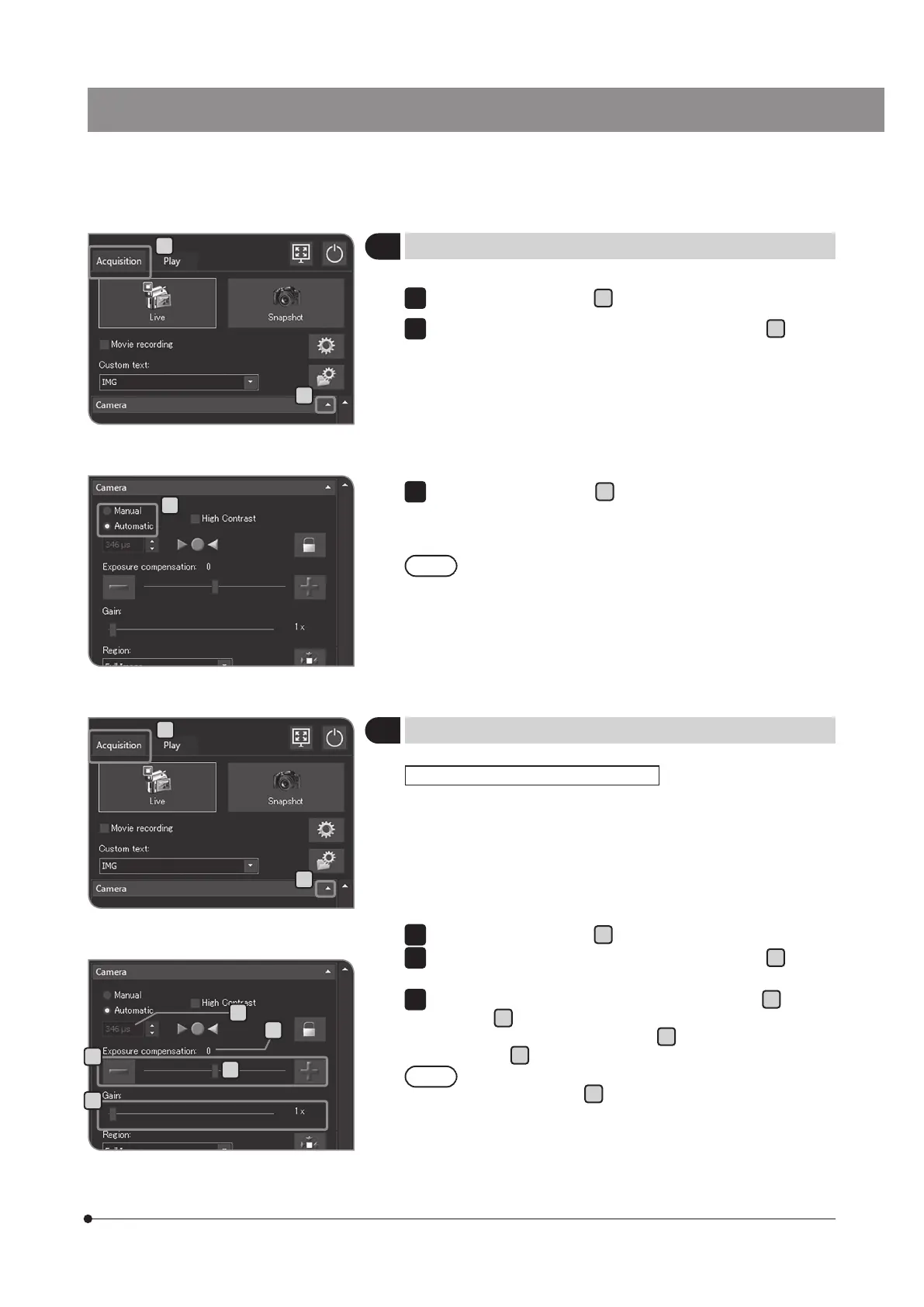
Selecting the exposure mode
Select the [Acquisition] tab
A
.
If the setting items of [Camera] are not displayed, press
B
to open
them.
1
2
A
C
B
B
C
G
3
Compensating the exposure
You can compensate the exposure time specified automatically. (The
exposure can be compensated in the range between -2EV and +2EV
in increments of 1/3EV.)
When acquiring a dark specimen, perform "+ compensation" to make
the exposure time longer to bring the overexposed effect. When
acquiring a bright specimen, perform "- compensation" to make the
exposure time shorter to bring the underexposed effect.
Select the [Acquisition] tab
A
.
If the setting items of [Camera] are not displayed, press
B
to open
them.
Press the [-] or [+] button of [Exposure compensation]
C
or move
the bar in
D
to set the exposure compensation value. The exposure
compensation value is displayed in
E
and the exposure time is
displayed in
F
.
· If you want to reduce the exposure time without darkening the
image, use [Gain]
G
. The [Gain] value is multiplied by the
intensity value. Using [Gain] allows you to brighten the entire
image and reduce the exposure time, but the noise in the
image is enhanced.
· When the exposure mode [Auto] is selected, you can change
the metering region. For details, see "Setting the metering
region (p.34)".
When the exposure mode [Auto] is selected
1
2
F
E
D
Select [Manual] or [Auto] in
C
to change the exposure mode.
For procedures to set the exposure when "Manual" is selected, see
"Manual exposure acquisition (p.39)”.
The initial setting is [Auto]. From the next time, the system
starts in the mode selected when the power was turned OFF.
3
A



 To Next Page