28
6
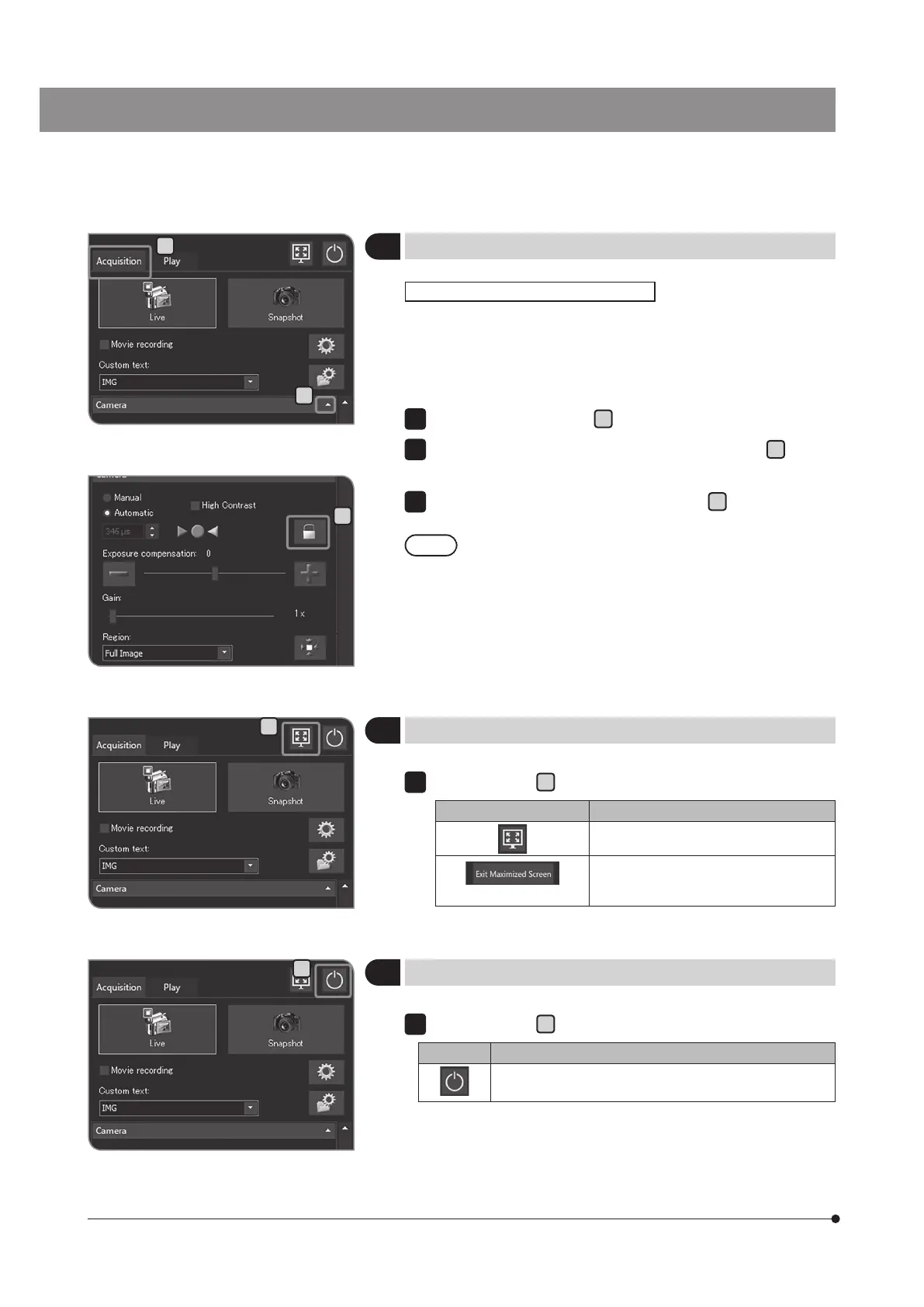
Locking and unlocking the exposure time
7
Showing or hiding the control window
8
Exiting the system
When observing the specimen where observation objects are scattered
in auto exposure mode, the exposure time may be increased or
decreased to allow the live image brighter or darker in association
with stage operation. In this case, lock the exposure time to observe
the specimen with the constant brightness.
Select the [Acquisition] tab
A
.
If the setting items of [Camera] are not displayed, press
B
to open
them.
Press the [Lock Current Exposure Time] button
C
to switch between
locking and unlocking the exposure time.
When the exposure time is locked, the metering region and
the ISO sensitivity cannot be changed and the exposure
cannot be compensated.
When the exposure mode [Auto] is selected
2
3
Operate with the
A
button.
Button Function
The control window is hidden.
(Upper right area of the screen)
The control window is shown again.
Operate with the
A
button.
Button Function
The system shuts down and the main switch of
DP2-AOU is turned OFF.
1
A
A
C
B
A



 To Next Page