DP23-AOU/DP28-AOU
9
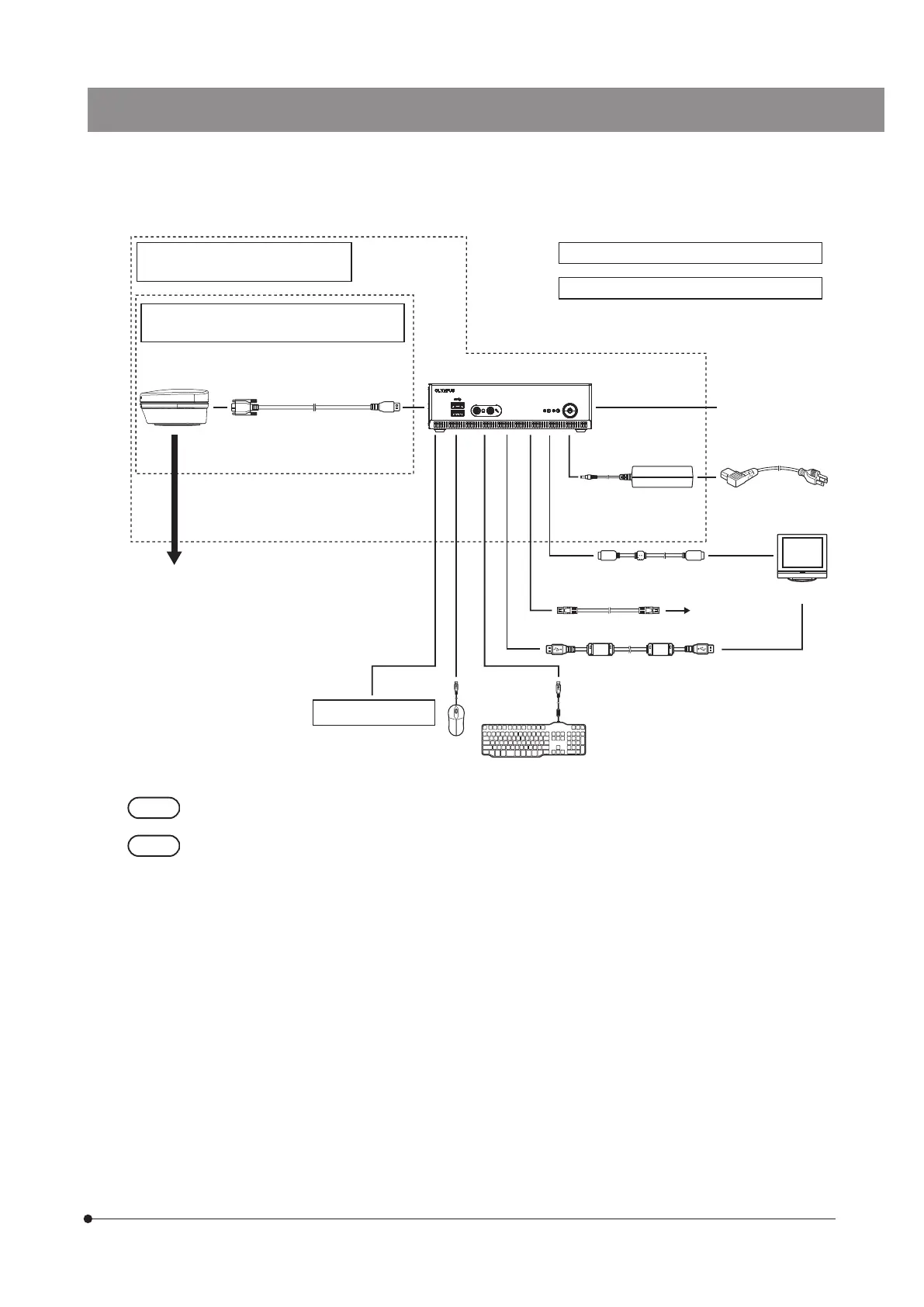
11 System diagram
If the display is connected via a display switcher, malfunction may be caused. Do not use a display
switcher.
· The image color settings suitable for the microscope are necessary for faithful color reproduction. (For details,
see page 37.)
· For the compatible microscopes and camera adapters, contact Olympus.
· Do not use the interface cable for any purpose other than its intended use.
Camera adapter
Interface cable
USB cable for touch panel
AC adapter
Power cord
Display cable
LAN cable
To network
Display
KeyboardMouse
DP23-AOU (DP23 control unit set) /
DP28-AOU (DP28 control unit set)
DP23-CU (Microscope digital camera) /
DP28-CU (Microscope digital camera)
DP2-AOU (Control box)
Other USB devices
Control box for
microscope system
Camera head
DP2-NS (Network Solution License) (optional)
DP2-AVS (Antivirus Software License) (optional)



 To Next Page