DP23-AOU/DP28-AOU
53
F
G
H
E
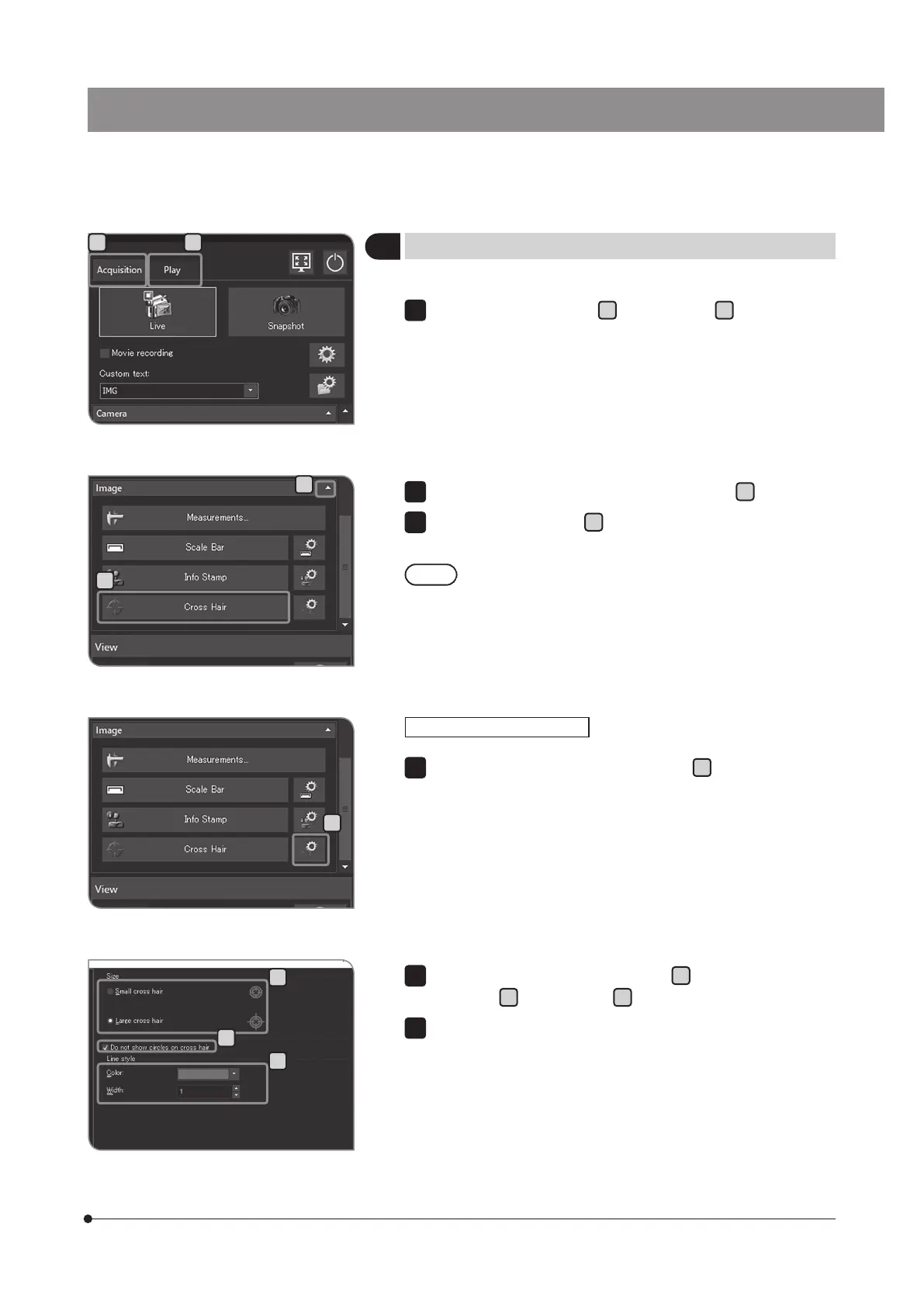
Change the necessary settings in [Size]
F
, [Do not show circles on
cross hair]
G
and [Line style]
H
.
Press the [OK] button to close the [Options] dialog box.
2
3
You can change the size or the line style of the cross hair.
Press the [Show Cross Hair Options] button
E
. The [Options] dialog
box opens, and [Cross Hair] > [Format] is displayed.
Changing the cross hair view
1
You can display the cross hair in the center of the screen.
Select the [Acquisition] tab
A
or the [Play] tab
B
.
7
Displaying the cross hair
C
D
If the setting items of [Image] are not displayed, press
C
to open them.
Press [Cross Hair] button
D
to switch between showing and hiding
the cross hair.
The color of the cross hair may not be displayed properly due
to the noise when the image is compressed. In this case,
record it in TIFF to display the cross hair properly.
2
3
A B



 To Next Page