DP23-AOU/DP28-AOU
67
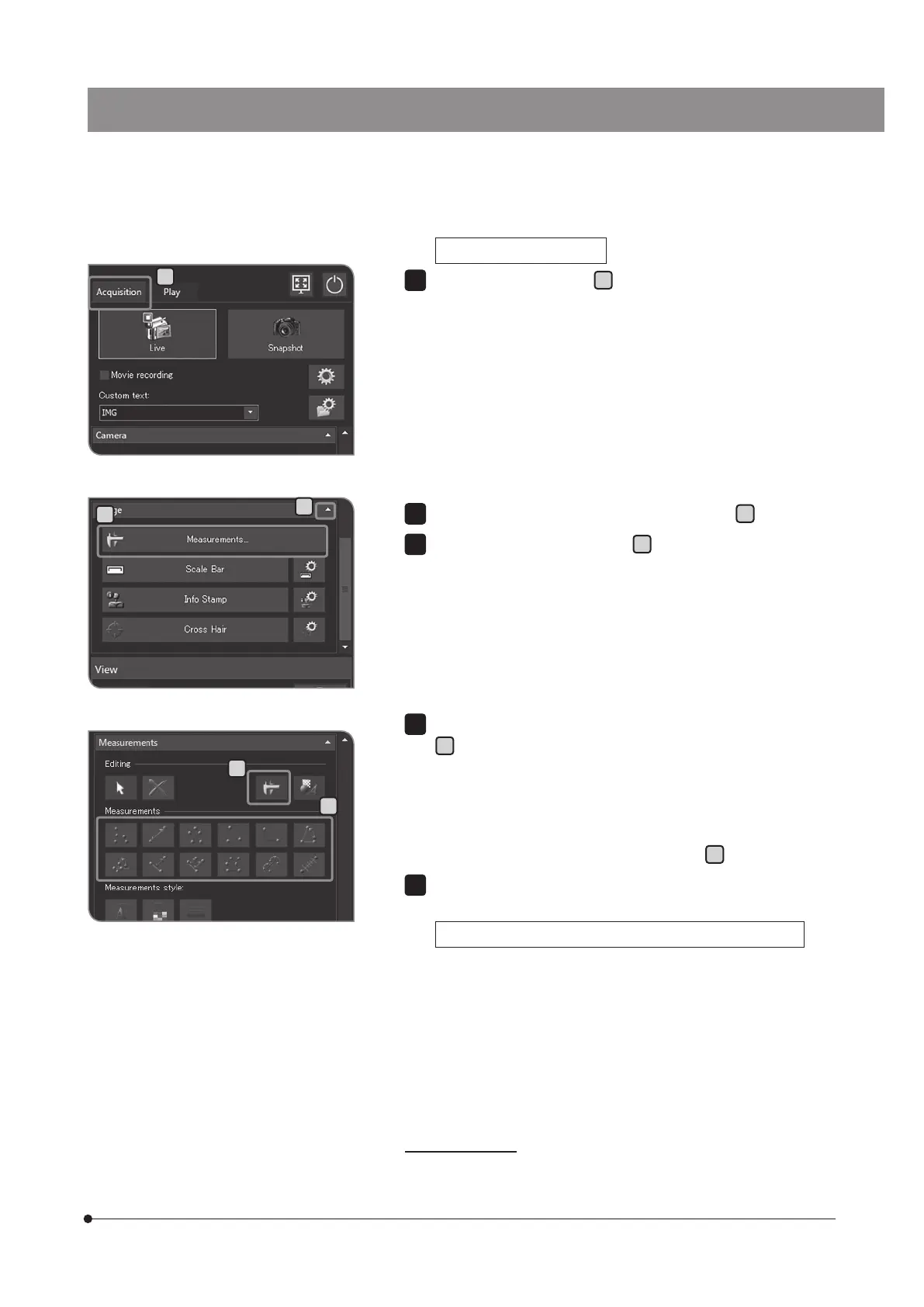
Measuring on the live image
Select the [Acquisition] tab
A
.
1
B
C
E
D
If the setting items of [Image] are not displayed, press
B
to open them.
Press the [Measurements] button
C
.
2
3
Press the arbitrary measurement method button in [Measurements]
D
to perform measurement on the live image. For measurement
procedures, see the table below.
The measurement results are displayed on the measurement layer *
on the image.
You can switch between showing and hiding the measurement layer
by pressing the [Show Measurements] button
E
.
To finish the measurement, press the [Close Measurements] button.
Adding measurement results on the image during acquisition
If you press the [Snapshot] button after measurement, the image is acquired,
measurement results are added to the image, and the image is saved.
The method to add measurement results differs depending on the
file format
· JPEG: The measurement results are imprinted on the image.
(There is no measurement layer.)
· TIFF: The image is saved keeping the measurement layer.
For procedures to set the file format to be saved, see“Setting the still
image format (p.32)".
* The measurement layer is like an transparent sheet overlaid on the
image. The measurement results are displayed on the measurement
layer.
4
5
A



 To Next Page