DMTA-20015-01EN [U8778402], Rev. M, February 2017
Basic Operation
41
2.3.4 Battery Removal and Installation
To remove or install a battery
1. On the right side panel, turn the two quarter-turn latches to open the battery
compartment door.
2. Pull the cloth tab to remove the battery (see Figure 2-5 on page 42).
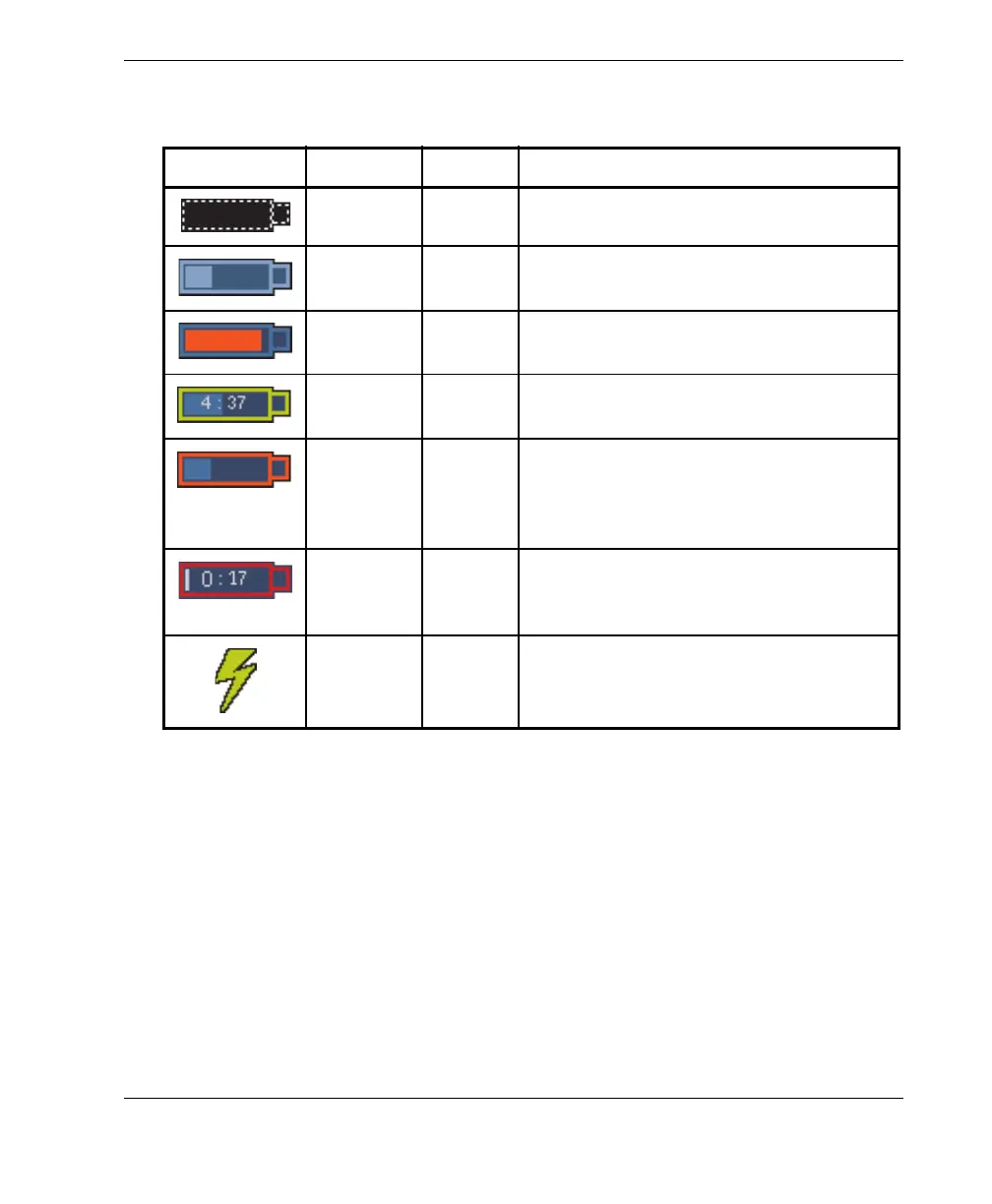
Table 7 Battery status indicator variations
Indicator Outline Fill Meaning
Dotted N/A There is no battery in that compartment.
Blue Blue The battery is functioning properly.
Blue Orange The battery is too hot for use.
Yellow
(blinking)
Blue The battery is charging.
Orange Blue The battery is too hot to be charged, or
the internal system temperature is too
high to enable charging (over 60 °C
[140 °F]).
Red
(blinking)
Blue The battery charge is critically low (less
than 10 %). A beeping noise is emitted
when there is no spare battery available.
N/A Yellow The OmniScan MX2 is being powered
externally through the DC adaptor.


 To Next Page