NOTE:
The screwdriver's bit should be at least 50 mm away from the picking point
until the screw is waiting in place. Otherwise, the magnetic force of the Screw-
bit System will attract the screw sidewise and it might cause a misalignment
between the screw and the bit.
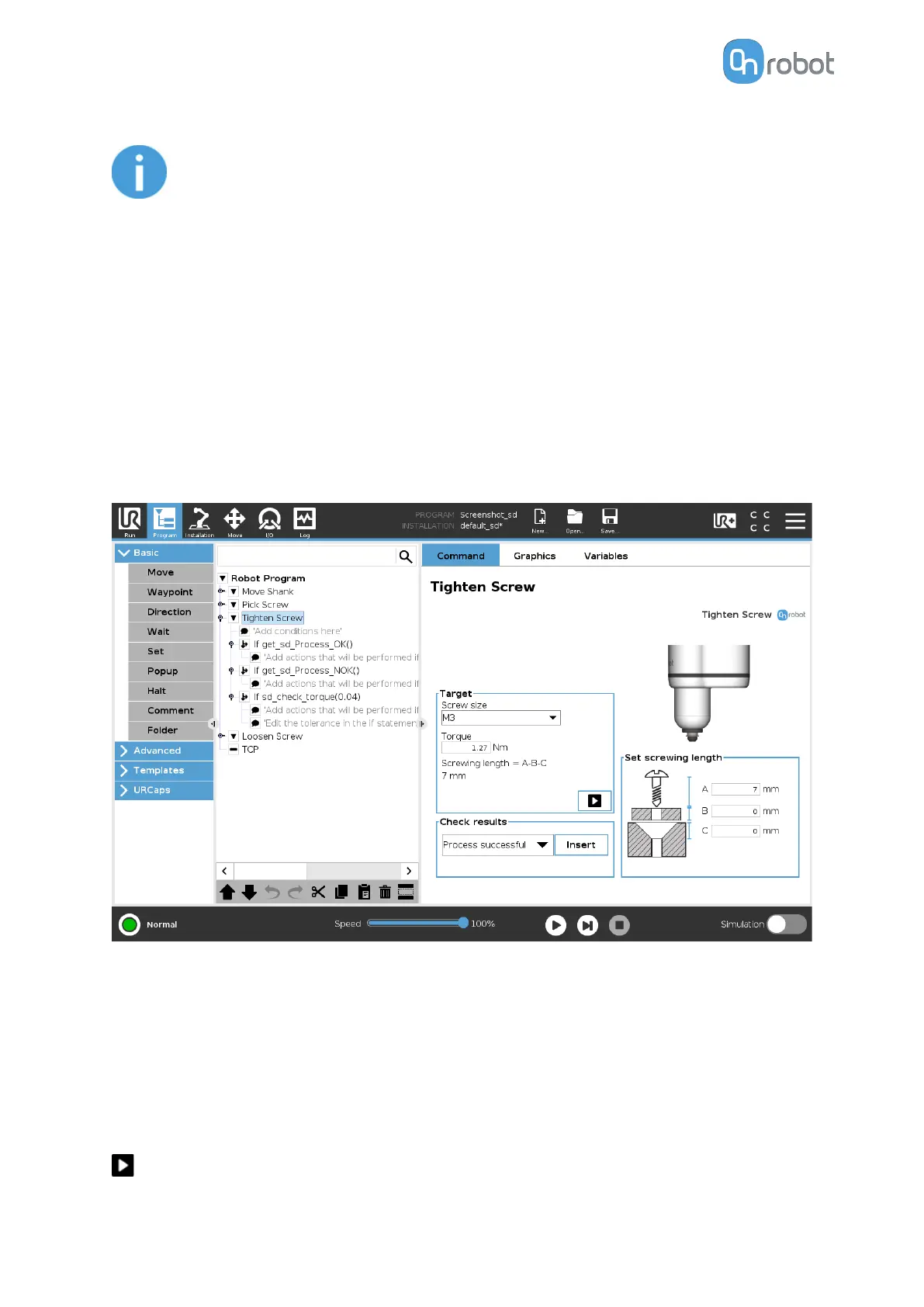
6.1.5.2. Tighten Screw
When the Tighten Screw command is executed, the screwdriver will move and rotate the
Screw-bit System until it reaches the thread. Then, it will start to screw in the screw until 90%
of the Screwing length is inside. During the rest 10% of the Screwing length, the screwdriver
will tighten the screw applying the Target Torque.
In the 6.6.5. Feedback variables section, the variables that provides information about the
result of the command are explained.
The
dierent functions are explained below.
Target
Screw size: The screw sizes from M1.6 to M6 can be selected. This selection will
autofill a
suggested torque value for that particular screw type.
Torque: Input the target tightening torque.
Screwing length = A-B-C: The resulting screwing length is shown here. This is the amount of
the screw that will be screwed into the thread. To set the value use the Set screwing length
card and the resulting amount will be the A (screw length) - B (Washer thickness) - C (Chamfer
deepness).
When pressed, the screwdriver will act as if the command is executed.
OPERATION
102



 To Next Page