A = This is the screw length, distance from the screw bit to the bottom part of the screw head.
B = This is the washer thickness (or piece in between screw and thread), if no piece is used
set it as 0. This amount will be subtracted from the Screw length to provide the resulting
Unscrewing length.
C = This is the chamfer deepness. This amount will be subtracted from the Screw length to
provide the resulting Unscrewing length.
The background of the A, B, and C fields becomes yellow, respectively, when the Unscrewing
length is out of range.
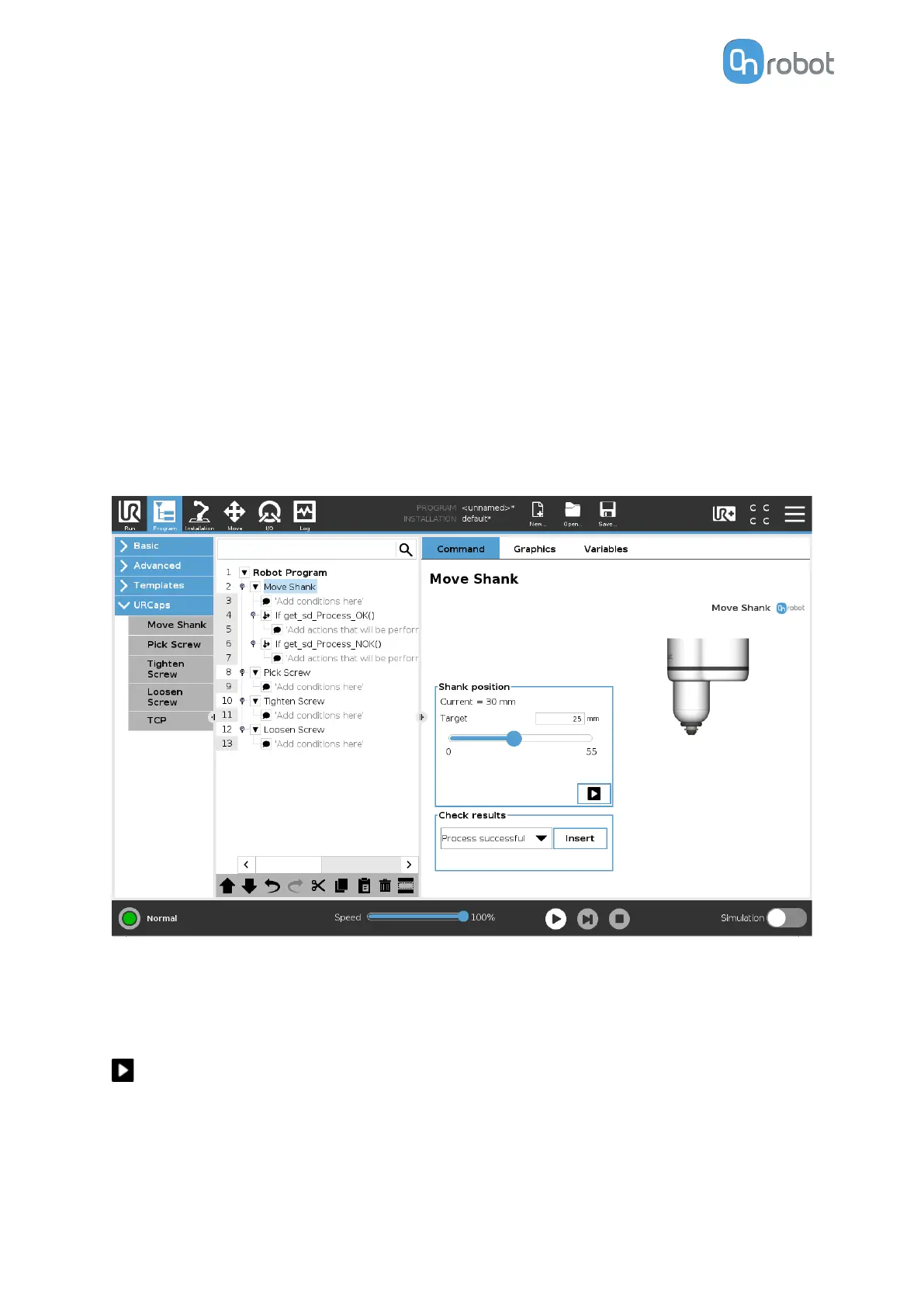
6.1.5.4. Move Shank
When the Move Shank command is executed, the screwdriver will move the shank showing
the Screw-bit system or hiding it inside the housing.
In the 6.6.5. Feedback variables section, the variables that provides information about the
result of the command are explained.
The
dierent functions are explained below.
Shank position
Current: shows the current position of the shank.
Target: selects the target shank position. The target position can also be set by using the
input field above the slider.
When pressed, the screwdriver will act as if the command is executed.
Check results
Selecting one of the 2 options from the dropdown list and pressing Insert will add an if
statement in the robot program based on the selected option as shown in the screenshot
below.
OPERATION
105



 To Next Page