SECTION 2: GETTING STARTED
19 REI OSC-5000E
Exercise 2 – Analyze A Bugging Device
The purpose of this exercise is to provide further practice manually locating signals, and
to introduce the Correlator and Time Spectrum Functions.
For this exercise, you must have an analog bugging device. A baby monitor or wireless
microphone will work very well. This exercise makes the following assumptions:
• The OSCOR is turned on in the default sweep mode.
• The transmitter is turned on and located about 6ft (2m) from the OSCOR
• The transmitter is an AM or FM modulated audio signal and the transmit
frequency is known.
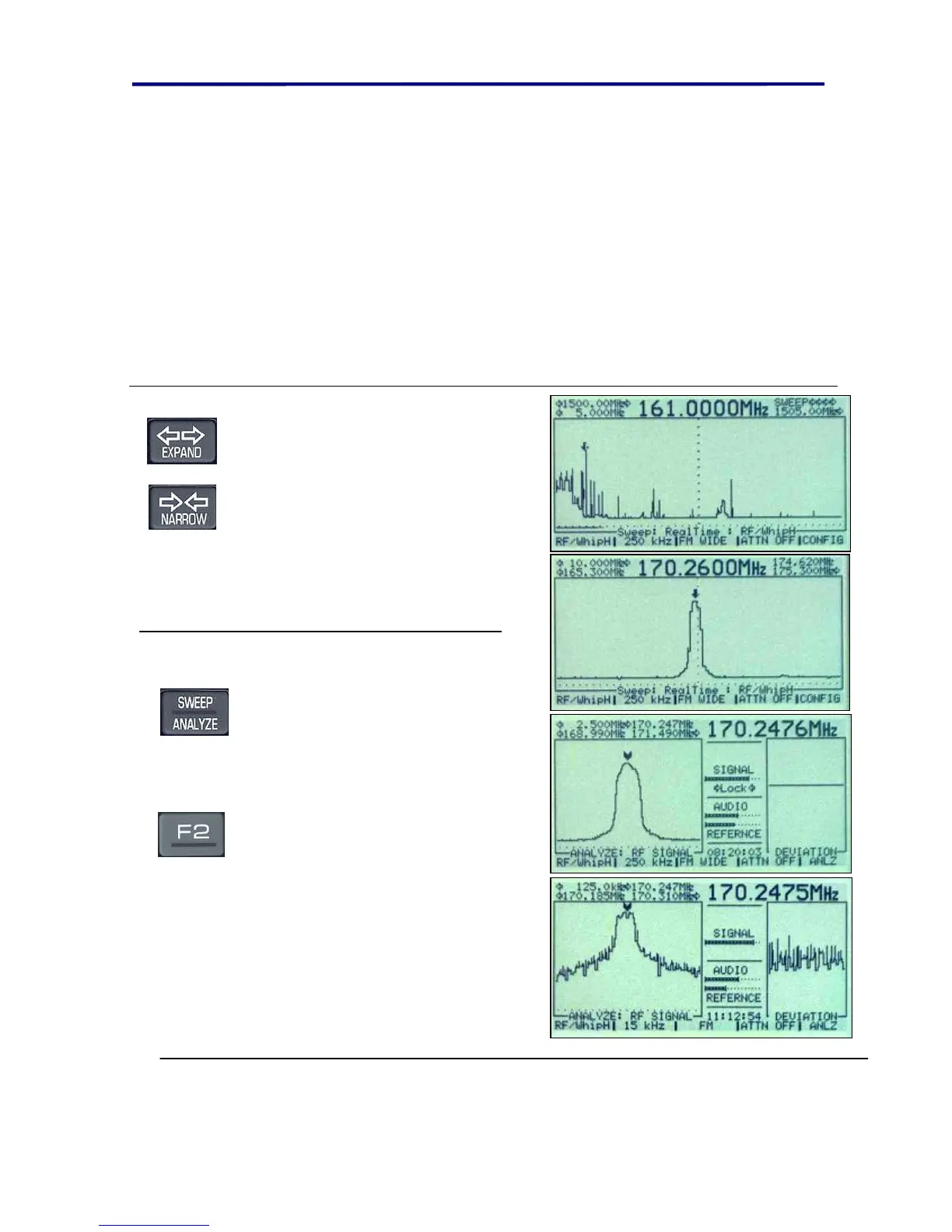
Use the EXPAND and NARROW
buttons to search for the signal
associated with the transmitter. If the
transmitter is close, it should be the
strongest signal in the spectrum
view. In this example, a wireless
microphone at 170MHz was used.
Note: Pressing the SHIFT key and
then the EXPAND or NARROW will
maximize the function.
Use the SWEEP/ANALYZE button
to enter the Analyze mode. Adjust
the volume and listen to the signal.
As the volume is increased, you
should hear feedback.
In this Example, a Narrow band
wireless microphone was used,
therefore, F2 was pressed to change
the receiver bandwidth to 15KHz to
increase the audio quality. (Notice,
the audio deviation with the 15KHz
versus the 250KHz Bandwidth.)



 To Next Page