SECTION 4: OSCOR AUTOMATIC OPERATION
69 REI OSC-5000E
SECTION 4: OSCOR AUTOMATIC OPERATION
The OSCOR can automatically scan all programmed inputs (antennas) and frequency
bands. The best method for using the automatic mode is to run the OSCOR away from
the threat environment in a “Load Friendly” mode. This will store ambient environment
frequency spectrum data in OSCOR memory. This procedure greatly speeds up the
automatic search process because when the OSCOR is programmed to search for
bugging devices in the threat environment, the signals labeled as friendly will be ignored
unless their power level changes by greater than 4%. Otherwise, each signal detected is
stored in the internal signal database and analyzed for threat correlation (see page 78
Correlate: Acoustic Correlator System (Automatic)).
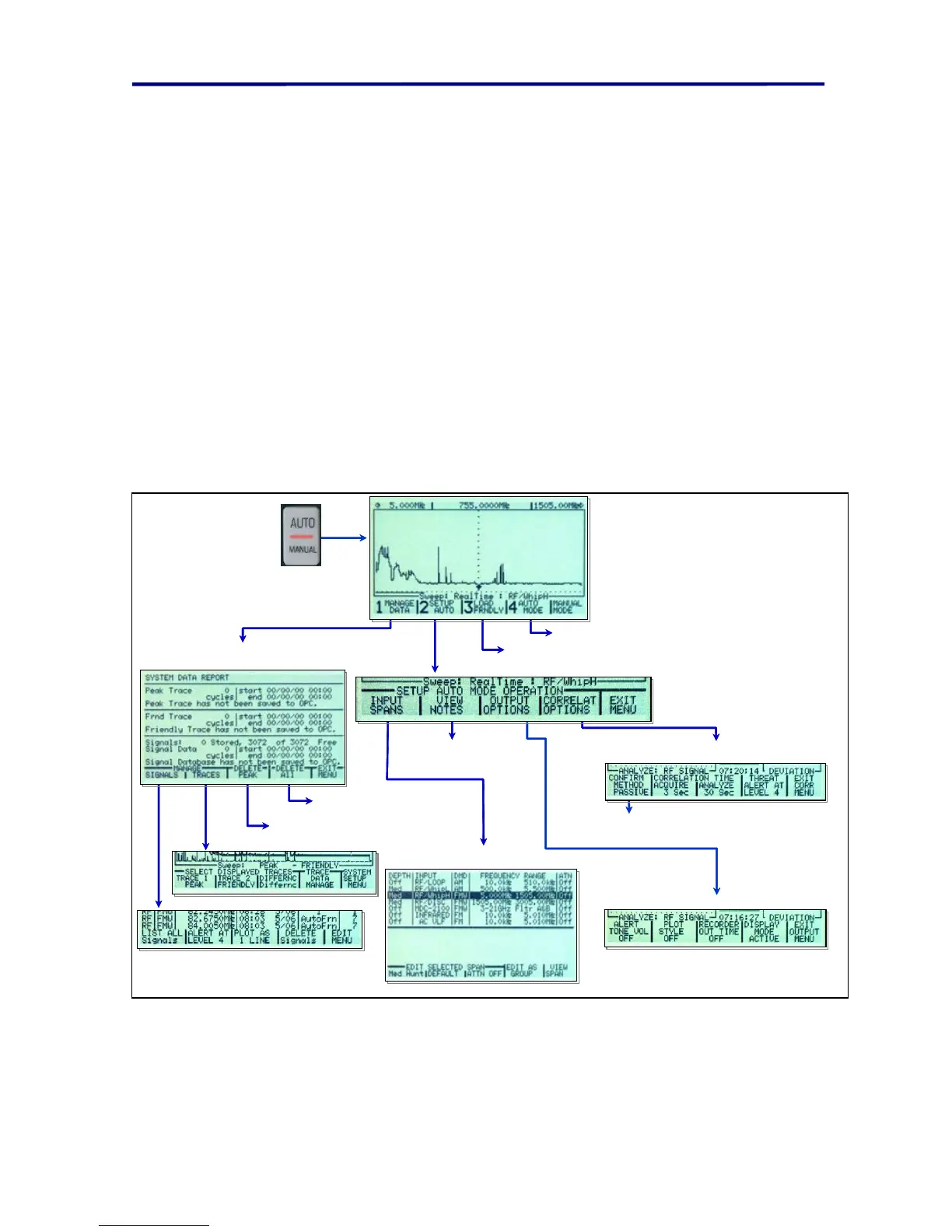
The Figure below provides a map of the automatic mode programming menus. This map
is also included at the end of this manual in the Quick Reference Guide.
Correlate method may be set to
PASSIVE, VERIFY, or ACTIVE
Configure the Correlation process
for automatic operation.
Configure the outputs for Automatic operation.
Select Inputs for
automatic searching.
Review and/or Clear stored Signals and traces
prior to Loading Friendly or Automatic Mode.
Set up automatic operations
Start Loading Friendly Trace and Signals.
Start Automatic Threat Trace and Signal Capture.
Deletes all Signals
and Traces
Deletes Peak Trace
Notes from OPC
Correlate method may be set to
PASSIVE, VERIFY, or ACTIVE
Configure the Correlation process
for automatic operation.
Configure the outputs for Automatic operation.
Select Inputs for
automatic searching.
Review and/or Clear stored Signals and traces
prior to Loading Friendly or Automatic Mode.
Set up automatic operations
Start Loading Friendly Trace and Signals.
Start Automatic Threat Trace and Signal Capture.
Deletes all Signals
and Traces
Deletes Peak Trace
Notes from OPC
FIGURE 45 AUTOMATIC MODE CONFIGURATION MENUS



 To Next Page