SECTION 1: INTRODUCTION AND EQUIPMENT DESCRIPTION
REI OSC-5000E 4
High Performance Receiver - sensitive quad conversion receiver controlled by three
phase-locked loop synthesizers. Frequency range 10 kHz - 3 GHz (21 GHz is
optional). Multiple IF filters, used throughout, allow tight selectivity in all bandwidth
selections.
Input Attenuators - selected when high RF or Audio levels are encountered.
Function Buttons
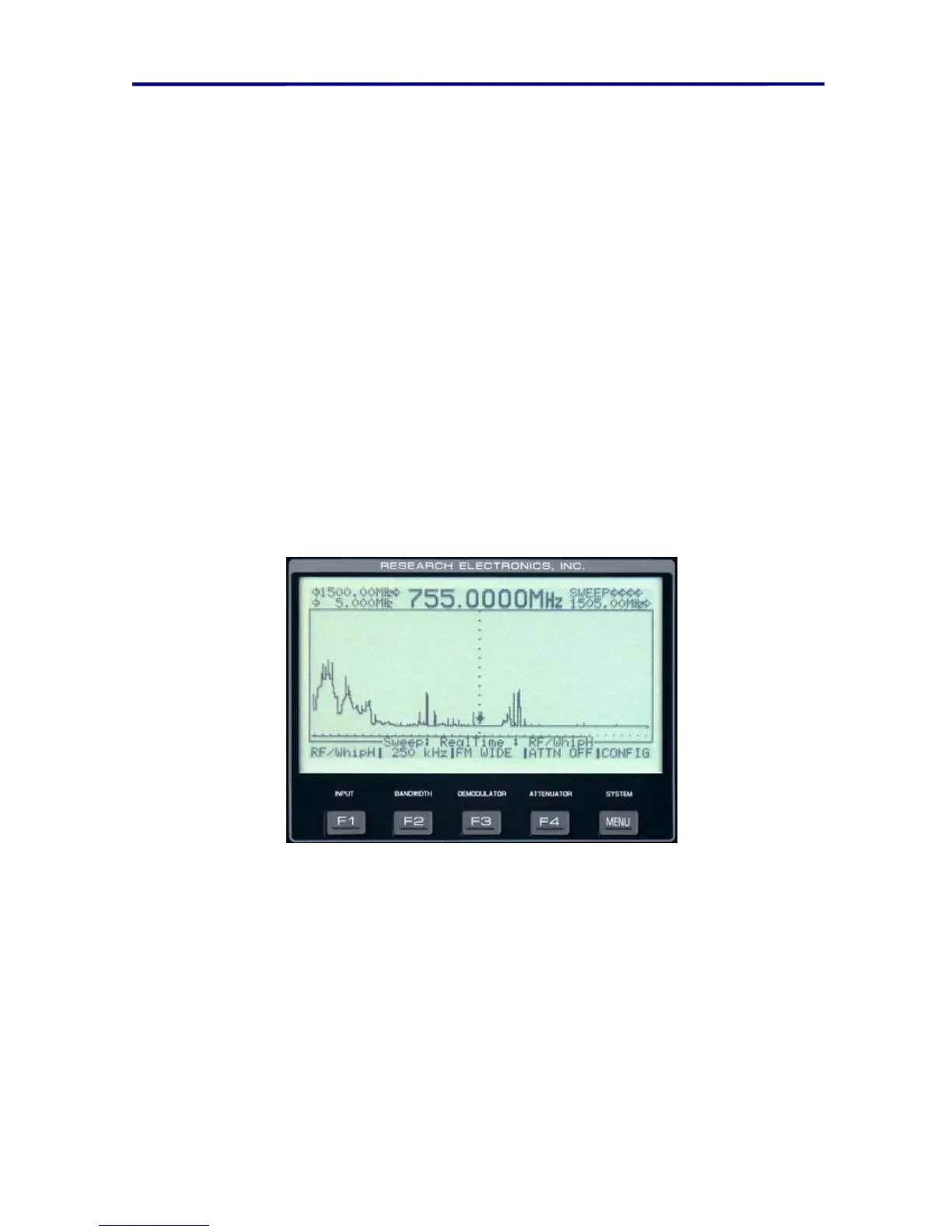
The OSCOR has 4 function buttons (F1 to F4) and a MENU button. These buttons are
multi-use buttons and the functions are always labeled on the OSCOR display screen.
For example, in the OSCOR display figure below:
• F1 button refers to the RF/WhipH antenna input
• F2 button refers to a 250KHz bandwidth
• F3 button refers to an FM Wide demodulation
• F4 button refers to the Attenuator being off
• The MENU button provides access to lower level Menus. In the case below, the
lower level menu is a Configuration menu.
Throughout the manual, it should be understood that the Function buttons refer to the
screen labels.
FIGURE 3 FUNCTION BUTTONS



 To Next Page