SECTION 2: GETTING STARTED
REI OSC-5000E 20
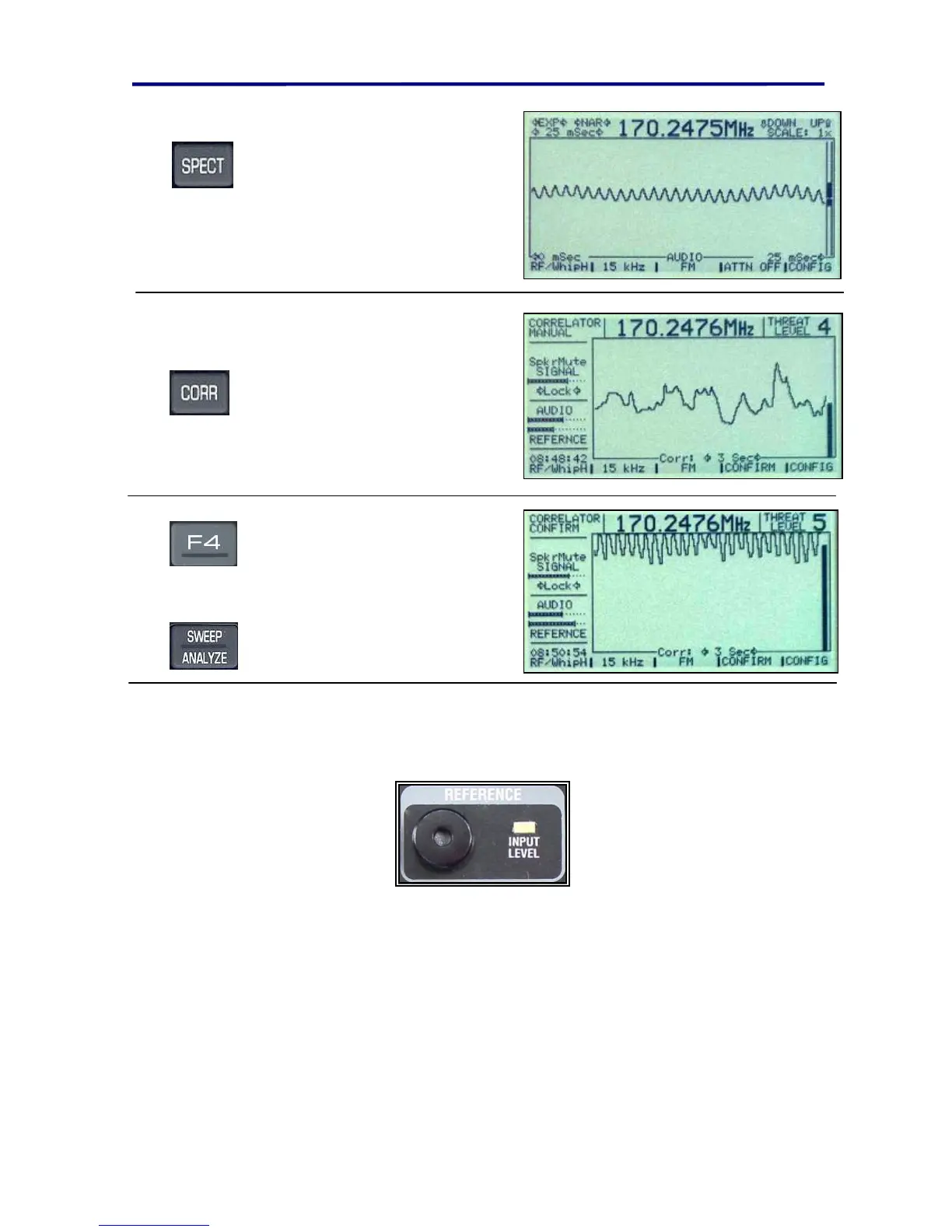
Press the SPECT button and
observe the screen as you talk,
whistle, and make other noises.
(The screen to the right shows
someone whistling.). You may
also wish to try this with a radio
station.
Press the CORR button to enter
the Correlator mode. Observe
screen as you talk, whistle, and
make other noises. You should
also try this with a radio station.
Press the F4 button to turn on a
confirm ringer. You may need to
adjust the volume of the ringer
using F1, F2, or F3.
From the SPECT or CORR
screens, Press
SWEEP/ANALYZE to
return.
NOTE: The correlator is described in more detail later in the manual. However, the
correlator function basically compares the audio on the received signal to the audio
received in the room via the refererence microphone.
FIGURE 13 REFERENCE MICROPHONE
This correlate function is important in the automatic mode operation because it provides
a method of identifying analog devices as threats.



 To Next Page