SECTION 2: GETTING STARTED
21 REI OSC-5000E
Exercise 3 – Basic Methods To Detect Threat Transmitters
The purpose of this exercise is to introduce locating threat signals using the OSCOR
Spectrum Display Modes and to get an introduction into Automatic Mode Operation.
This exercise has two parts:
3a. Use display modes to locate threats
3b. Automatic Mode to find threat signal
3a. Using display modes to locate threats
For this exercise, you must have an analog bugging device. A baby monitor or wireless
microphone will work very well. This exercise makes the following assumptions:
• An eavesdropping transmitter is available, but not yet turned on.
• The transmitter is located in the same room as the OSCOR.
• The transmitter is an AM or FM modulated audio signal.
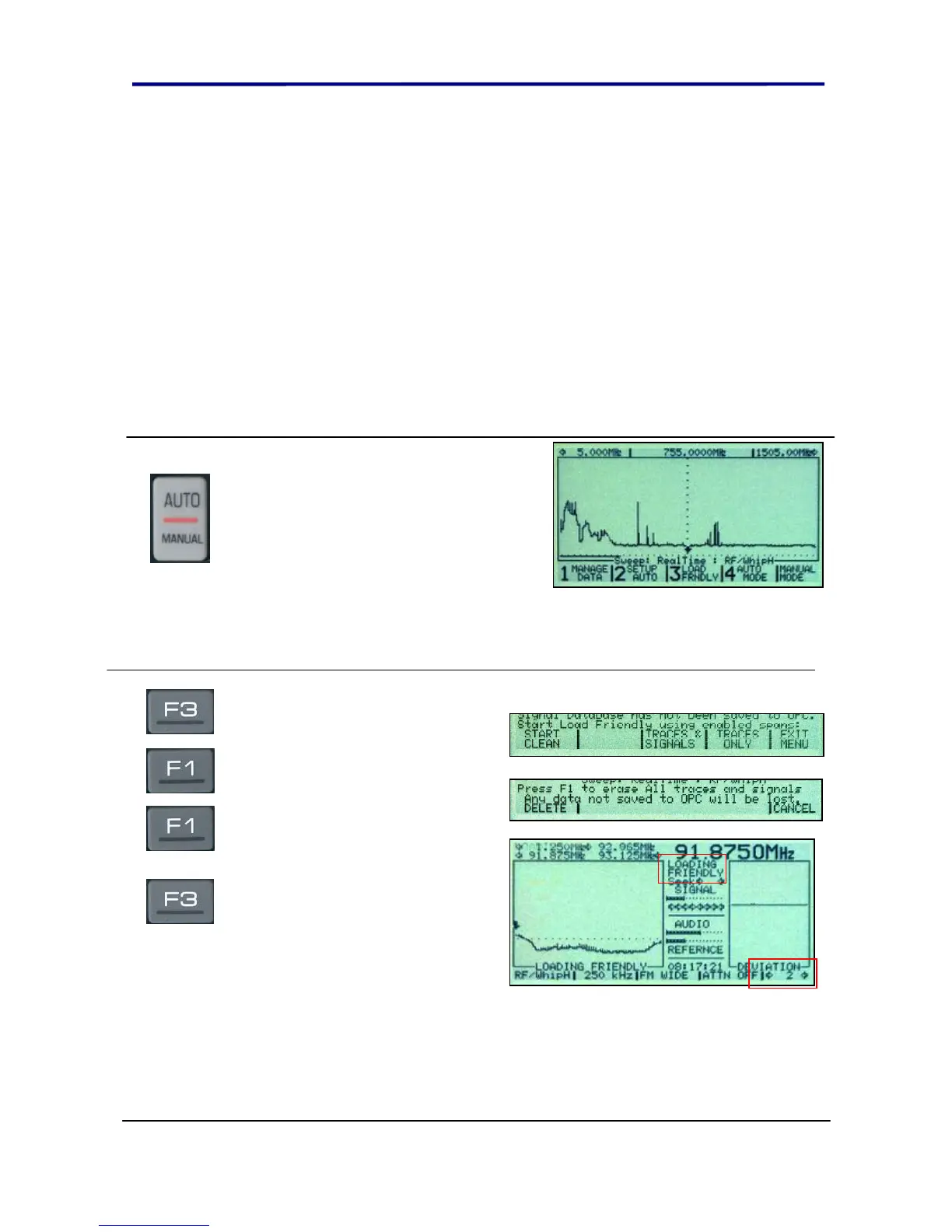
Take the OSCOR outside of the
building. Turn the unit on and press
the MENU button to enter the Auto
Configuration Menu
NOTE: For this quick start exercise, all of the automatic mode defaults will be used. It is
not necessary to set up the OSCOR antenna inputs, outputs, and correlation settings
described later in this manual.
Press F3 to enter the Load
Friendly Menu.
Press F1 to “START CLEAN” and
again to confirm a delete all
stored traces and signals. This is a
complete data erase.
Press F3 to start Loading Traces
and Signals. This will capture a
Friendly Frequency spectrum trace
and load the ambient
environment signals into memory.
Allow the OSCOR to complete at
least 2 complete cycles as
indicated by the number “2” just
above the MENU button.
NOTE: For this exercise, only the trace data will be used. However, the signals are pre-
loaded in this exercise to prepare for the next exercise.



 To Next Page