SECTION 2: GETTING STARTED
REI OSC-5000E 22
At this point take the OSCOR back into the target environment. Turn on an analog
testing device. The same device described in the previous exercise is recommended.
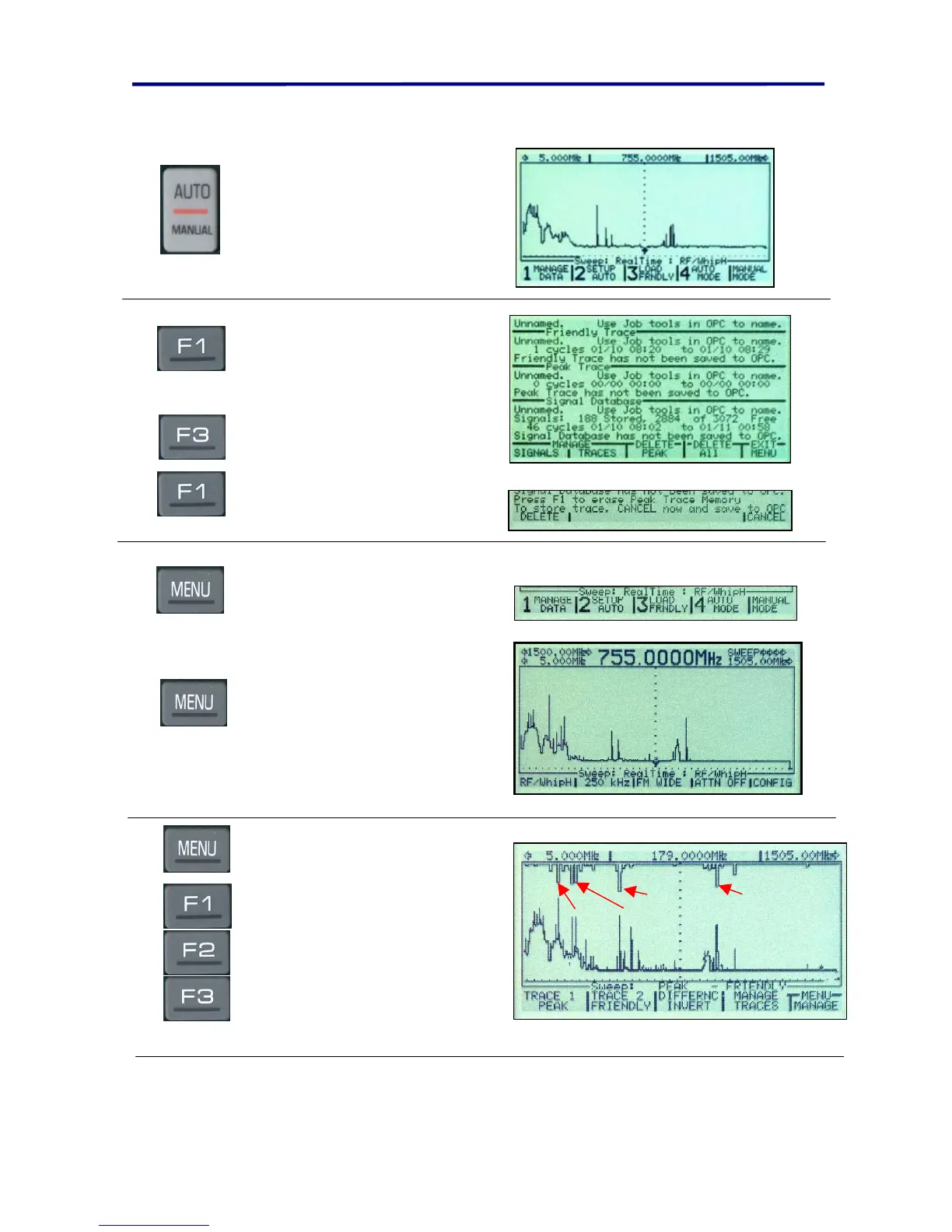
Press the AUTO/MANUAL
button to return to the main
Auto Mode set-up menu.
Press the F1 button to enter
the Memory & Data Manage
menu.
Press the F3 button to delete
the Peak Trace data. Press F1
to confirm.
This is a very important step
because the peak memory is
updated constantly regardless
of location.
Press the MENU button to
exit and return to the main
auto mode set-up menu with
the OSCOR in the sweep
display mode.
Press the MENU button to
enter the Manual Mode.
Allow the OSCOR to sweep
across the screen at least 4
times. This should take about
30 seconds.
Press the MENU button to enter
the display mode.
Press the F1 button until the F1
menu displays PEAK display.
Press the F2 button until the F2
menu displays the Friendly
Spectrum.
Press the F3 button until the F3
menu displays the “DIFFERNC”
INVERT.
Test Tx
Pagers
Low band Police
Hi band Police
This display shows a graphical difference of the Peak Display generated in the threat
environment and the Friendly spectrum stored without the transmitter on. The inverted



 To Next Page