SECTION 3: OSCOR MANUAL OPERATION
37 REI OSC-5000E
4. Press F2 to select Trace 2.
5. Press F3 to select the type of difference trace.
The most useful of these difference combinations is the Peak minus Friendly Spectrum
trace. This display provides a very quick view of the difference between the Frequency
Spectrum of two different locations, and is a very reliable method for detecting
sophisticated transmitters that are not continuous transmitters.
This mode may also prove to be useful when trying to determine the location of a
transmitter within an environment. You may wish to compare the RF spectrum of one
room to another room.
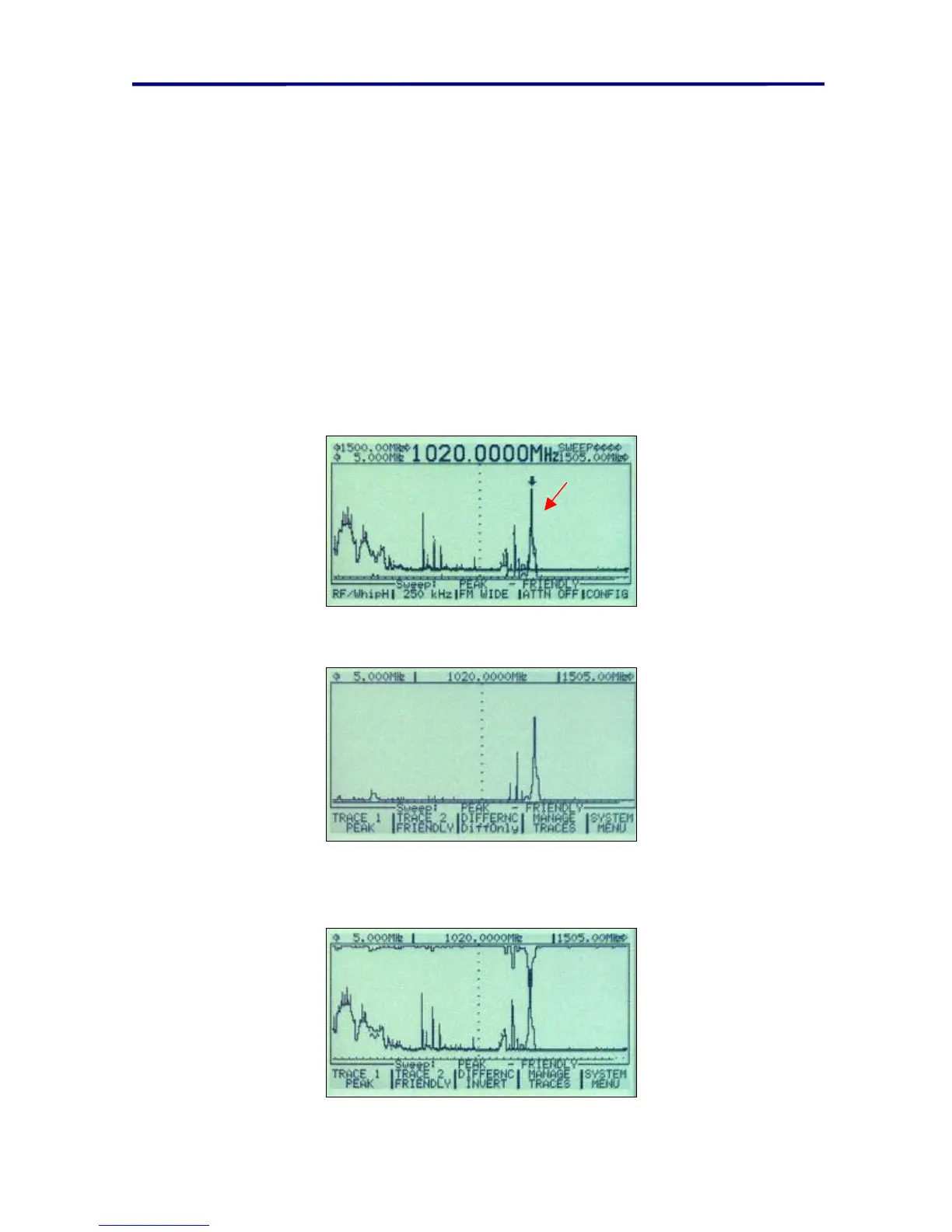
There are three difference modes available:
• Difference – This display shows two types of traces as well as the difference
between the traces.
New
Signal
FIGURE 22 DIFFERENCE MODE DISPLAY
• Difference Only – Only shows the difference between two traces.
FIGURE 23 DIFFERENCE ONLY TRACE DISPLAY
• Difference Invert – Shows two types of traces and the difference is inverted and
shown at the top of the display so that the differences can be easily identified.
FIGURE 24 DIFFERENCE INVERT TRACE DISPLAY



 To Next Page