USER'S MANUAL
General instructions for use
(Rev. 0) I-Max Touch (110-120V)
117
6.12.1.2 Images with artefacts
• Radiographs that show images with soft tissues or artefacts
The radiographs may show anatomical parts of the soft tissues or
show radiographic artefacts.
Normally the soft tissues might be more or less present, depending
on the patient positioning, while the presence of artefacts is strictly
dependent on the presence of foreign objects on the trajectory of the
X-ray beam.
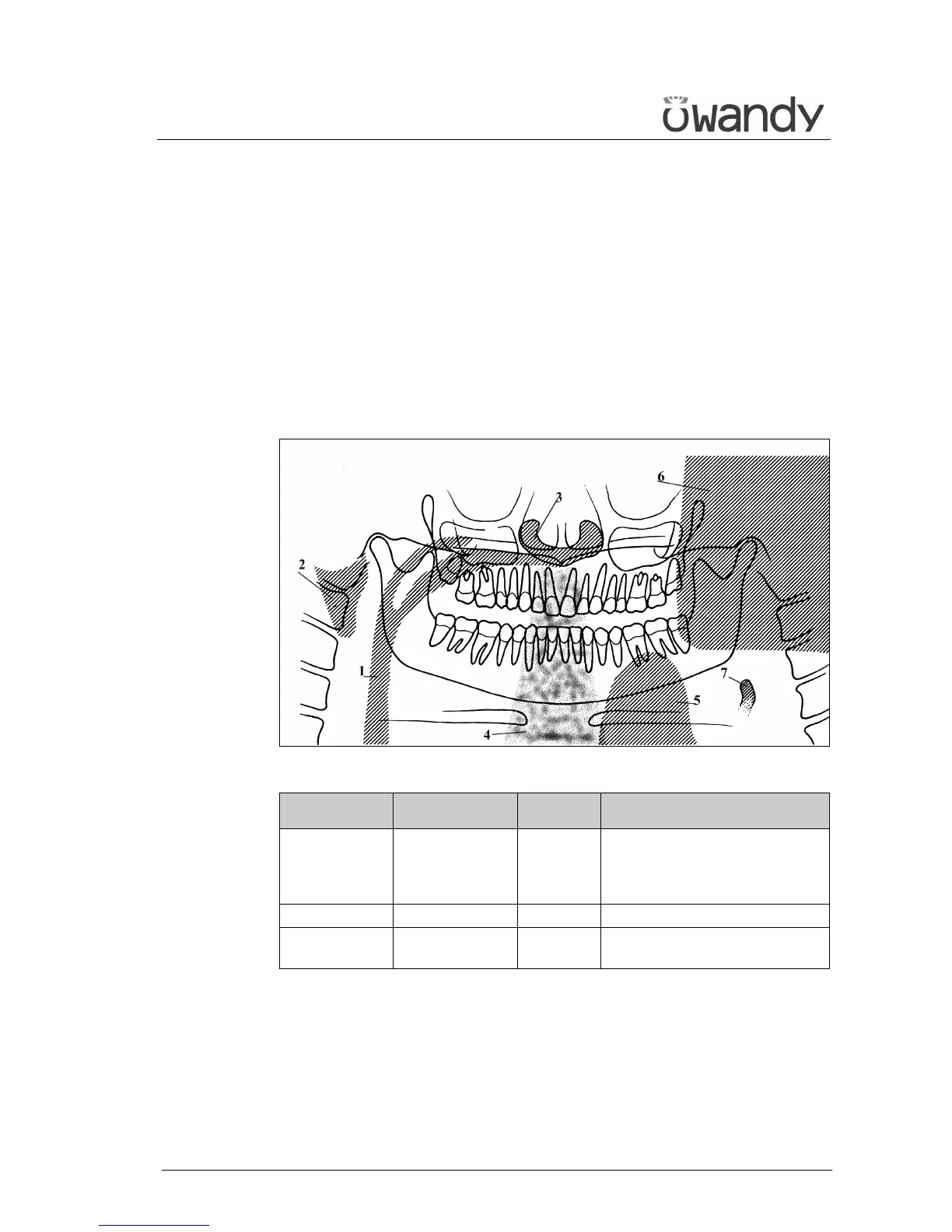
The next figure shows these cases; please consider that all structures
have a bilateral duplicate.
Figure 28
Soft tissue Description Artefacts Description
2 Ear soft tissue 1 Space between tongue and
palate. All the structures of
the oropharynx cavity can be
shown
3 Nose soft tissue 4 Spinal column
7 Epiglottis 5 Image of the patient's leaded
protective apron (light area)
The part identified with "6" in Figure 28 represents the image of the
controlateral mandible (the other side of the mandible). That
therefore results as a clearer area overlapped with the real image.
Very often the resulting darker area in the bottom corner is noticed
and is considered as an artefact of the radiological image.



 To Next Page