50
DATA LOGGING
Data logging is a function that allows the user to record the functional status of the combiner over time.
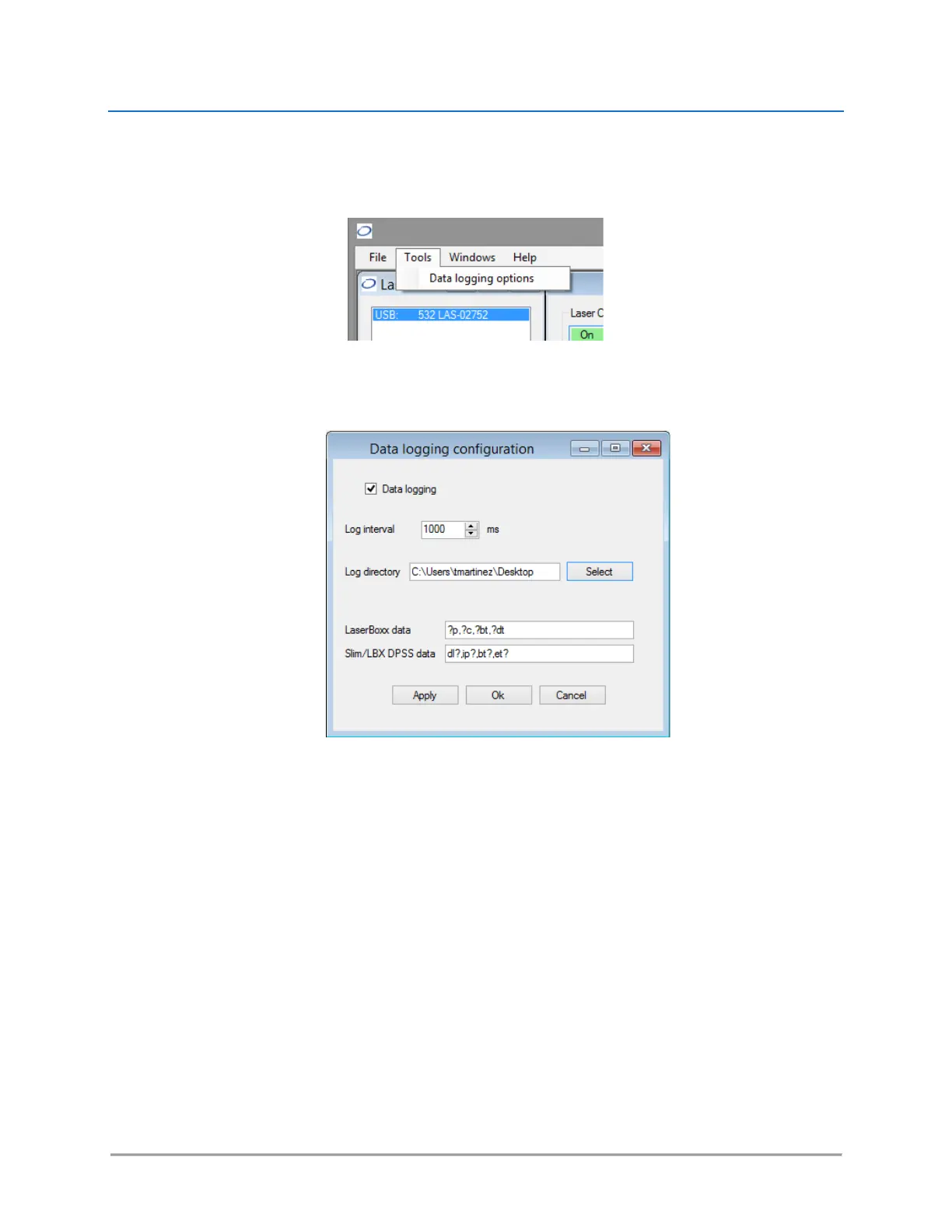
This function first needs to be configured: click on the “Tools” menu and select “Data logging options.”
This will open a separate configuration window:
From top to bottom, here are the elements present inside this window:
- Tick the box called “Data logging” to activate (or deactivate) data logging,
- The “log interval” determines how often the combiner will be polled for data. The default value is
“1000 ms”.
- The “log directory” is where the record file will be created and data will be saved. Click on the
“Select” button to change this directory.
NOTE: Make sure that this location is a directory for which you have the appropriate rights (file
creation and write access). Failing to do so will result in an error when the record is launched.
- The two following boxes contain the set of queries the laser sources will be polled for. Edit the box
named “LaserBoxx data” by listing the queries you need to record on your LBX units. Edit the box
named “DPSS data” by listing the queries you need to record on your LCX units. In both lists, the
separator is a comma “,”.
- Click on the “Ok” button once you are done.



 To Next Page