RT-3100 5-Port Single-WAN Gigabit Router User Guide
NAT (Port Forwarding)
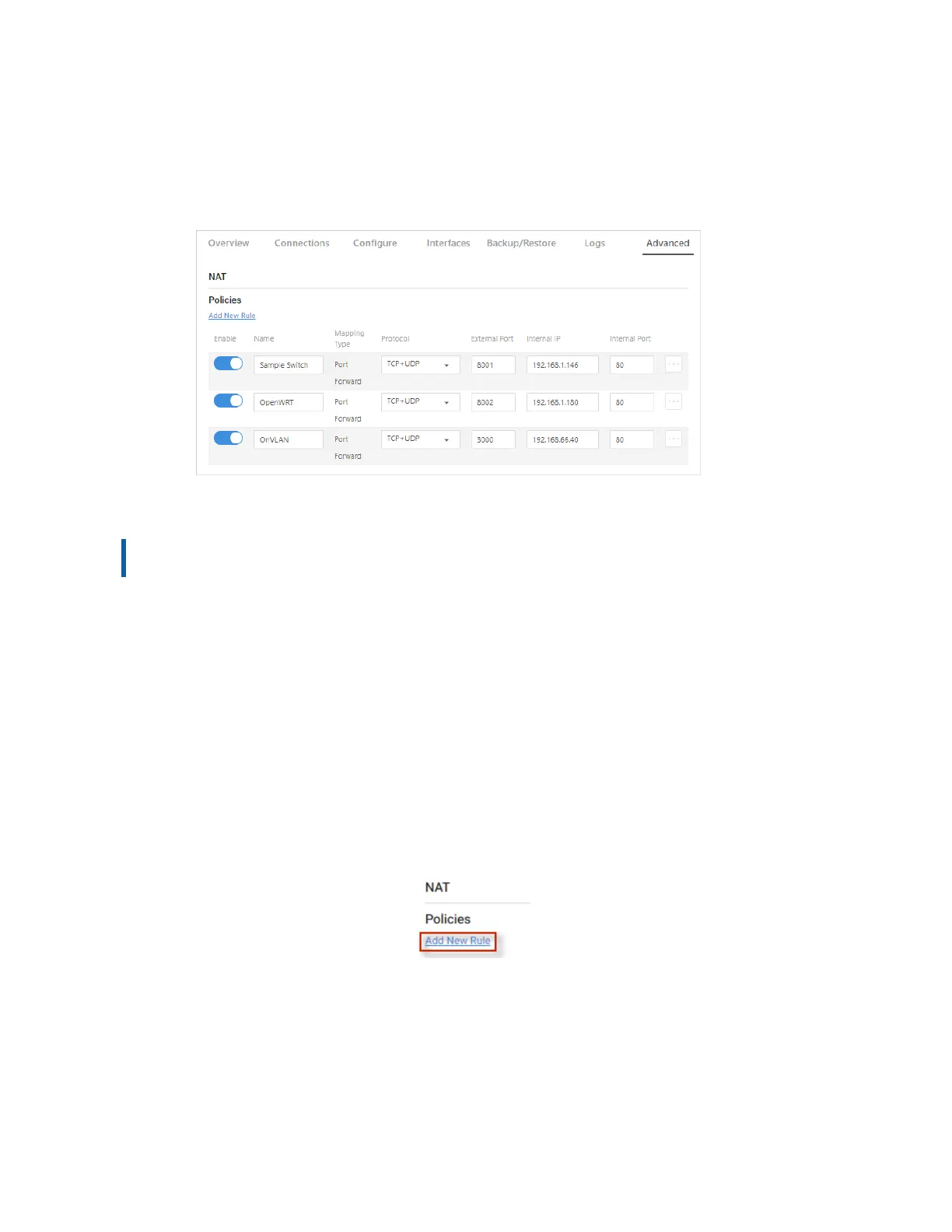
Use the NAT tile to define Network Address Translation rules for incoming traffic.
Network Address Translation allows an external port to go through the firewall to connect to
an internal IP address (for example, a public-facing webserver).
NAT is also referred to as Port Forwarding, 1:1NAT, Virtual Server, or Port Mapping.
Important! Use with caution, as this could expose the device to tampering if proper
security measures have not been taken).
Two types of NAT can be managed on the NAT tile.
l
Port Forwarding allows services inside the network to be available from the Internet. For
example, if you have an IP camera on your network, port forwarding would allow you to
remotely view the camera.
l
1:1 NAT is similar to NAT (port forwarding) in that it allows you to forward ports to any
specific device on the network. This feature is useful in situations where a block of public
IP addresses is available from a service provider and the user wants to assign a specific
public IP to a specific device on the network. This will make any traffic originating from the
device pass to the internet using the public IP specified for that device.
To configure a new NAT policy:
1. Go to the Advanced tab > NAT. Under Policies, click Add New Rule.
2. Complete the New Rule dialog (see table below) and click Continue.
50



 To Next Page