RT-3100 5-Port Single-WAN Gigabit Router User Guide
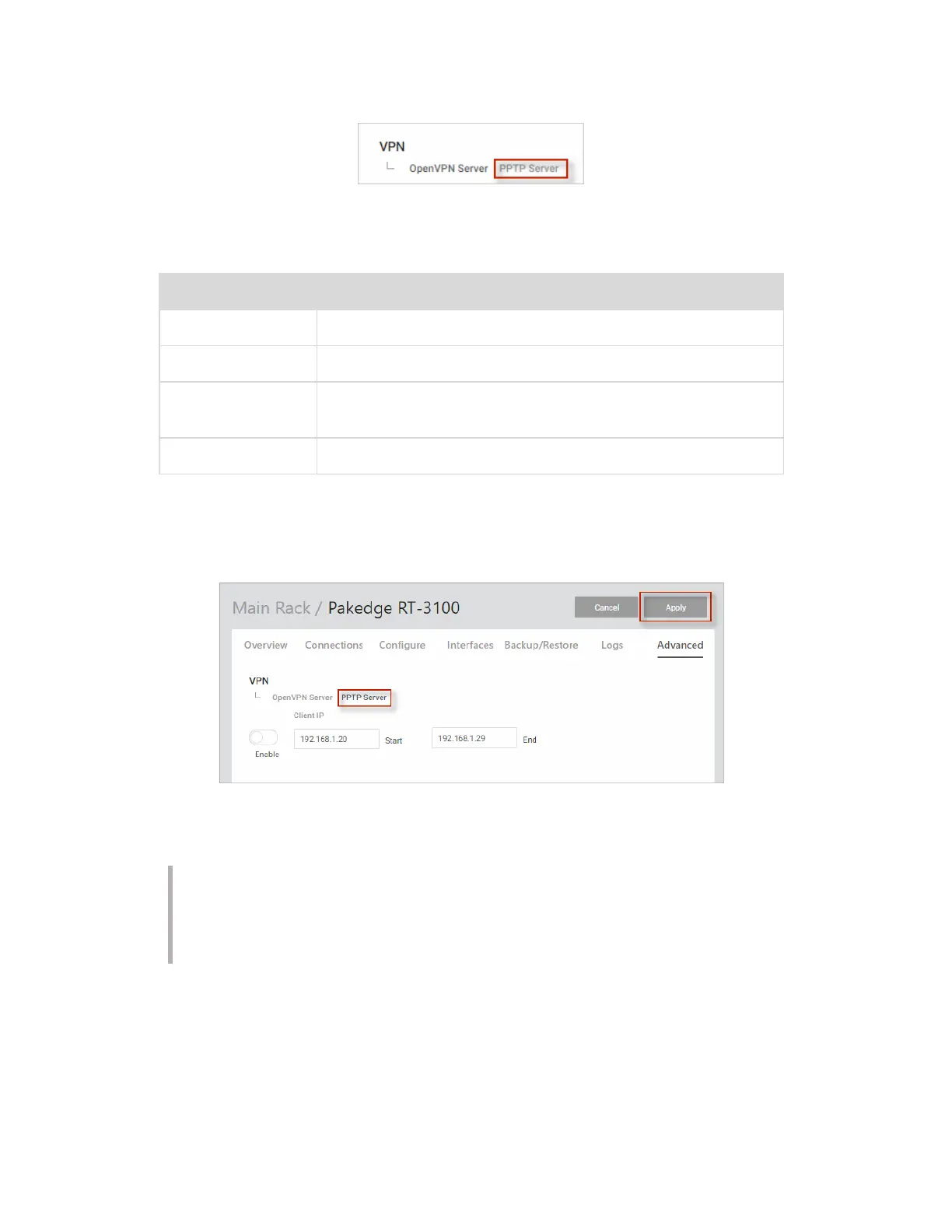
3. Click Enable.
4.
Complete the fields (see below).
Field Explanation
Enable/disable
Enable or Disable the PPTP server.
Client IP
Enter IP address for PPTP Server.
Start
Enter start address for PPTP VPN IP addresses to be
assigned.
End
Enter end address for PPTP VPN IP addresses to be assigned.
5. You can also add a second user to the VPN by clicking Add New.
6.
Enter the username and password.
7. When you are done, click Apply at the top of the page to finalize the settings.
When you connect to the VPN, you will have full access to all of your devices on the
network.
Note: When you connect to the VPN you will receive an IP address from the same IP
scheme as your LAN zone. For example, if your LAN zone is setup for 192.168.1.X,
you will receive an IP address from the IP range of 192.168.1.20 thru 192.168.1.30. If
your network LAN zone is setup as 192.168.10.X you will receive an IP address from
the IP range of 192.168.10.20 through 192.168.10.30.
78



 To Next Page