SGM700 Digitizer
Configuration Menu -Fun-
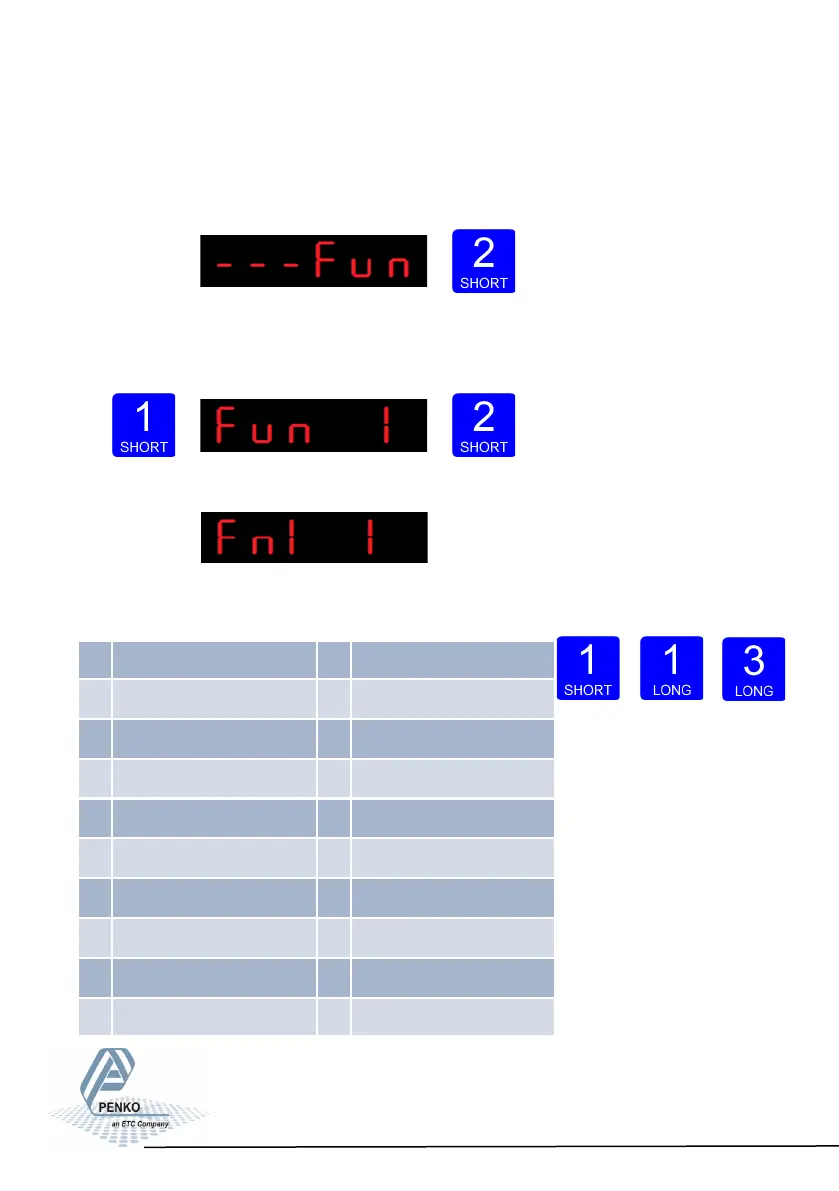
6.1 - - - Fun setpoint function settings (not for SGM710)
Configure the weiger mode the outputs has to switch on press key 2 <2 sec to en-
ter the setpoint function settings menu.
Select the output you want to configure pressing key 1 <2 sec. Fun 1= output 1,
Fun 2= output 2, Fun 3= output 3 and Fun 4= output 4. Confirm the selected output
by pressing key 2 <2 sec.
The following screen is visible:
Scroll thru the weigher function options pressing key 1
and select which weigher mode is needed by pressing key 3 >2sec. (options are: 1
-19)
Up Down Confirm
For
further detais on the weigher functions check appendix I
33
1 Weigher 10 Weigher x 10
2 Fast gross 11 Fast gross x 10
3 Fast net 12 Fast Net x 10
4 Display Gross 13 Display Gross x 10
5 Display Net 14 Display Net x 10
6 Tare 15 Tare x 10
7 Peak 16 Peak x 10
8 Valley 17 Valley x 10
9 Hold 18 Hold x 10
19 Signal



 To Next Page