AXC F X152
76 / 112
PHOENIX CONTACT 107708_en_08
8.12 PROFINET system variables
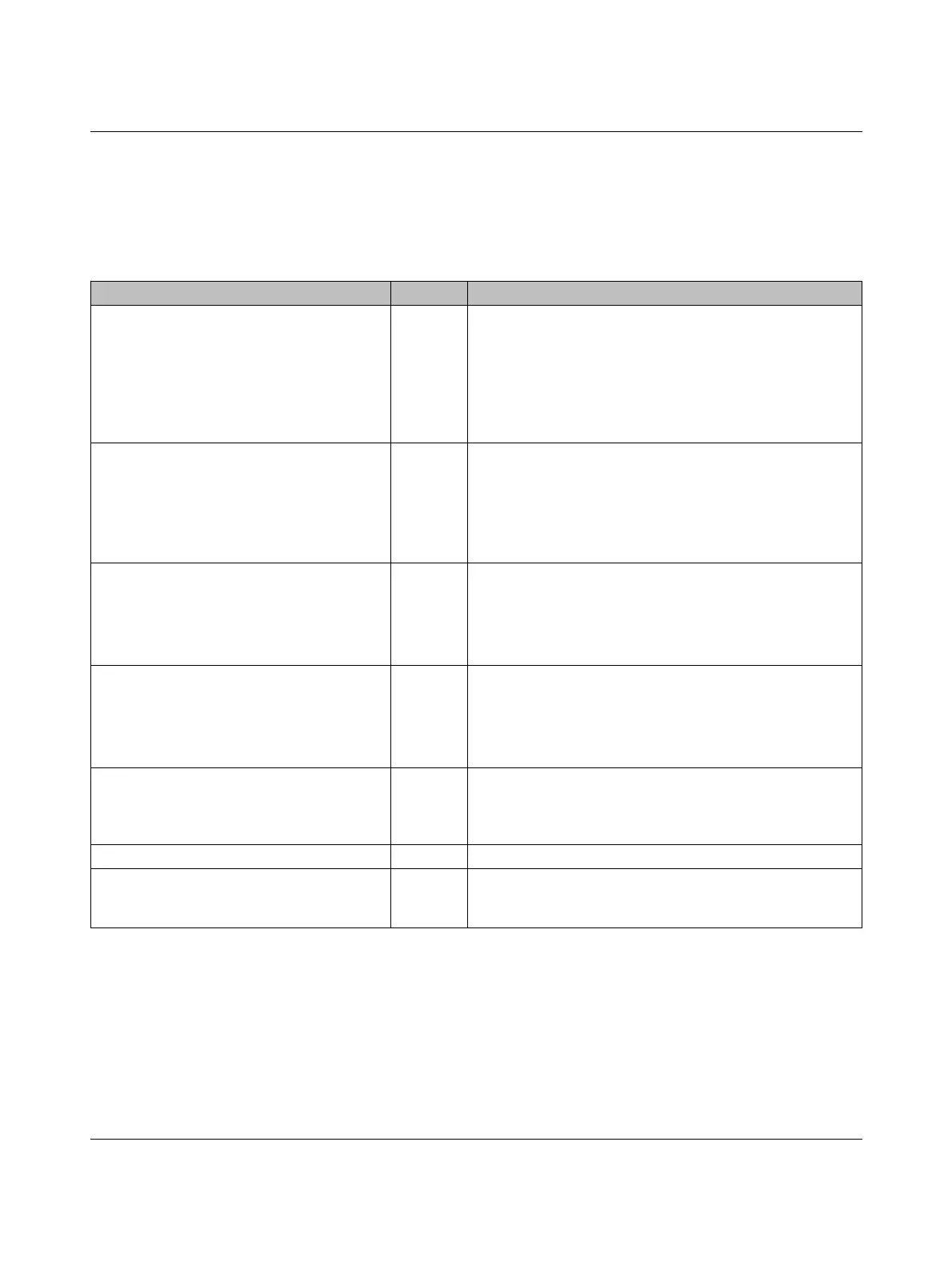
Table 8-11 lists the PROFINET system variables of the integrated PROFINET controller
functionality.
Table 8-11 PROFINET system variables (PROFINET controller functionality)
System variable Typ e Description
PNIO_SYSTEM_BF BOOL No connection to a configured PROFINET device
An error has occurred in the PROFINET network, i.e., a con-
nection could not be established to at least one configured
PROFINET device. This value is not set if the “Control BF” pa-
rameter was set to FALSE for a PROFINET device. The
PROFINET device has therefore been excluded from con-
nection monitoring.
PNIO_SYSTEM_SF BOOL Diagnostic alarm on a configured PROFINET device
At least one PROFINET device is indicating a system error
(diagnostic alarm or maintenance alarm). The error priority
can be determined from the PNIO_DIAG_AVAILABLE,
PNIO_MAINTENANCE_DEMANDED, and PNIO_MAINTE-
NANCE_REQUIRED variables.
PNIO_MAINTENANCE_DEMANDED BOOL Maintenance demand
At least one PROFINET device is indicating the “maintenance
demand” alarm (high-priority maintenance alarm) with an ac-
tive connection. The PROFINET device can be identified
using the RALRM diagnostic block.
PNIO_MAINTENANCE_REQUIRED BOOL Maintenance required
At least one PROFINET device is indicating the “maintenance
requirement” alarm (low-priority maintenance alarm) with an
active connection. The PROFINET device can be identified
using the RALRM diagnostic block.
PNIO_FORCE_FAILSAFE BOOL All PROFINET devices are prompted to set their configured
substitute values.
If required, the system variable can be written/set from the
program.
PNIO_CONFIG_STATUS WORD Configuration status of the PROFINET controller
PNIO_CONFIG_STATUS_READY BOOL This variable is set if the PROFINET controller has been ini-
tialized correctly. No desired configuration has been loaded
by PLCnext Engineer yet.


 To Next Page
 Loading...