Setting the Time
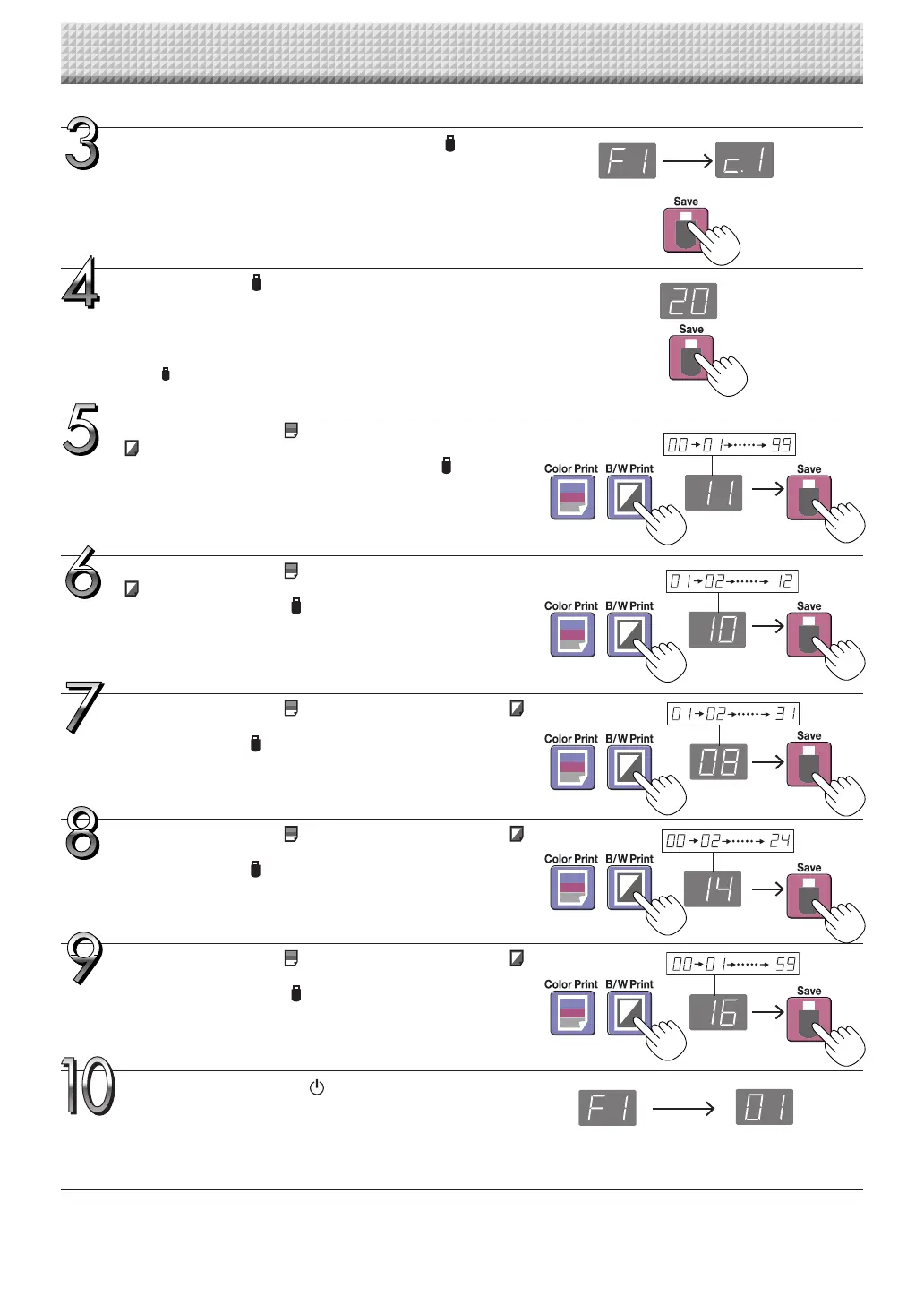
Use the Color Print (Increase) and B/W Print
(Decrease)buttonstoselect“14”(thehours),then
press the Save button to enter.
Thedisplayswitchesto“c6”(settingofminutes).
Use the Color Print (Increase) and B/W Print
(Decrease)buttonstoselect“08”(theday),then
press the Save button to enter.
Thedisplayswitchesto“c5”(settingofhours).
Use the Color Print (Increase) and B/W Print
(Decrease)buttonstoselect“16”(theminutes),
then press the Save button to enter.
Thedisplayswitchesto“F1”(functionsetting).
Press the ON/Standby button to return to the
normal mode.
• Thecaptureboardalso returns to the normal mode if you just
wait10seconds.
This completes the time setting.
Use the Color Print (Increase) and B/W Print
(Decrease)buttonstoselect“10”(themonth),
then press the Save button to enter.
Thedisplayswitchesto“c4”(settingofday).
Use the Color Print (Increase) and B/W Print
(Decrease) buttons to select “11” (the last 2
digitsoftheyear),thenpresstheSave button
to enter.
Thedisplayswitchesto“c3”(settingofmonth).
Press the Save button to move to the last dig-
its of the year
Thedisplayswitchesto“c2”(last2digitsofyear).
Notice:
Thefirst two digits of the year(“20”) are fixed. Simply pressthe
Save button to switch to the last 2 digits of the year setting
position.
While“F1”isdisplayed,presstheSave button
to enter.
Thedisplayswitchesto“c1”(first2digitsofyear).
Ifnobuttonsareoperatedfor10secondswhileinthetimesetting
mode,themodereturnstothe“CBSetup”mode.
“CBSetup”mode Normalmode
https://www.supplychimp.com/



 To Next Page