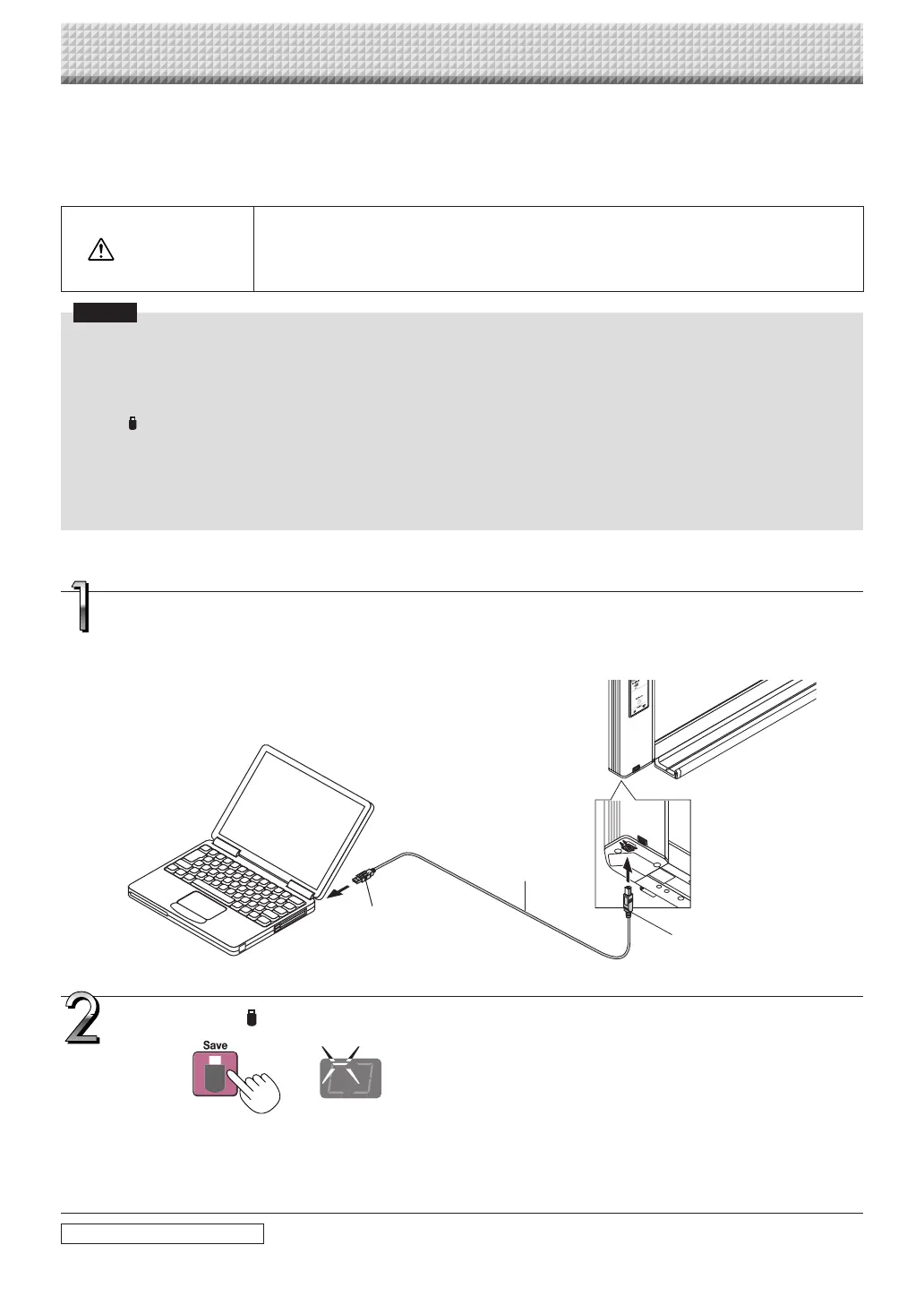
When the captureboard and a computer are connected by USB cable, the captureboard is recognized as an
external memory device (removable device). Below is the procedure for copying the “CBImage” file from this
device onto the computer.
Images can be stored in JPEG (.jpg), PNG (.png) or PDF (.pdf) format, selectable in the captureboard settings
(“CB Setup”). (See pages E-31, E-38.) The factory default is “JPEG”.
CAUTION
Withthisfunction,iftheoperationfordisconnectingtheUSBconnectionbetweenthecapture-
boardandcomputerisperformedorthecaptureboard’spoweristurnedoff,theimagedatain
thecaptureboard’scomputerstoragememoryisdeleted.Besuretosaveimportantimagedata
onthecomputer,etc.
Notice
• Onlyonescreen’sworthofdatacanbestoredinthecaptureboard’smemoryforcomputerstorage.
Whenthecaptureboard’ssaveoperationisperformedsuccessively,previousdataisoverwritten.
• Donotstorecomputerdatainthecaptureboard’smemoryforcomputerstorage.
• Thememoryforcomputerstoragecannotbeformattedfromacomputer.
• DonotdisconnecttheUSBcableoraccessthecaptureboardwhiledataisbeingsavedafterpressingthecaptureboard’s
Save button.Doingsowillcausethecomputer’soperationtobecomeunstable.
• Do not press operation buttons on the captureboard while thecaptureboard’s memory forcomputer storage isbeing
accessedfromthecomputer.Doingsowillresultinincreasedtimeforresponsebetweenthecomputerandcaptureboard,
andoperationsmaynotbepossible.
• WhenconnectedtoaMacintoshcomputer,thewarningmessage“Thediskwasnotejectedproperly.”isdisplayed,butthe
datacanbestorednormallyinthecomputer’smemory.
Using the captureboard connected to a computer
• Onesheet’sworth of the screenis scanned(scrolled)and storingin thememory for computerstorage startsonce
scrollingstops.
TheLEDsonthedisplaywindowflashinacircularmotionduringsavinginthememoryforcomputerstorage.
LEDsflashincircularmotionduringsavinginmemoryforcomputerstor-
age
Displaywindow
Press the Save button to store.
continued on next page
Turn on the captureboard’s power and connect the PC dedicated USB port (type B) and
computer using the USB cable.
• Usually,withWindowsXP/WindowsVista/Windows7,thestandarddriverisinstalledautomaticallyandthecapture-
boardisidentifiedbythecomputerasaremovabledevice.
ToUSBportoncomputer
(typeA)
USBcableincluded
withcaptureboard
Tocaptureboard’scomputer
USBport(typeB)
https://www.supplychimp.com/



 To Next Page