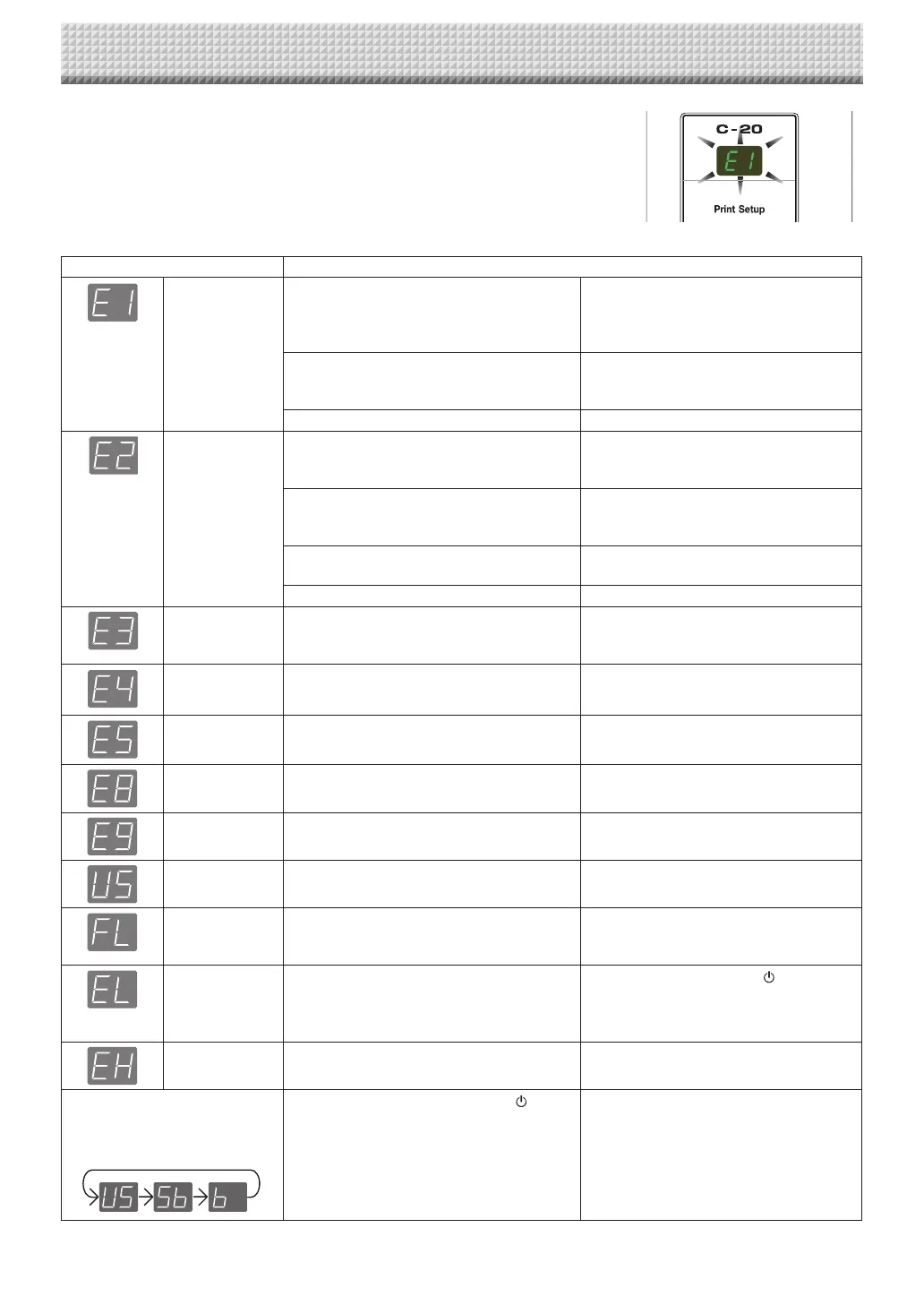
Captureboard (main unit) related errors
ErrorDisplayNumber ProblemandSolution
Printernotcon-
nected
Noprintingpaper
Printerproblem
• Istheprintercableconnected?
• Ispowerbeingsuppliedtotheprinter?
• WhentheprinterusesanACpoweradapt-
er,isthecabledisconnectedsomewhere?
• Connect the printer properly and switch
ontheprinterpower.
• Haspaperbeensetintheprinter? • Turnthepoweroftheprinteroffandthen
onagain,andloadtheprinterwithA4or
lettersizepaper.
• Istheprintererrorindicatorflashing(orlit)? • Readtheprinterinstructionmanual.
USBMemorynot
recognized
• IstheUSBmemoryunformatted. • This unit supports the FAT and FAT 32
formats. Perform the formatting with the
personalcomputer.
• IsaUSB memory thatisnot supportedby
thecaptureboardbeingused?
• ThefileformatsforUSBmemorydevices
that can be used on this captureboard
areFATandFAT32.
• IstheUSBmemorydevicepluggedinfully? • Please check the operation with a per-
sonalcomputer.
• IstheUSBmemorydamaged? —
Memorystorage
problem
• Anerroroccurredduringmemorystorage. • Pleaseperformmemorystorageagain.
• DonotinsertorremovetheUSBmemory
duringprocessing.
Readingproblem • There is a lighting fault of the reading light
source,orareadsignalerror.
• Unplug the power plug from the power
outletandthenplugitinagain.
Systemerror • Thereisamemoryorinternalfault. • Unplug the power plug from the power
outletandthenplugitinagain.
Securityprotec-
tion
• The operation is set to “Disable” in the
securitysettings.
• Changethesettingofthedesireditemto
“Enable”.(SeepageE-42.)
Colorprinting
prohibited
• Coloringprintingissetto“Disable”. • Change the color printing setting to
“Enable”.(SeepagesE-31,E-38.)
USBmemorynot
connected
• USBmemorydeviceisnotpluggedintothe
mainunit.
• Plug the USB memory device into the
USBport.
Memoryisfull • Thereisnoavailablespace. • Please delete unnecessary data using
a personal computer (See Page E-19,
E-27).
Anunsupported
printeriscon-
nected
• Aprinterthat isnot supported bythe cap-
tureboardhasbeenconnected.
• Press the ON/Standby button and
switch off the power. When a record is
required,switch onthe power andsave
toUSBmemory.
Timesettingerror • An error has occurred when setting the
time.
• Start over and set the proper date and
time.
When the “USb” letter display is
flowing...Warning that disconnec-
tionofUSBmemoryhasbeenfor-
gotten
• Did you press the ON/Standby button
whiletheUSBmemorydevicewasplugged
intothemainunit?
• A USB memory device is plugged into
the main unit. When the USB memory
device is disconnected, the power will
beswitchedoffandtheunitwillenterthe
standbymode.
Iftheproblempersists,pleasecontactyournearbyPLUSCorporationsalesoffice,dealer,orstore.
Meaning of Error Messages
If any of the following flashing indications appear in the display window of the
control panel, please check the matters described below.
Error messages flash for 5 seconds, then stop flashing, remaining lit.
https://www.supplychimp.com/



 To Next Page