Simple Network Settings (via USB)
Uponpurchase(bydefault),thecaptureboard’sIPaddressandsubnetmaskarenotyetset.Whenfirstconnecting
thecaptureboardtoanetworktouseit,usethesimplenetworksettingstosetthecaptureboard’sIPaddresson
thenetworkfollowingtheprocedurebelow.
Notice
• Whenmakingnetworksettings,followingtheinstructionsofthenetworkadministrator.
• Itisnotpossibletoformatthecomputerstoragememoryfromthecomputer.
• Donotpressoperationbuttonsonthecaptureboardwhilethecomputerstoragememoryisbeingaccessedfromthecom-
puter.Doingsowillresultinincreasedtimeforresponsebetweenthecomputerandcaptureboard,andoperationsmaynot
bepossible.
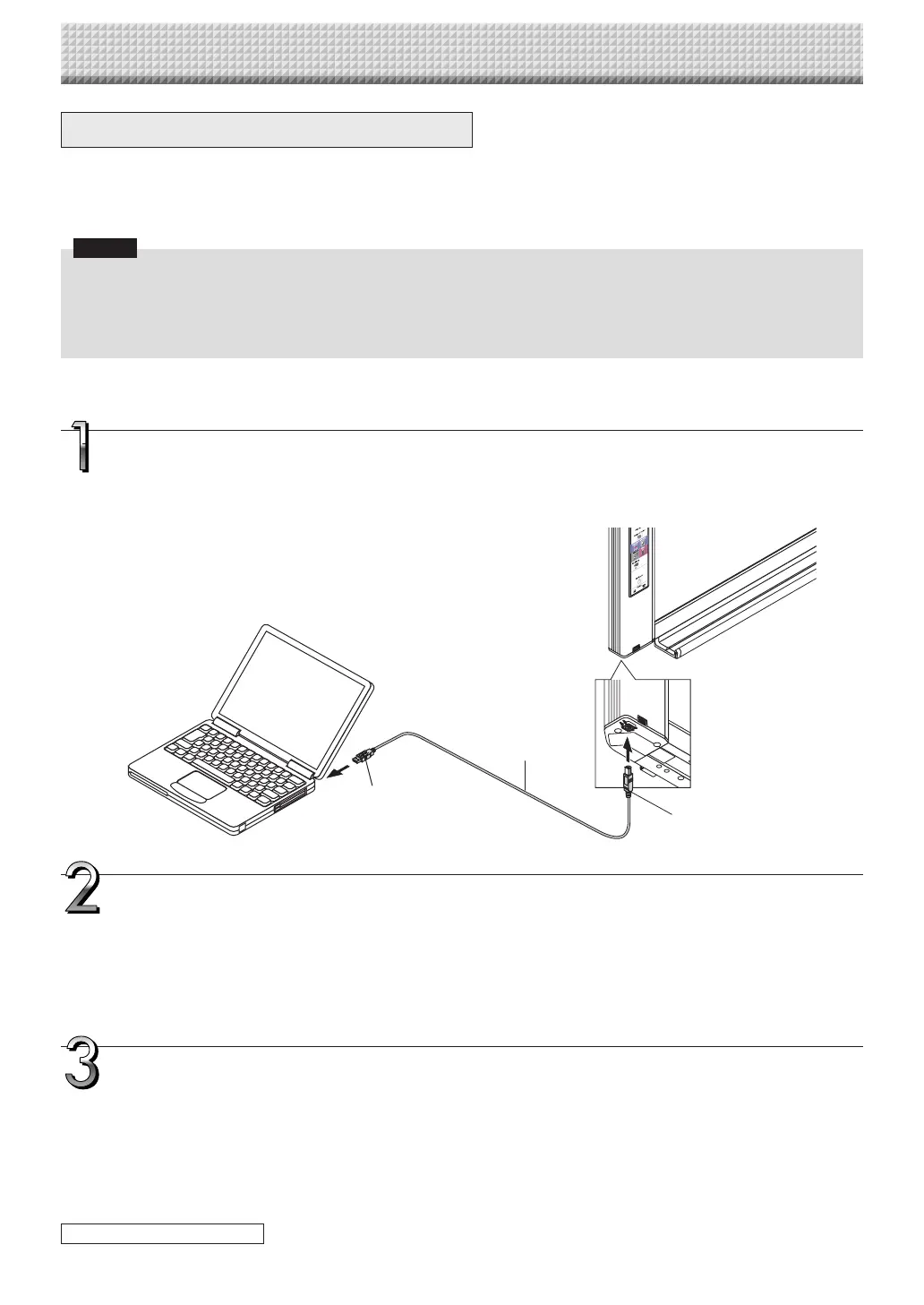
Turn on the captureboard’s power and connect the captureboard’s computer USB port for
(type B) to the computer using a USB cable.
• Normally, on Windows XP/WindowsVista/Windows7, the standarddriver is installed automatically and the capture-
boardisrecognizedbythecomputerasaremovabledevice.
Open“MyComputer”,andinthisopenthecaptureboard(removabledevice).
1 Double-clickthe“MyComputer”(or“Computer”)icontoopen.
2 Double-clickthecaptureboard(adevicedisplayedasaremovabledisk)toopenthecaptureboard’scomputerstorage
memory.
• Tocheckthat thecaptureboardisoperating asadevice,right-click “MyComputer”(or “Computer”)todisplaythe
menu,thencheckthat“PLUSCaptureboardUSBDevice”isdisplayedasthediskdrivenameat“Management”→
“DeviceManager”forWindows7(“Properties”→“DeviceManager”forWindowsXP).
Useaprogramonthecomputer(Notepad,etc.)toopenthe“setting.ini”fileinthe“setup”
folder.
1 Double-clickthe“setup”foldertoopenit.
2 Openthe “setting.ini”file (textformat) locatedin thisfolder using Notepador anotherprogramon thecomputer and
directlyoverwritethecontentsofthesettingsfile.
• Theonlycharactersthatcanbeinputarenumbersandperiods.
Donotinsertanyspaces.Ifso,thefilewillbeidentifiedascorruptwhenthecaptureboardisstartedandthesettings
willberesettothedefaults.
CB Setup and Network Setting Procedure
ToUSBportoncomputer
(typeA)
USBcableincluded
withcaptureboard
Tocaptureboard’scomputer
USBport(typeB)
continued on next page
https://www.supplychimp.com/



 To Next Page