CB Setup and Network Setting Procedure
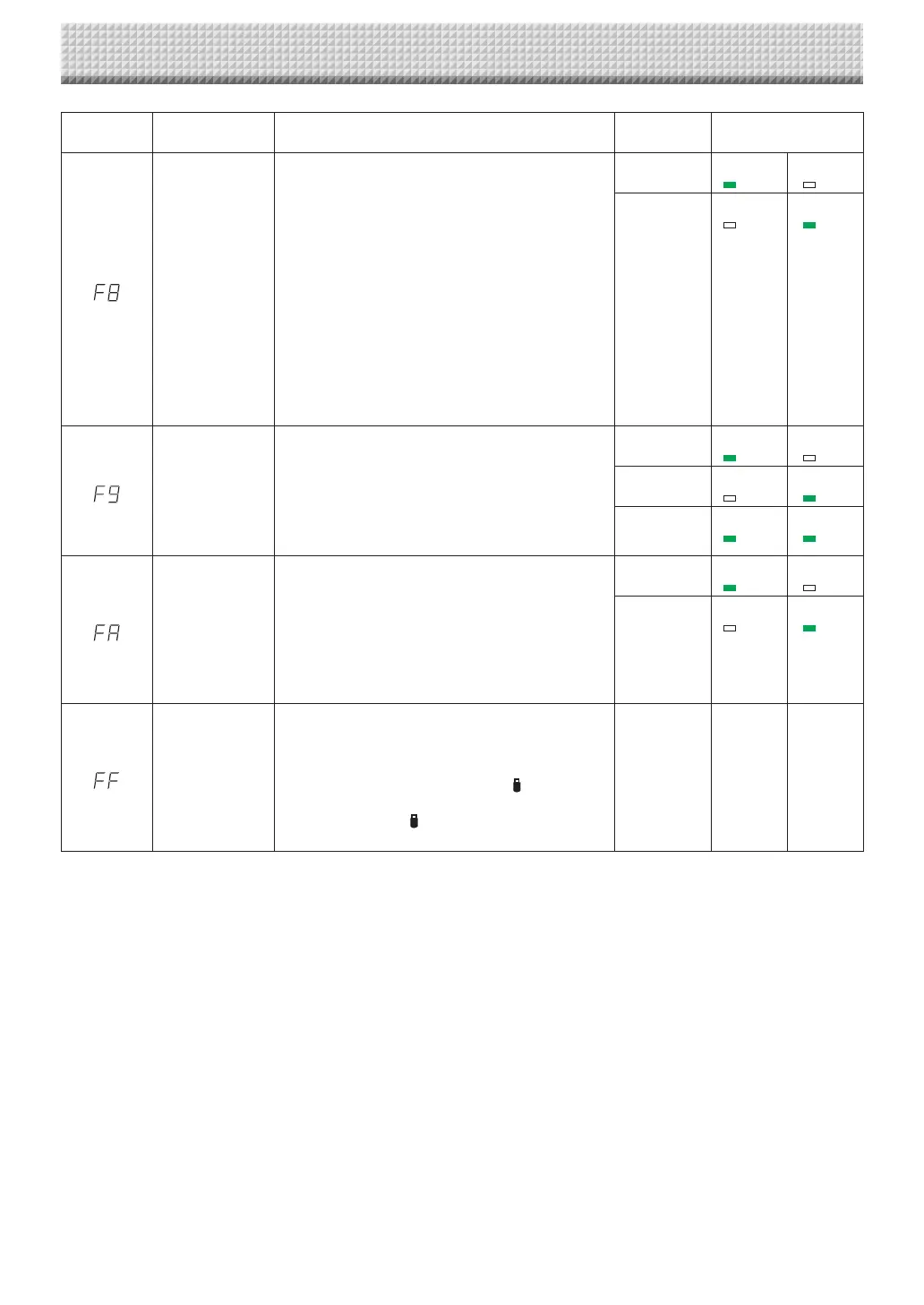
Function
Number
SettingItem Description Setting StatusIndicators
EraseReminder
Settingofwhetherornottonotifytheuserthatchar-
acters or diagrams drawn on the back side of the
captureboard’s sheetsurface have notbeen erased.
Thisiseffectiveforconfidentialmeetings,etc.
Disable:TheEraseReminderfunctiondoesnotwork.
(Settinguponfactoryshipment)
Enable:When the ON/Standbybuttonis pressed to
turnthepoweroff,thedisplaywindowonthe
captureboard’s operation panel flashes and
thecaptureboardautomaticallymovestothe
non-erased surface, after which the power
turnsoff.
• TheEraseReminderfunction maynotworkprop-
erly due to dirt on the sheet adhesive or marker
traces.
Disable* USB
(Lit)
Printer
(Off)
Enable USB
(Off)
Printer
(Lit)
TimeDayStamp
Format
Selectionoftheformatinwhichthedateandtimeare
displayed.
Examplesofdisplays:
YYYY/M/D 2011/1/2301:23
DD-MMM-YYYY 23-Jan-201101:23
MMM-DD-YYYY Jan-23-201101:23
YYYY/M/D* USB
(Lit)
Printer
(Off)
DD-MMM-
YYYY
USB
(Off)
Printer
(Lit)
MMM-DD-
YYYY
USB
(Lit)
Printer
(Lit)
Printfromcap-
tureboardprinter
Printingispossiblefromtheprinterconnectedtothe
captureboardusingthecomputer.
Disable:Settingfordisabling printing from the com-
puter
Enable:Setting for enabling printing from the com-
puter
* Usethe CD-ROM included with the captureboard
toinstallthedriver.
Disable* USB
(Lit)
Printer
(Off)
Enable USB
(Off)
Printer
(Lit)
ResetDeviceSet-
tings
Thisrestoresthecaptureboarddevice settingsatF2
to F9 to their defaults (settings upon factory ship-
ment).
Thesettingsmarked“*”arethedefaults.
(1) SelectFA,thenpresstheSave button.“FA.”
isdisplayed(withthedotlit).
(2) PresstheSave buttonagain.Thesettingsare
reset.
— — —
https://www.supplychimp.com/



 To Next Page