Using USB Memory
• Thereadingoperationisperformedforaone-sheetportion(whilethesheetisscrolled)andUSBmemorystorage
starts after the scrolling completes.
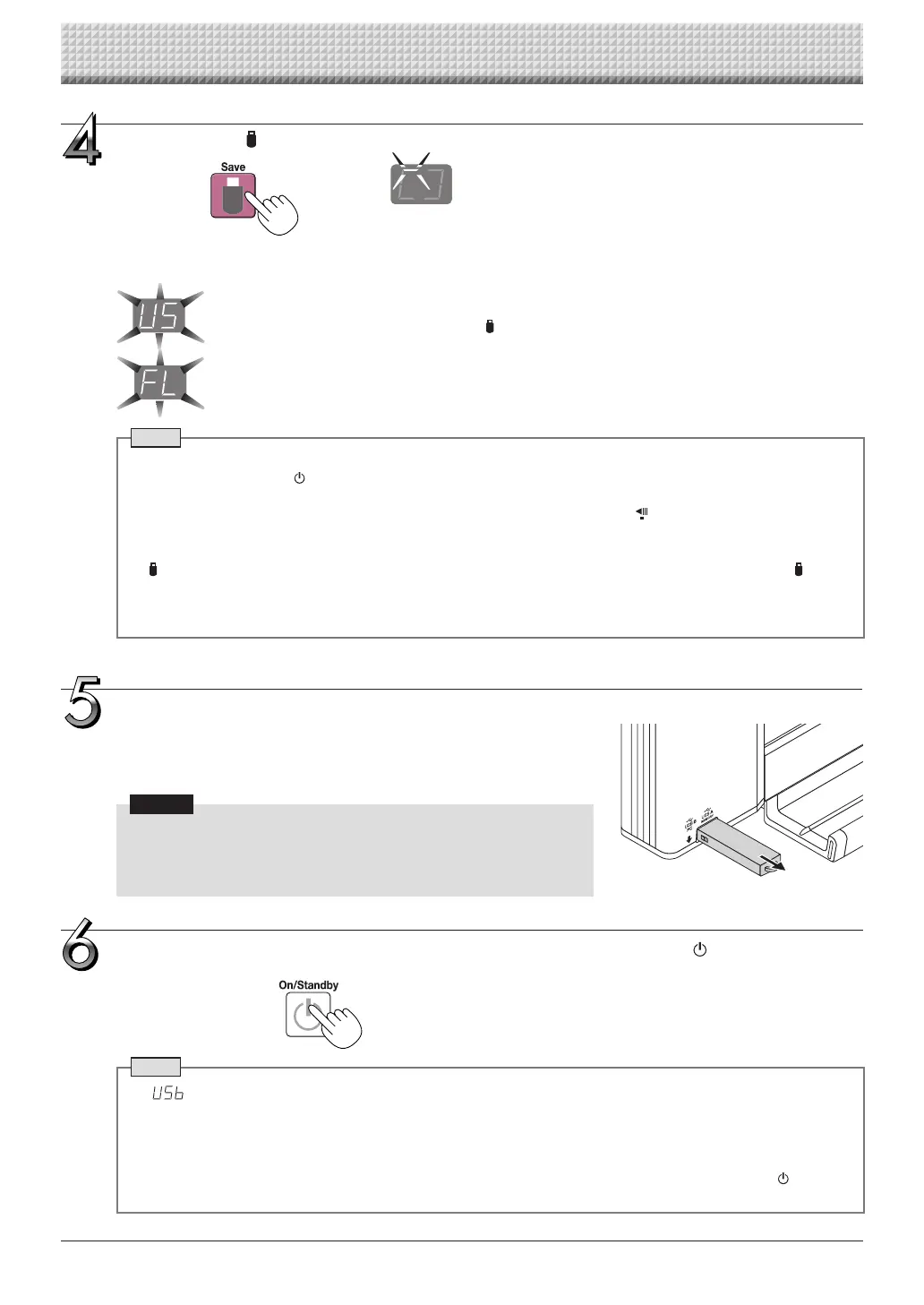
The(5second)flashing“US”displayindicatesthattheUSBmemoryhasnotbeeninserted.Pleaseinsert
theUSBmemoryandthenpresstheSave button.
A (5 second) flashing “FL” display indicates that thereis insufficient free capacity to permit storage in
USBmemory.ReplacewithaUSBmemorydevicehavingsufficientcapacity.
See“MeaningofErrorMessages”onPageE-46forothererrordisplays.
Note
• DependingontheUSBmemory,itmaytaketimeforrecognitionoritmaytaketimeforsaving.
• WhentheON/Standby buttonispressedduringthereadingoperation,thereadingoperationwillbediscontin-
uedandthepartiallyreadimagedatawillbestoredintheUSBmemory.
Tomovethesheetsurface,waituntilscrollingstops,thenpresstheScroll/Stop button.
• Thedateandtimeofthesavedfilewillreflectthecaptureboardtimesetting.See“CBSetup”onPageE-31.
• WhenacertainamountoffreecapacityisnotavailableintheUSBmemory,“FL”willbedisplayedwhentheSave
buttonispressed.Deletedata,setthesheetsurfacebacktotheoriginalstatus,thenpresstheSave button
again.
• WhenthecaptureboardandacomputerareconnectedbyUSBcable,thedataisstoredinthemainunit’sinternal
memory.
Flashingindicator“rotates”sequentiallyduringUSBmemory
storageoperation.
Displaywindow
Press the Save button to store.
Removing the USB memory
Checkthattheflashingrotationofthedisplaywindowhaschangedtosteady
lightingandthattheUSBmemoryaccessindicatorisnotflashing,thenpullthe
USBmemorystraightout.(PleaseseeyourUSBmemorymanualfordetails.)
Notice
• DonotunplugtheUSBmemorydeviceduringtheUSBmemorystor-
age operation (i.e., during the rotating, flashing display in the display
window),or while the accessindicator of the USB memory device is
flashingbecausedatawillbedestroyed.
Whenthecaptureboardisnotgoingtobeused,presstheON/Standby button and switch
off the power (standby mode).
Note
• “ ”lettersappearingatone-secondintervalsina movingdisplayinthedisplaywindowindicatethataUSB
memorydeviceismounted.UnpluggingtheUSBmemorydevicewillswitchoffthepower.(Afunctionthatserves
asaremindertounplugtheUSBmemorydevice)
• WhenthecaptureboardandacomputerareconnectedbyUSBcable,theautopowerofffunction(whichturnsthe
poweroffautomatically)iscanceled.
• ScannedimagefilesstoredinthememoryforcomputerstoragearedeletedwhentheON/Standby buttonis
turnedoff.Filesinthememoryfornetworkstoragearenotdeleted.
https://www.supplychimp.com/



 To Next Page