PMDG 737 0.00.115
INTRODUCTION
For Simulator Use Only DO NOT DUPLICATE NOVEMBER 2022
In order to reduce this inconvenience as much as possible, we have
made it possible for you to retract the yoke toward the floor of the airplane
in order to “free up” a clear line-of-sight to the FMS keyboard from the
normal head position.
Alternate TO/GA Click Spot:
When flying the real airplane, the TO/GA buttons are placed quite
comfortable under the tips of your fingers at the top of the throttle
columns.
Unfortunately, we don’t all have fully operable replicas of the 737 throttles
to use with our MSFS setups, so we have added a few features to help
you manage the TO/GA process as if it were right under your fingertips.
You can click on the actual TO/GA button if you like, but this is arguably
not very convenient, especially when initiating a go-around at low altitude.
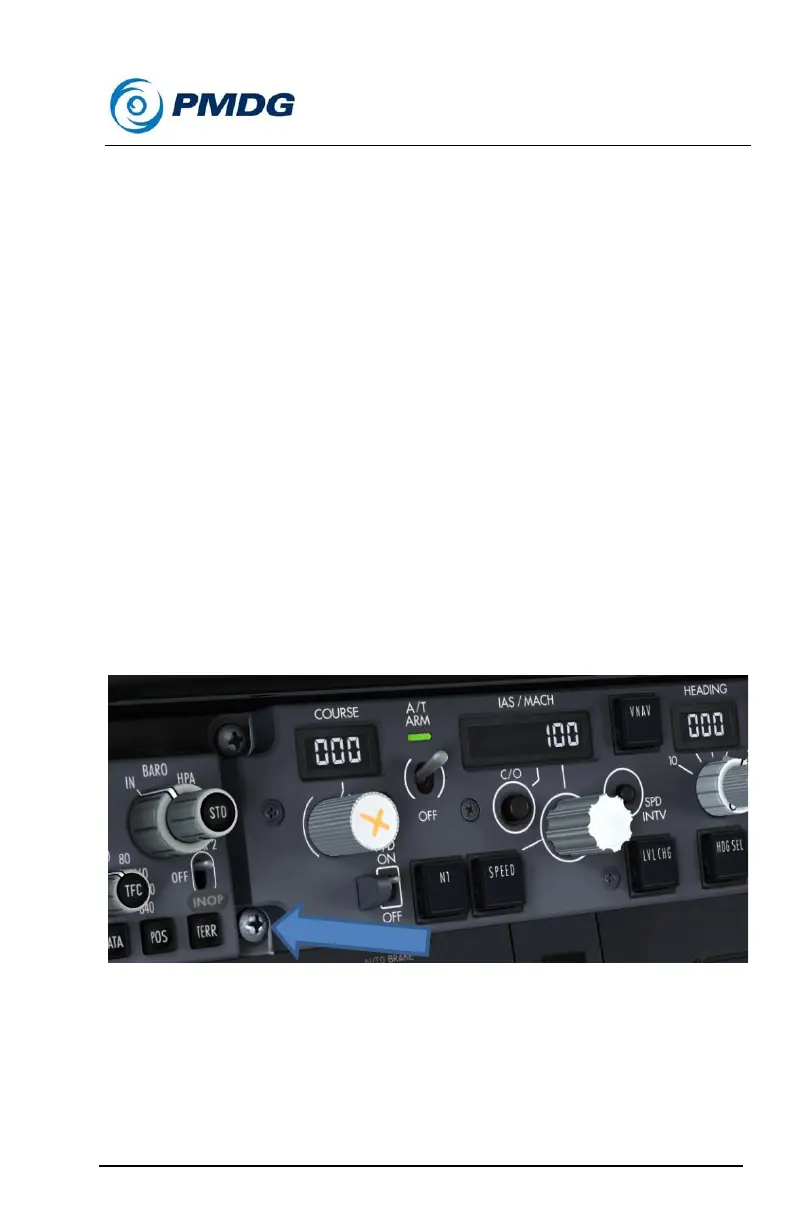
This is why we have placed a “TO/GA Click Spot” on the screw in the
uninhabited lower left corner of the MCP for your ease of use.
To activate TO/GA mode, click on the screw as shown in the image
below:
PFD/ND/EICAS/CDU Pop-ups:
If you want or need to pop up any of the display screens in the 737, you
can do so by pressing RIGHT ALT on your keyboard, and then clicking on
the display you want to pop up.



 To Next Page