5
Introduction
Introduction
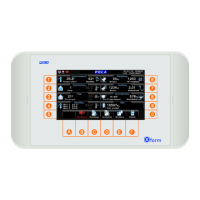
The main feature of the range is the color display screen (4.3”) with WQVGA 480x272 dots
resolution.
The user interface is easy and friendly. The easy touch screen systems gives both the typical “easy to
use” approach of a touch screen system and the strength and mechanical protection of a polycarbonate
IP65 keyboard. The IP65 protection standards (protection against dust and water jets) make it
ideal for damp and dusty environments.
At every screen the function keys display a different graphic making the program very user friendly.
Each programming step has its own help screen so the program has a “built in” instruction manual.
Each programming step comes with its help screen so the program has a “built in” instruction manual.
Setting values on the keyboard. For each value to be inputed the display looks like the one above:
Input the value by using the keys or pressing on the numeric keyboard .. .......
confirm by pressing , to escape press .
Only if
Feeding is
active.


 To Next Page
 Loading...