100
10 Monitoring Controls
10.1 Solo Controls
StudioLive™ Series III
Owner’s Manual
10.1.2 Using the Solo Bus for Monitoring
When mixing live, or when recording multiple musicians at once, it is often necessary
to quickly listen to just one instrument or group. The Solo and Monitor buses can be
used together for this purpose. It is important to note that if you wish to monitor with
speakers, rather than with headphones, it is necessary to connect the speakers to the
Monitor Outs, rather than to the Main Outputs.
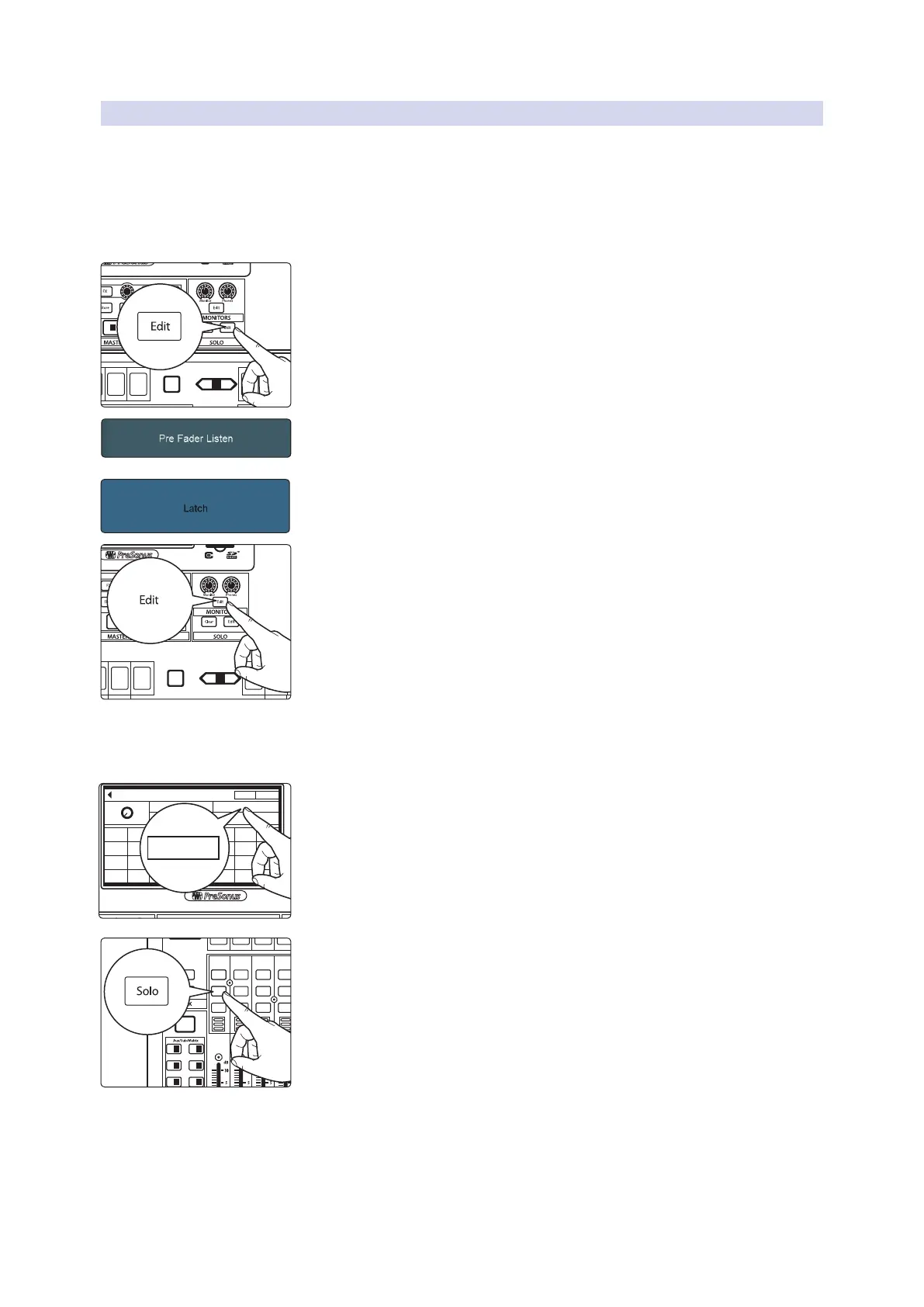
To use the Solo bus for monitoring purposes, do the following:
1. Press the Edit button in the Solo section to bring up the Solo screen.
2. Enable the Pre-Fader Listen option if you want to hear the soloed channels
pre-fader (unaffected by fader level). Disable it if you want channel levels to
be affected by fader levels.
3. Touch Latch in the Solo Mode section of the Touch Display to enable the
Latch solo mode. This lets you solo multiple channels at the same time,
which is usually desired, in this case.
4. Press the Edit button in the Monitors section to bring up the Monitor
screen.
5. Press Monitors if you want to listen on your booth or control room
speakers. Press Phones if you want to listen on headphones. This brings up a
list of available sources to route to the chosen monitoring system.
6. Touch Solo on the Touch Display to route the Solo bus to the monitor
system you’ve chosen.
7. Press Solo on the channels or buses you want to monitor. The signal being
fed to the Main outputs is unaffected.
Select
GEQ
Mute
AUX
Inputs
DCA
Groups
Mix/FX
Master
Talk
NextPrev
Mute
Select
Solo
Mute
Select
Solo
Mute
Select
Solo
Mute
Select
Solo
Mute
Select
Solo
Mute
Select
Select
GEQ
AUX
Inputs
DCA
Groups
Mix/FX
Master
Talk
NextPrev
Solo
Select
Solo
Select
Solo
Select
Solo
Select
Solo
Select
Mix 14
Mix 10
Mix 15
Mix 11
Mix 7
Delay
0.0 ms
Mix 1 Mix 5
Mix 9 Mix 13 Mix 14Mix 10
Mix 6Mix 2
Mix 15Mix 11
Mix 7Mix 3
Mix 16Mix 12
Mix 17 Mix 21 Mix 22Mix 18 Mix 23Mix 19 Mix 24Mix 20
Mix 25 Mix 29 Mix 30Mix 26 Mix 31Mix 27 Mix 32Mix 28
Mix 8Mix 4
Tape
Main Solo
Phones Monitor
Monitor Edit
Solo
Inputs
User
Main
Mix
NextPrev
Solo
Mute
Select
Solo
Mute
Select
Solo
Mute
Select
Solo
Mute
Select
1 17 18
19 20
21 22
3
5
2
4
6
23 247 8
25 269 10










 To Next Page