101
10 Monitoring Controls
10.1 Solo Controls
StudioLive™ Series III
Owner’s Manual
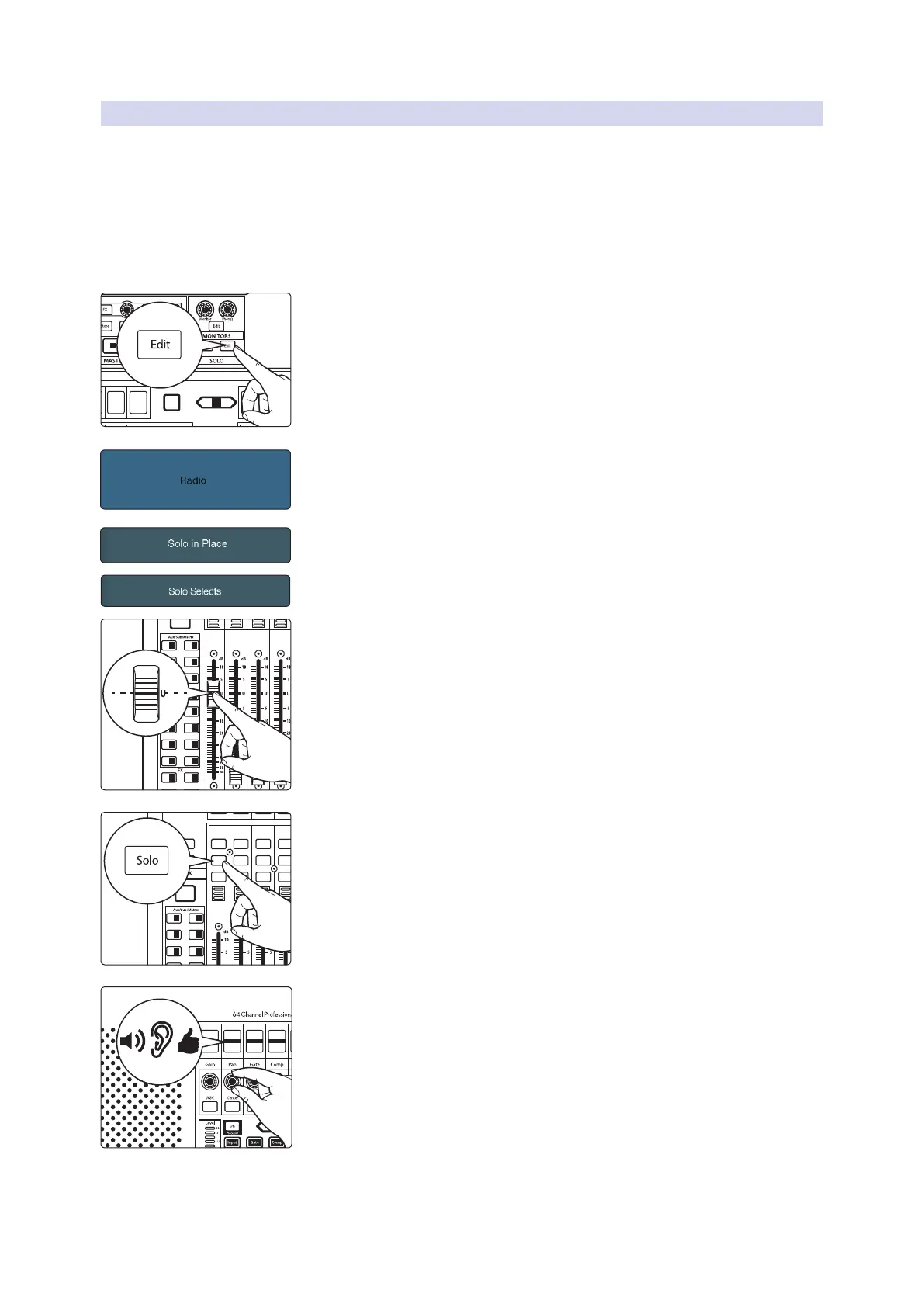
10.1.3 Using Solo in Place to Set Up a Mix
We started this manual with a quick and easy way to set up the input levels for your
StudioLive, ensuring that you have the highest possible input level without clipping
your analog-to-digital converters. The next step is to set up your mix by dialing in
the dynamics, EQ, and fader settings for each channel. This is a job for Solo In Place
(SIP) mode. As previously mentioned, Solo In Place is a great way to dial in your mix
without disturbing your musicians’ last minute rehearsal or subjecting your audience
to that impromptu jam session on stage. Radio Solo mode is especially useful for this
purpose because it allows you to quickly solo just one channel at a time.
1. Press the Edit button in the Solo section to bring up the Solo screen.
2. Touch Radio in the Solo Mode section of the Touch Display to enable Radio
Solo mode.
3. Touch Solo in Place on the Touch Display to enable Solo in Place mode.
4. Touch Solo Selects on the Touch Display to enable Solo Selects mode.
5. Raise your channel faders and Master fader to unity gain.
6. Many engineers start with the drums and work from the bottom up, so
press the Solo button on your kick-drum mic channel. Notice that all the
other channels on your StudioLive have been muted, and the kick-drum
channel is selected.
7. The Fat Channel is now focused on the selected channel, giving you access
to EQ, dynamics, and effects settings for the kick-drum channel. Set these to
your liking.
8. Once you’re satisfied, press the Solo button on the next channel and repeat
step 6. In this way, continue with each channel in your mix.
9. When you’ve finished, press the Edit button in the Solo section and touch
Solo in Place on the Touch Display to disable it and set up your fader mixer.
Power User Tip: While Radio Solo mode is especially useful for setting levels as described
above, it is not ideal for soloing during a live show. Because of this, once you have set your
levels, go back to the Solo Edit menu and select either Latch or CR Solo Mode.
Select
GEQ
Mute
AUX
Inputs
DCA
Groups
Mix/FX
Master
Talk
NextPrev
Mute
Select
Solo
Mute
Select
Solo
Mute
Select
Solo
Mute
Select
Solo
Mute
Select
Solo
Mute
Select
Main
Mix
11 27
13 29
15 31
12 28
14 30
16 32
A E
C G
B F
D H
1
17 18
19 20
21 22
3
5
2
4
6
23 247 8
25 269 10
Inputs
User
Main
Mix
NextPrev
Solo
Mute
Select
Solo
Mute
Select
Solo
Mute
Select
Solo
Mute
Select
1 17 18
19 20
21 22
3
5
2
4
6
23 247 8
25 269 10
GAT E
Release
700 ms
GAT E
Attack
5 ms
GAT E
Range
-84.00 dB
GAT E
Thresh
-84.00 dB










 To Next Page