133
13 Resources
13.6 Using Input Delay
StudioLive™ Series III
Owner’s Manual
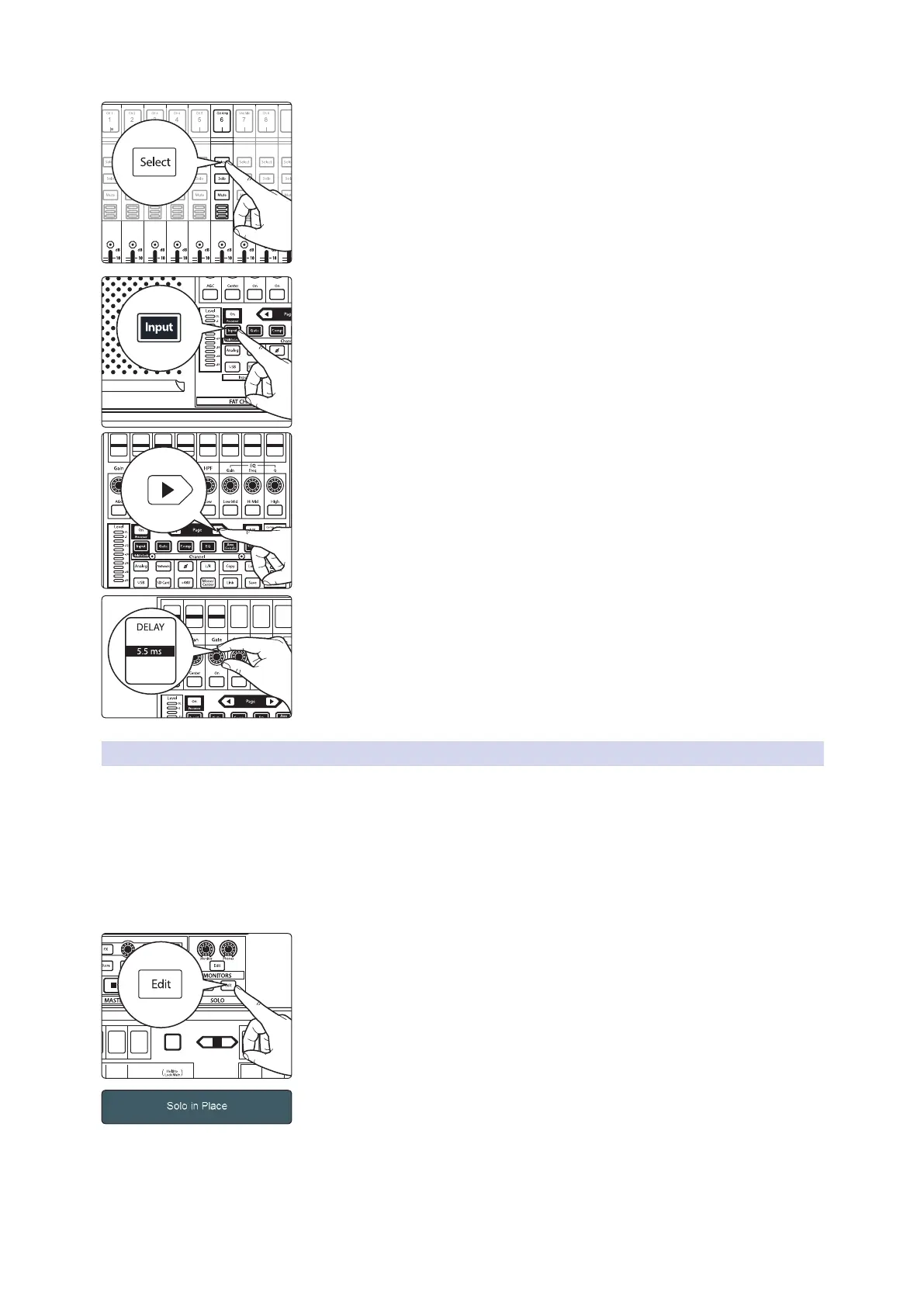
5. Press the guitar channel’s Select button.
6. Press the Input button in the Fat Channel.
7. Press the Next Page button in the Fat Channel to move to the second page
of the Fat Channel Input layer.
Note: StudioLive 32SX and 32SC users must set the Input Delay from the Touch
Display.
8. Use the third encoder to the input delay to 5.5 ms.
9. Ask your guitarist to play a staccato pulse and listen for any remaining
flamming. Move up or down 0.1 ms until you hear the tightest sound.
13.6.2 Aligning Direct and Mic’d Signals
When combining a direct input signal with a mic’d signal from a single source, the
direct sound will arrive earlier than the microphone’s signal because the latter’s
source has to travel some distance through the air before reaching the microphone.
This results in the two signals being out of phase with respect to each other. This
problem can sometimes be corrected by alternatively flipping polarity on the direct
and microphone channels to find which combination of the two signals provides the
desired result. However, by using input delay it is possible to achieve a closer, more
accurate phase relationship.
1. To begin, press the Solo edit button.
2. On the Touch Display, select Solo In Place and Latching Solo Mode.
3. Solo both the Direct Input channel and the microphone channel.
4. Set the pan position of both channels to the center. This will sum both
signals mono and allow you to better hear the phase differences between
the channels.
5. Press the Direct Input Channel’s Select button.
6
Ch. 6
7
Ch. 7
8
Ch. 8
9
Ch. 9
10
Ch. 10
11
Ch. 11
12
Ch. 12
13
Ch. 10
PREAMP
Gain
0 dB
HI PA SS
Filter
34 Hz
PAN
Center
L18
Thresh
GAT E
Comp
-84.00 dB
Thresh
COMP
Gate
0.00 dB
Gain
EQ
5.71 dB
Freq
Q
EQ
130.0 Hz
EQ
0.60
Thresh
LIMITER
Lim
5.71 dB
Send
MONO
0.00 dB
DE LAY
5.5 ms
Select
GEQ
Mute
AUX
Inputs
DCA
Groups
Mix/FX
Master
Talk
NextPrev
Mute
Select
Solo
Mute
Select
Solo
Mute
Select
Solo
Mute
Select
Solo
Mute
Select
Solo
Mute
Select










 To Next Page