111
12 Home
12.2 User Profiles
StudioLive™ Series III
Owner’s Manual
12.2.1 Default Administrator
User Profiles must be activated on your mixer. By default, your mixer is logged
into the Default Adminitrator profile. This profile has access to every setting and
parameter on your mixer.
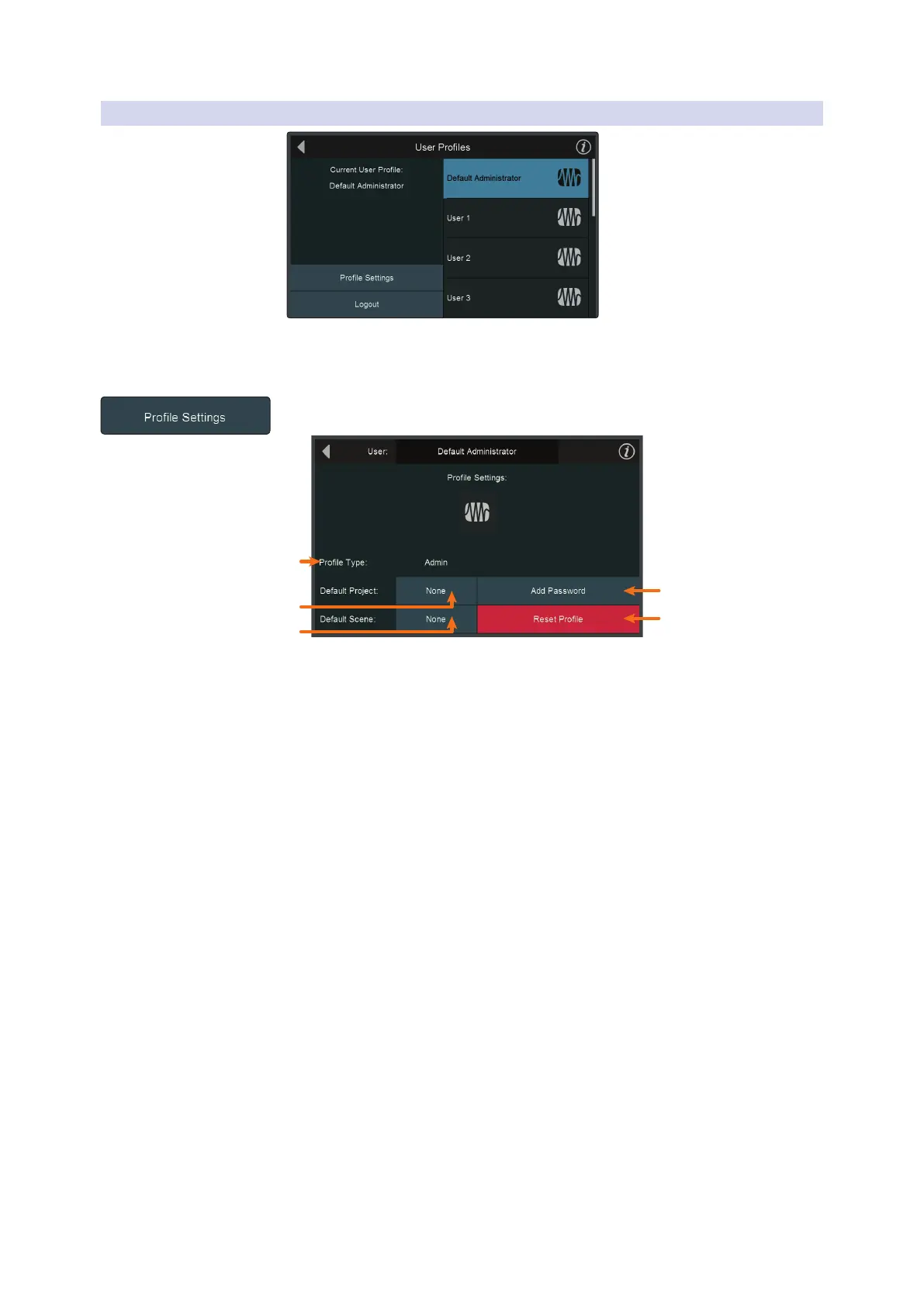
Several customized settings can be added to the Default Administrator profile. Press
the Profile Settings button to open these options.
5
2
1
4
1. Profile Type. This setting cannot be changed for the Default Administrator
account. For more information on Profile Types, see Section 12.2.2.
2. Default Project. Tap to open a list of all available projects. Once a project is
selected, you will be ask if you’d like to load it when you log in as the Default
Administrator.
3. Default Scene. Tap to open a list of all availble Scenes for the Default Project.
Power User Tip: You can set the Default Project and Scene simultaneously, by selecting
either option. While any Project can be set as the default, only Scenes within the Default
Project can be chosen as the default.
4. Add Password. Tap to password protect the Default Administrator profile. If you
log out of this profile, you will be prompted to enter the password to log back
in. To remove the Default Administrator password, hold the Master Mute button
while powering up your mixer. Once the progress bar appears on the screen, the
password will be deleted.
5. Reset Profile. Resets profile to default state.










 To Next Page