34
5 Buses and Routing
5.3 Subgroups
StudioLive™ Series III
Owner’s Manual
5.3.1 Creating a Subgroup
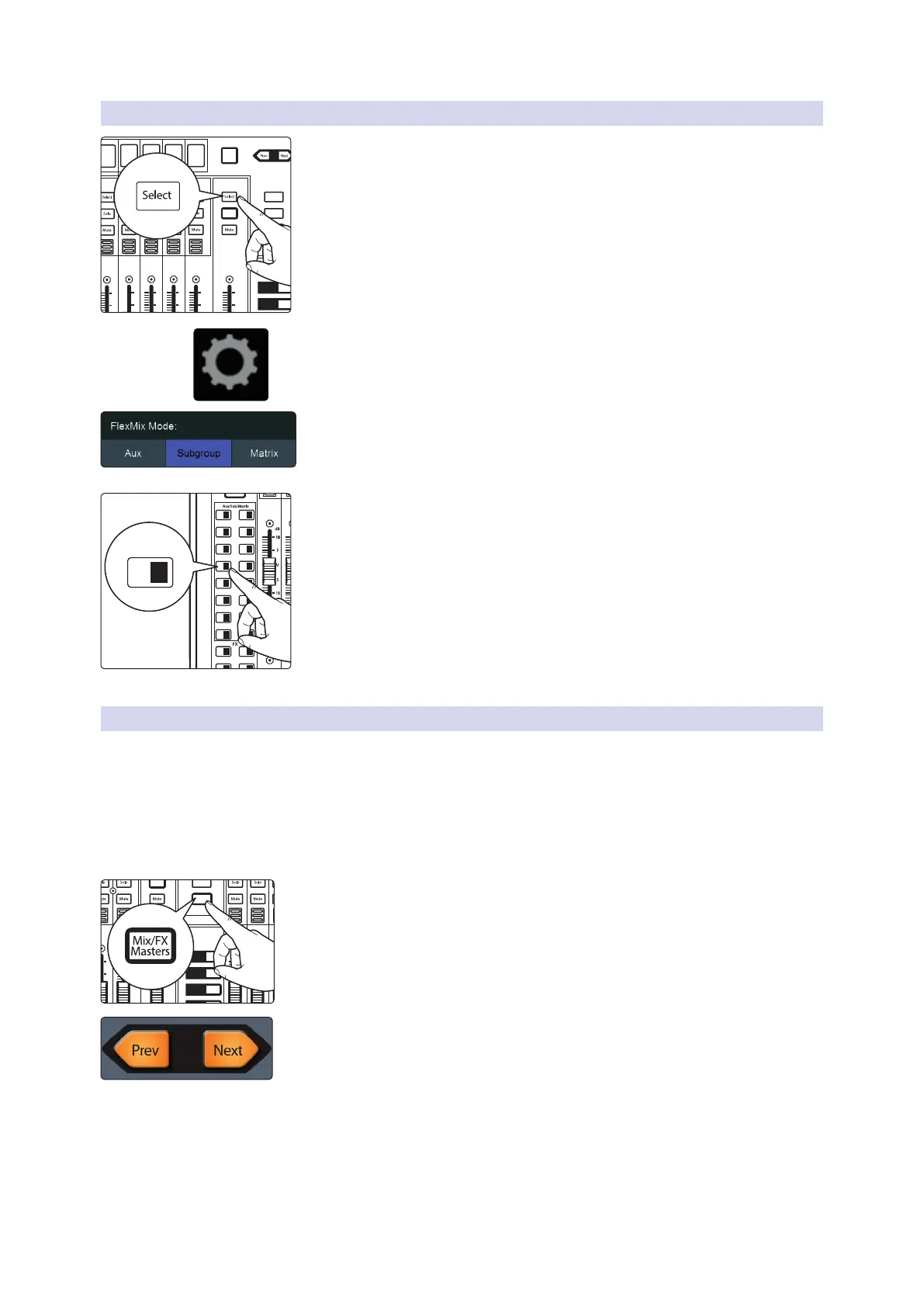
1. Press the Select button for the FlexMix Master you’d like to make a
Subgroup.
2. Press the Settings button on the Master Control Touch Display.
3. Press the Subgroup button under FlexMix Mode.
4. Press and hold the FlexMix button. All the channel Select buttons will begin
to flash. Press the Select buttons for the channels you’d like to add to the
subgroup. Release the FlexMix button when you have completed your
channel selection.
Only channels that have been added to a FlexMix subgroup will be
displayed across the fader layers when the FlexMix is selected.
Channels can be added or removed at any time by pressing and holding the
FlexMix button for the desired FlexMix subgroup.
5.3.2 Fixed Subgroups (32-channel models only)
In addition to the FlexMixes, 32-channels StudioLive mixer models are equipped
with four subgroups. Like the FlexMix Subgroups, the StudioLive allows you to group
channels and apply the Fat Channel’s noise gate, limiter, compression, and EQ to the
group as a whole, in addition to the processing available for each channel. Subgroups
can be soloed and muted. The StudioLive 32S, 32SX, and 32 provide dedicated
Subgroup outputs on the back panel. Subgroups on the StudioLive 32SC, 24 and 16
can be routed to the AVB network.
To view the fixed Subgroups’ master faders, press the Mix/FX Masters button. This will
bring up the master output control for every output bus.
Use the Next button to bank to the end of the FlexMixes.
AUX
Inputs
DCA
Groups
Mix/FX
Master
GEQ
Talk
1
2
3
4
BANK
10
U
10
5
5
dB
U
10
U
10
5
5
dB
U
10
U
10
5
5
dB
U
10
U
10
5
5
dB
U
10
U
10
5
5
dB
U
Hold to
Lock Main
( )
10
U
10
5
5
dB
U
Main
Mix
11 27
13 29
15 31
12 28
14 30
16 32
A E
C G
B F
D H
1
17 18
19 20
21 22
3
5
2
4
6
23 247 8
25 269 10
237
HOLD
AUX
Inputs
DCA
Groups
Mix/FX
Master
GEQ
Talk
1
2
3
4
10
U
10
5
5
dB
U
10
U
10
5
5
dB
U
BANK
10
U
10
5
5
dB
U
10
U
10
5
5
dB
U
10
U
10
5
5
dB
U
Hold to
Lock Main
( )










 To Next Page