26
4 Basic Mix Functions Overview
4.3 Filter DCA Groups
StudioLive™ Series III
Owner’s Manual
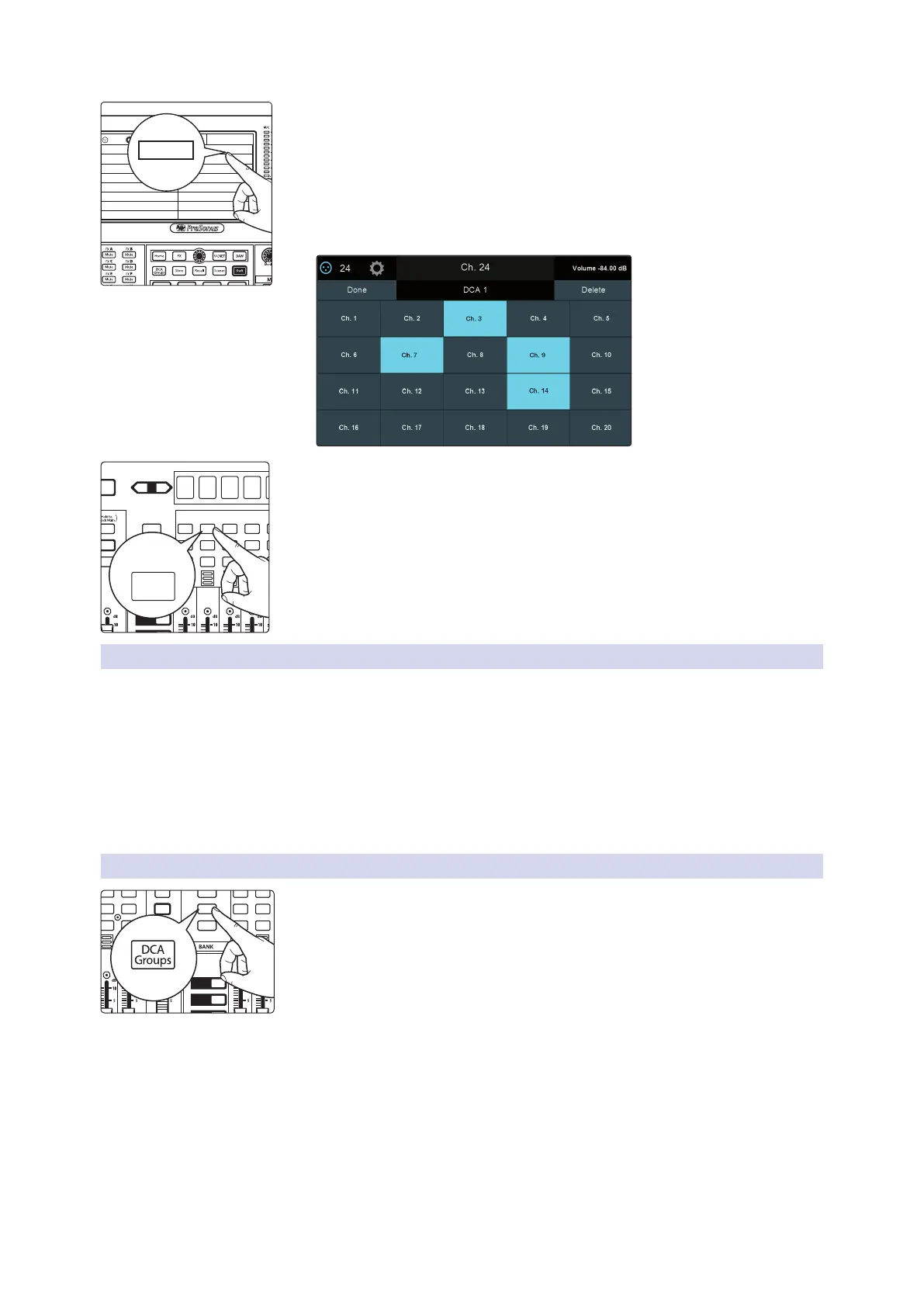
4. Press the “Edit” button on the Master Control Touch Display.
5. Press the default name to create custom filter name. Press “Enter” when done.
6. The Select buttons on your mixer will flash. Press the Select buttons for the
channels you’d like to assign to your new Filter DCA Group. The Select buttons
will illuminate solid as the channel is assigned to the group. You can also use the
select buttons on the Touch Display to assign channels.
7. Press “Done” when you’ve finished making your channel selections.
You can add and remove channels to a DCA group, or quickly create a new group by
pressing and holding the Group Master Select button.
All the Select button for any channel currently not in the DCA group will flash. Simply
touch the select button for a channel to add or remove it to the group.
4.3.2 Editing or Deleting a Filter DCA Group
1. To edit or delete a Filter DCA Group, first touch its name to select it.
2. Touch the Edit button to enter the Filter DCA Group Edit screen.
3. To add or remove a channel from the group, touch the name of the channel in
the provided list to select or deselect them.
4. To name or rename the group, touch the name field.
5. To delete this group, touch the Delete button.
When you’re finished, touch Done to confirm your changes.
4.3.3 Managing DCA Group Masters
You can bring the master faders for all existing Filter DCA Groups to the channel strips
by pressing the DCA Groups button in the Bank section.
Pressing the Select button on a DCA Group master while the DCA Groups screen is
active will select it on the screen.
Pressing and holding the Select button for a DCA Group master will allow you to add
or remove channels from the group by pressing the desired channel’s Select button.
Power User Tip: Pressing the Select button for a DCA Group Master will spill the group on
the faders. In this way, you can quickly make adjustments to a DCA mix.
Guitars
Rhythm Section
Backing Vocals
Drums
Traditional DCAAuto Groups Edit
DCA 6
DCA 8
DCA 10
DCA 12
DCA 5
DCA 7
DCA 9
DCA 11
Groups
Main
Volume -84.00 dB
M1
Edit
1
2
3
Select
GEQ
Mute
AUX
Inputs
DCA
Groups
Mix/FX
Master
Talk
NextPrev
Solo
Mute
Select
Solo
Mute
Select
Solo
Mute
Select
Solo
Mute
Select
Solo
Mute
Select
Select
Select
Press
and hold
DCA 1
1
DCA 2
2
DCA 3
3
DCA 4
4
DCA 5
5
1
2
3
Select
GEQ
Mute
AUX
Inputs
DCA
Groups
Mix/FX
Master
Talk
NextPrev
Solo
Mute
Select
Solo
Mute
Select
Solo
Mute
Select
Solo
Mute
Select










 To Next Page